


As a supplier of Omron Variable Frequency Drives (VFDs), I often get asked about how to set the overload protection level of these devices. Overload protection is a crucial feature in VFDs as it safeguards the drive and the connected motor from damage due to excessive current. In this blog post, I'll walk you through the process of setting the overload protection level for Omron VFDs, ensuring that your equipment operates safely and efficiently.
Understanding Overload Protection in Omron VFDs
Before we dive into the setting process, it's important to understand what overload protection is and why it's necessary. An overload occurs when the current drawn by the motor exceeds its rated value for an extended period. This can happen due to various reasons such as mechanical jams, overloading of the motor, or incorrect sizing of the motor and VFD. Overload protection in Omron VFDs monitors the current flowing through the drive and trips the drive if the current exceeds a preset limit for a certain duration.
Types of Overload Protection in Omron VFDs
Omron VFDs typically offer two types of overload protection: electronic thermal overload protection and instantaneous overcurrent protection.
- Electronic Thermal Overload Protection: This type of protection simulates the heating characteristics of the motor. It monitors the current and calculates the temperature rise of the motor based on a thermal model. If the calculated temperature exceeds a safe limit, the VFD trips to protect the motor.
- Instantaneous Overcurrent Protection: This protection is designed to quickly detect and respond to sudden large increases in current. It trips the VFD immediately when the current exceeds a very high preset limit, protecting the drive and the motor from damage caused by short - circuits or other high - current faults.
Steps to Set the Overload Protection Level
Step 1: Gather Necessary Information
Before setting the overload protection level, you need to collect some important information about the motor and the application.
- Motor Rated Current: This is the current that the motor is designed to draw under normal operating conditions. You can find this information on the motor nameplate.
- Load Characteristics: Determine whether the load is constant torque, variable torque, or a combination of both. Different load characteristics require different overload protection settings.
Step 2: Access the VFD Parameter Menu
To set the overload protection level, you need to access the parameter menu of the Omron VFD. The process may vary depending on the model of the VFD. Generally, you can use the control panel on the VFD to navigate through the menu.
Step 3: Locate the Overload Protection Parameters
Once you are in the parameter menu, look for the parameters related to overload protection. In most Omron VFDs, these parameters are labeled clearly. For example, you may find parameters such as "Electronic Thermal Overload Set Current" or "Overload Protection Level".
Step 4: Set the Electronic Thermal Overload Current
The electronic thermal overload current is the maximum current that the VFD allows the motor to draw continuously without tripping. Set this value based on the motor rated current. It is usually recommended to set this value slightly higher than the motor rated current to account for small variations in the load. For example, if the motor rated current is 10 A, you might set the electronic thermal overload current to 11 A.

Step 5: Adjust the Overload Trip Time
In addition to setting the overload current, you also need to adjust the overload trip time. The overload trip time is the duration for which the current can exceed the set overload current before the VFD trips. Omron VFDs usually have a characteristic curve for overload protection, which shows the relationship between the overload current and the trip time. You can adjust this curve according to the application requirements. For example, in applications where short - term overloads are common, you may want to increase the trip time to avoid unnecessary tripping.
Step 6: Set the Instantaneous Overcurrent Protection
The instantaneous overcurrent protection is set to protect the drive and the motor from sudden large increases in current. Set this value to a very high level, typically several times the motor rated current. For example, you might set the instantaneous overcurrent protection to 5 times the motor rated current.
Considerations for Different Omron VFD Models
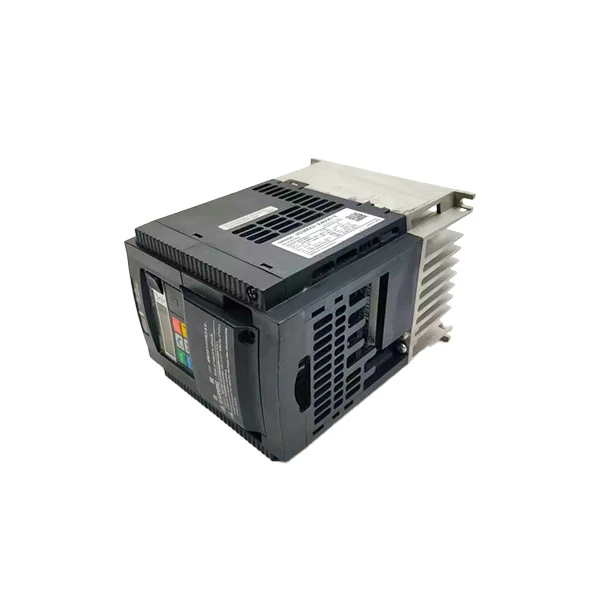
Omron Frequency Inverter 3G3JZ - A4007
This model is suitable for a wide range of applications. When setting the overload protection, make sure to follow the specific instructions in the user manual. The parameter menu is intuitive, and you can easily locate and adjust the overload protection parameters.
Omron 3G3MX2 - A2007 - V1
This VFD offers advanced features for overload protection. It has a more precise thermal model for electronic thermal overload protection. You can fine - tune the overload protection settings to match the specific characteristics of your motor and load.
Omron 3G3MX2 - A4030 - E
For this model, pay special attention to the interaction between the electronic thermal overload protection and the instantaneous overcurrent protection. Make sure that the settings are coordinated to provide comprehensive protection for the motor and the drive.
Testing the Overload Protection Settings
After setting the overload protection level, it's important to test the settings to ensure that they work correctly. You can perform a simple test by gradually increasing the load on the motor and monitoring the VFD's response. The VFD should trip when the current exceeds the set overload limit for the specified duration.
Troubleshooting Overload Protection Issues
If you encounter problems with the overload protection, such as false tripping or failure to trip when an overload occurs, here are some troubleshooting steps:
- Check the Parameter Settings: Make sure that the overload protection parameters are set correctly. Double - check the values of the overload current and the trip time.
- Inspect the Motor and Load: Look for any mechanical problems with the motor or the load. A mechanical jam or an unbalanced load can cause the current to increase and trigger the overload protection.
- Verify the Wiring: Check the wiring connections between the VFD and the motor. Loose or incorrect wiring can lead to abnormal current readings and cause the overload protection to malfunction.
Conclusion
Setting the overload protection level of Omron VFDs is a critical step in ensuring the safe and efficient operation of your motor and drive system. By following the steps outlined in this blog post, you can set the overload protection parameters correctly and avoid potential damage to your equipment. If you have any questions or need further assistance in setting the overload protection level or choosing the right Omron VFD for your application, please don't hesitate to contact us for procurement and in - depth discussions.
References
- Omron Variable Frequency Drives User Manuals
- Electrical Engineering Textbooks on Motor Protection and Control


