


As a trusted supplier of ABB PLC products, I've had the privilege of witnessing firsthand how these advanced automation solutions empower industries across the globe. One of the key aspects that users often grapple with is the effective utilization of diagnostic tools in ABB PLCs. In this blog, I'll share insights on how to leverage these tools to enhance the performance, reliability, and troubleshooting capabilities of your ABB PLC systems.
Understanding the Importance of Diagnostic Tools
Diagnostic tools are essential for maintaining and optimizing the performance of ABB PLCs. They provide real - time information about the status of the PLC, including hardware health, communication errors, and program execution. By using these tools, operators can quickly identify and resolve issues, minimizing downtime and improving overall productivity.
Types of Diagnostic Tools in ABB PLCs
1. Built - in Diagnostic LEDs
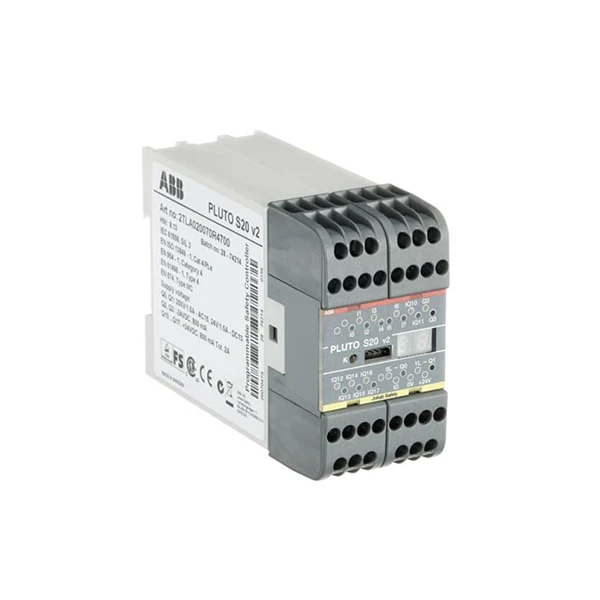
ABB PLCs are equipped with a series of built - in diagnostic LEDs on the front panel. These LEDs provide a quick visual indication of the PLC's status. For example, the POWER LED indicates whether the PLC is receiving power, while the RUN/STOP LED shows if the PLC is in the run or stop mode. The ERROR LED lights up when there is a system error, such as a hardware failure or a communication problem.

2. Diagnostic Messages in the Programming Software
The programming software for ABB PLCs, such as ABB Automation Builder, provides detailed diagnostic messages. These messages can be accessed through the software's diagnostic view. They offer in - depth information about errors, including the error code, description, and possible causes. For instance, if there is a communication error with a module, the diagnostic message will tell you which module is affected and what type of communication problem has occurred.
3. Remote Diagnostic Tools
ABB also offers remote diagnostic solutions that allow users to monitor and troubleshoot their PLCs from a distance. These tools use secure communication channels to transmit diagnostic data from the PLC to a remote server. This is particularly useful for large - scale industrial plants where the PLCs are located in different geographical locations.
How to Use Diagnostic Tools Effectively
1. Regular Monitoring
Make it a habit to regularly check the diagnostic LEDs on the PLC. A simple visual inspection can help you detect potential issues early. For example, if the ERROR LED is lit, you can start investigating the problem immediately. Additionally, set up a routine to check the diagnostic messages in the programming software. This will help you stay on top of any emerging issues and take preventive measures.
2. Interpreting Diagnostic Messages
When you encounter a diagnostic message, it's important to understand its meaning. Refer to the ABB PLC documentation to decode the error code and understand the possible causes. For example, if the error message indicates a module failure, you can check the module's status and connections. Sometimes, a loose connection can cause a module to malfunction, and simply tightening the connection can resolve the issue.
3. Using Remote Diagnostic Tools
If you have access to remote diagnostic tools, configure them properly. Set up alerts so that you are notified immediately when an error occurs. This will allow you to respond quickly, even if you are not on - site. Remote diagnostic tools also provide historical data, which can be used for trend analysis. By analyzing the historical diagnostic data, you can identify patterns and predict potential failures before they happen.
Practical Examples of Using Diagnostic Tools
Let's take a look at some practical scenarios where diagnostic tools can be used effectively.
Scenario 1: Hardware Failure
Suppose you are using a 2TLA020070R4700 ABB PLC in a manufacturing plant. One day, you notice that the ERROR LED on the PLC is lit. You open the programming software and check the diagnostic messages. The message indicates a failure in an input module. You then go to the physical location of the PLC and visually inspect the input module. You find that one of the input channels is not functioning properly. By using the diagnostic tools, you were able to quickly identify the problem and replace the faulty module, minimizing production downtime.
Scenario 2: Communication Problem
In another scenario, you are using an ABB PLC system that communicates with several other devices, including an 1TNE968902R1101 ABB - AI561 analog input module. The diagnostic message in the programming software shows a communication error with the AI561 module. You check the communication settings in the software and the physical connections between the PLC and the module. After verifying that the settings are correct and the connections are secure, you suspect a problem with the module itself. You replace the module, and the communication error is resolved.
Scenario 3: Relay Issue
If you are using an Abb 1sbh143001r8822 Contactor Relay in your ABB PLC system and the diagnostic message indicates a relay problem, you can use the diagnostic tools to troubleshoot. First, check the relay's status in the programming software. If the relay is not operating as expected, you can check the electrical connections and the coil voltage. Sometimes, a low coil voltage can cause the relay to malfunction.
Best Practices for Using Diagnostic Tools
1. Keep Documentation Up - to - Date
Ensure that you have the latest documentation for your ABB PLCs and their associated modules. The documentation contains important information about the diagnostic tools, error codes, and troubleshooting procedures. Regularly update the documentation as new versions of the PLCs and software are released.
2. Train Your Staff
Provide training to your staff on how to use the diagnostic tools effectively. Make sure they understand the meaning of the diagnostic LEDs, how to interpret diagnostic messages, and how to use the remote diagnostic tools. Well - trained staff can respond quickly to issues and minimize the impact on production.
3. Create a Diagnostic Log
Maintain a diagnostic log where you record all the errors and their resolutions. This log can be used for future reference and for analyzing the overall health of the PLC system. It can also help you identify recurring issues and take corrective actions.
Conclusion
Using the diagnostic tools of ABB PLCs effectively is crucial for maintaining the reliability and performance of your industrial automation systems. By understanding the different types of diagnostic tools, regularly monitoring the PLC's status, and following best practices, you can quickly identify and resolve issues, minimizing downtime and improving productivity.
If you are interested in enhancing your industrial automation with high - quality ABB PLC products and need more information about diagnostic tools or any other aspects of ABB PLCs, we encourage you to reach out to us for procurement and further discussion. We are committed to providing you with the best solutions and support for your automation needs.
References
- ABB PLC User Manuals
- ABB Automation Builder Software Documentation
- Industry - specific case studies on ABB PLC diagnostic tool usage


