

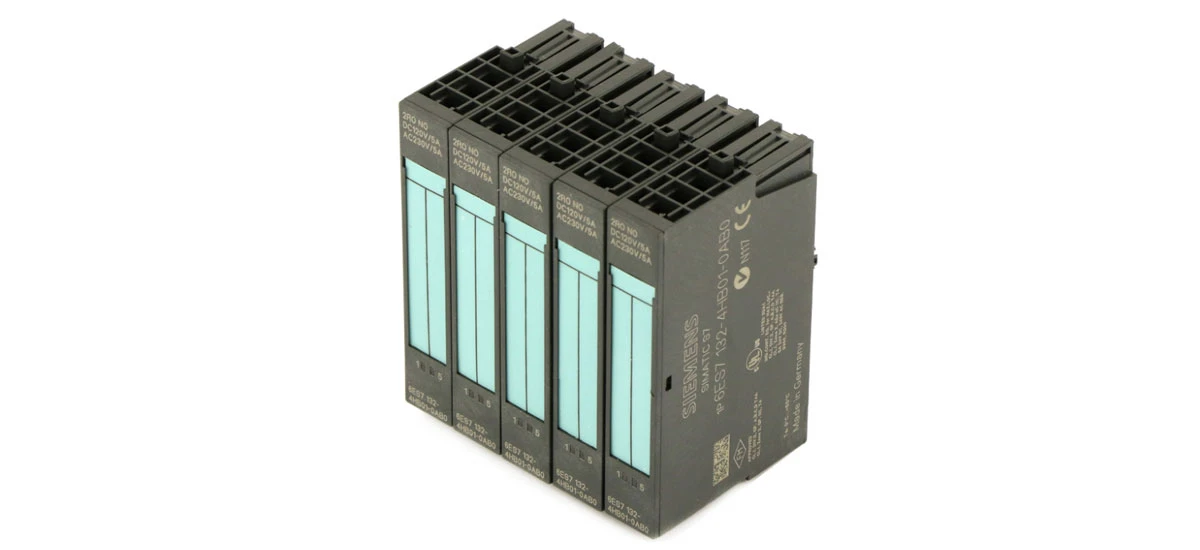
In today's industrial world, automation is everywhere-from factory assembly lines to water treatment plants. At the heart of most industrial automation systems is the Programmable Logic Controller (PLC), a device that controls machines and processes by sending and receiving signals. But for a PLC to work with real-world devices like sensors, motors, and valves, it needs a key helper: the SIMATIC DP electronic module.
Many people who work with PLC systems-whether they're new technicians or experienced engineers-struggle with one big question: Which SIMATIC DP electronic module should I choose? With different types designed for different tasks (like handling "on/off" signals vs. continuous measurements), picking the wrong module can lead to system delays, broken devices, or wasted money.
This blog is here to solve that problem. We'll start by explaining what SIMATIC DP electronic modules are and what they do. Then, we'll compare the four main types of these modules, so you know which one fits your needs. We'll also walk you through how to choose the right module for your PLC system, how to install it correctly, and how to keep it running well. By the end, you'll have all the knowledge you need to pick a SIMATIC DP electronic module that makes your PLC system work smoothly and reliably.
What Are SIMATIC DP Electronic Modules?
SIMATIC DP electronic modules are essential components of Programmable Logic Controller (PLC) systems, especially in industrial settings. DP stands for "Decentralized Periphery," which means these modules connect PLCs to decentralized devices like sensors, motors, and switches. A SIMATIC DP electronic module acts as a bridge: it takes signals from field devices, sends them to the PLC for processing, and then carries the PLC's commands back to the devices. Without a reliable SIMATIC DP electronic module, a PLC system can't work efficiently-data might be lost, or devices might not respond correctly.
Key Functions of SIMATIC DP Electronic Modules
Every SIMATIC DP electronic module has three main jobs:
- Signal Conversion: It turns raw signals (like 24V DC from a sensor) into a format the PLC can understand.
- Data Transmission: It sends data to the PLC quickly (often via Profibus DP, a common industrial network).
- Device Protection: It shields connected devices from voltage spikes or electrical noise, which helps prevent damage.
These functions make the SIMATIC DP electronic module a critical part of PLC systems used in factories, warehouses, and power plants.
Types of SIMATIC DP Electronic Modules to Compare
Not all SIMATIC DP electronic modules work the same way. They're designed for different tasks, so you need to pick the type that matches your PLC system's needs. Below are the four most common types:
SIMATIC DP Digital Input Modules
A SIMATIC DP digital input module handles "on/off" signals from devices like pushbuttons, proximity sensors, or limit switches. For example, the SIMATIC DP DI 8x24VDC module can connect up to 8 digital input devices, all using 24V DC power. This module is great for small to medium PLC systems-like those in assembly lines-because it's compact and works with most standard digital sensors. If your PLC needs to detect simple states (e.g., "is the door closed?"), a SIMATIC DP digital input module is the right choice. It's also one of the most affordable SIMATIC DP electronic module options, making it popular for basic industrial tasks.
SIMATIC DP Digital Output Modules
Unlike input modules, a SIMATIC DP digital output module sends "on/off" commands from the PLC to devices that act on signals-such as relays, indicator lights, or small motors. The SIMATIC DP DO 4x24VDC/2A module is a common model: it has 4 output ports, uses 24V DC, and can supply up to 2 amps of current per port. This is enough to power devices like conveyor belt motors or alarm buzzers. When choosing a SIMATIC DP digital output module, check the current rating: if you need to power larger devices (like high-torque motors), pick a module with a higher amp rating. This type of SIMATIC DP electronic module is key for PLC systems that control physical processes, like packaging machines.
SIMATIC DP Analog Input Modules
A SIMATIC DP analog input module deals with continuous signals (not just "on/off") from devices that measure variables like temperature, pressure, or flow. For example, a temperature sensor might send a 4-20mA signal (where 4mA = 0°C and 20mA = 100°C). The SIMATIC DP AI 4x13bit module can process 4 such analog signals and convert them into data the PLC can use to adjust processes. This module is ideal for PLC systems in environments where precision matters-like food processing plants (to monitor oven temperatures) or water treatment facilities (to track water flow). A SIMATIC DP analog input module is more complex than a digital one, but it's necessary for systems that need to measure and respond to changing conditions.
SIMATIC DP Analog Output Modules
A SIMATIC DP analog output module sends continuous commands from the PLC to devices that need variable control-such as control valves, speed controllers for motors, or dimmers for lights. The SIMATIC DP AO 2x12bit module is a typical choice: it has 2 output ports and can send 0-10V or 4-20mA signals. For example, if a PLC needs to adjust the opening of a valve (to let more or less liquid flow), this module will send a signal that tells the valve how far to open. Like analog input modules, SIMATIC DP analog output modules are used in precision-focused PLC systems. They're also compatible with most industrial analog devices, making them a flexible SIMATIC DP electronic module option.
How to Choose the Right SIMATIC DP Electronic Module for Your PLC System
Picking the best SIMATIC DP electronic module isn't hard-just follow these steps to match the module to your PLC system's needs:
Assess Your PLC System's Needs
First, list the devices your PLC will connect to. Ask:
- Do you need to read signals (input) or send signals (output)?
- Are the signals digital ("on/off") or analog (continuous, like temperature)?
- How many devices do you need to connect? (e.g., 8 sensors = a digital input module with 8 ports)
This step helps you narrow down the type of SIMATIC DP electronic module you need. For example, if you have 6 pressure sensors (analog input devices), a SIMATIC DP analog input module with at least 6 ports is a must. This is also how you answer the question: "how to choose SIMATIC DP electronic module for PLC system?"
Check Compatibility with Your PLC
Not every SIMATIC DP electronic module works with every PLC. Most SIMATIC DP modules are designed for Siemens PLCs, like the SIMATIC S7-300 or S7-400 series. Before buying, check the module's datasheet to confirm it's compatible with your PLC model. For example, the SIMATIC DP DI 8x24VDC module works with S7-300 PLCs but may not work with older Siemens models. Ignoring compatibility can lead to the module not working at all, which wastes time and money. So, always verify SIMATIC DP electronic module compatibility with PLC before making a purchase.
Consider Industrial Environment Conditions
Industrial environments can be harsh-think high temperatures, dust, or moisture. Different SIMATIC DP electronic modules are built to handle different conditions. For example:
- Modules with an IP20 rating are good for clean, indoor areas (like control rooms).
- Modules with an IP65 rating can handle dust and water, making them suitable for factories or outdoor use.
If your PLC system is in a hot factory (where temperatures reach 50°C), choose a SIMATIC DP electronic module that can operate in that range (most Siemens modules work up to 60°C). This ensures the module lasts longer and doesn't fail due to environmental stress.
Installing and Maintaining Your SIMATIC DP Electronic Module
Once you've chosen the right SIMATIC DP electronic module, proper installation and maintenance will keep it working well.
Step-by-Step Installation of SIMATIC DP Electronic Modules
Installing a SIMATIC DP electronic module is straightforward if you follow these steps:
- Turn off the PLC power: Never install a module while the PLC is on-this can damage the module or PLC.
- Align the module: Slide the module onto the PLC's mounting rail (most SIMATIC modules use a standard rail).
- Secure the module: Use the locking clip on the module to attach it firmly to the rail.
- Wire the module: Connect the field devices (sensors, motors) to the module's terminals. Follow the module's wiring diagram-for example, digital input modules have "signal" and "ground" terminals.
- Test the module: Turn the PLC back on and use the PLC's software (like Siemens TIA Portal) to check if the module is sending/receiving data.
If you're new to this, refer to the SIMATIC DP electronic module's user manual for detailed instructions. Installing SIMATIC DP electronic module in PLC system correctly is key to avoiding malfunctions.
Tips for Maintaining SIMATIC DP Electronic Modules
To keep your SIMATIC DP electronic module in good shape, follow these maintenance tips:
- Check wiring regularly: Loose wires can cause signal loss. Every 3 months, inspect the module's terminals to make sure wires are tight.
- Clean the module: Use a dry, soft cloth to wipe dust off the module. Avoid water or harsh cleaners-they can damage the electronics.
- Monitor module temperature: If the module feels hot to the touch, it may be overloaded. Check if you're using too many devices with the module.
- Replace old modules: Most SIMATIC DP modules last 5-10 years. If a module starts failing (e.g., no data transmission), replace it with a new one.
Maintaining SIMATIC DP electronic module for PLC ensures your PLC system runs smoothly and reduces downtime.
Common Questions About SIMATIC DP Electronic Modules
Q1: Can I mix different types of SIMATIC DP electronic modules in one PLC system?
Yes! Most PLC systems use a mix of input and output modules. For example, a packaging machine PLC might have one SIMATIC DP digital input module (for sensors), one digital output module (for motors), and one analog input module (for temperature sensors). Just make sure all modules are compatible with your PLC.
Q2: What if my SIMATIC DP electronic module stops working?
First, check the power and wiring-loose wires or a power outage are common causes. If that doesn't work, use the PLC software to see if the module is detected. If not, the module may be faulty, and you'll need to replace it.
Q3: Is a SIMATIC DP electronic module better than other brands?
SIMATIC DP modules are known for reliability and compatibility with Siemens PLCs (the most common PLCs in industry). They also come with good customer support from Siemens, which is helpful if you have issues. For Siemens PLC users, a SIMATIC DP electronic module is often the best choice.
Q4: How many devices can one SIMATIC DP electronic module handle?
It depends on the module type. Digital input/output modules usually handle 4-16 devices, while analog modules handle 2-8 devices. Check the module's datasheet for the exact number.
Q5: Do I need special tools to install a SIMATIC DP electronic module?
No-you just need a screwdriver to tighten wires and a PLC software (like TIA Portal) to test the module. Most modules come with all the parts you need for installation.
Final Thoughts
Choosing the right SIMATIC DP electronic module is key to a working PLC system. By understanding the different module types (digital input/output, analog input/output), assessing your PLC's needs, checking compatibility, and following proper installation/maintenance steps, you can pick a module that works for your industrial setup. Remember, the best SIMATIC DP electronic module for industrial automation is the one that matches your devices, PLC model, and environment. With the right module, your PLC system will run efficiently and reliably for years.


