

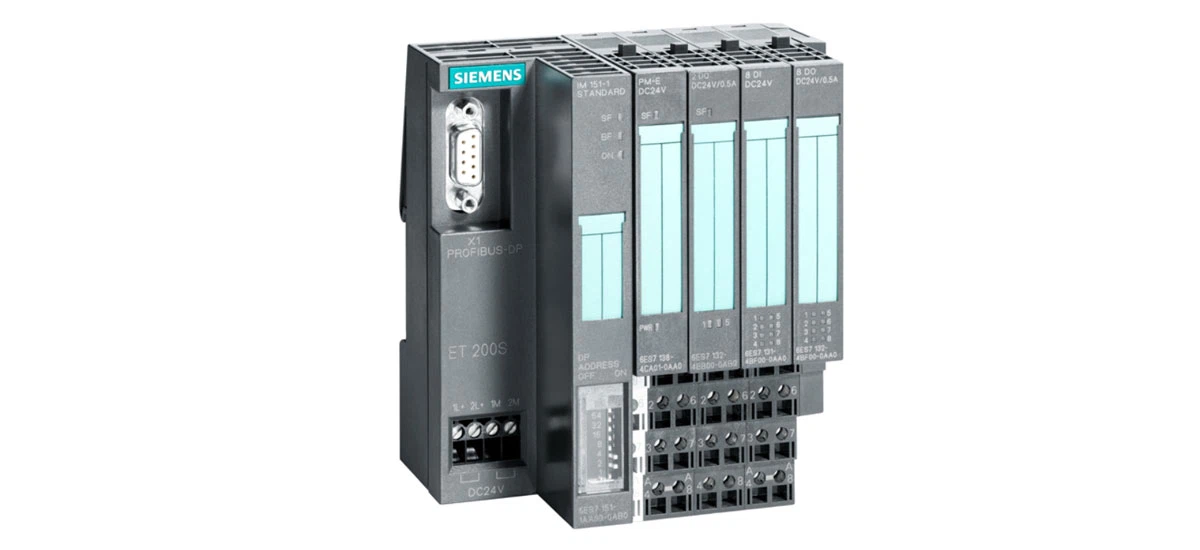
In today's fast-paced industrial world, automation is the key to keeping factories efficient, reliable, and competitive. At the heart of many automated setups lies the distributed I/O system-a tool that connects sensors, motors, and controllers to ensure seamless data flow. Among the top choices for this critical role is the Siemens ET 200S: a system designed to meet the diverse needs of modern manufacturing, from small workshops to large-scale production lines. Whether you're new to industrial automation and want to learn the basics of distributed I/O, or you're an experienced technician looking to optimize your current setup, this guide has you covered. We'll break down what the Siemens ET 200S is, its standout features, real-world applications, step-by-step installation tips, maintenance tricks, and why it outperforms other I/O systems. By the end, you'll have a clear understanding of how the Siemens ET 200S can boost your factory's performance and save you time and money.
What Is Siemens ET 200S?
In modern factories, machines, sensors, and computers need to "talk" to each other smoothly-without delays or errors. That's where the Siemens ET 200S comes in. Developed by Siemens, a leader in industrial automation, it's a distributed I/O (Input/Output) system: a smart, compact device that acts as a bridge between different industrial components. Unlike traditional centralized systems (which require long wires and take up more space), the Siemens ET 200S can be placed close to machines, reducing wiring costs and improving response time. Think of it as a translator that lets temperature sensors, conveyor motors, and PLCs (Programmable Logic Controllers) share data quickly and reliably. This makes factories run more efficiently, whether you're building cars, packaging food, or sorting packages. From small workshops to large manufacturing plants, the Siemens ET 200S plays a key role in keeping daily operations smooth and consistent.
Key Features of Siemens ET 200S
What makes the Siemens ET 200S stand out from other industrial I/O systems? Let's break down its most useful features, with real-world benefits:
1. Modular Design for Flexibility
The Siemens ET 200S uses a modular design-meaning you can customize it like a puzzle. You can add or remove modules based on your factory's needs: choose from digital input modules (to read signals from sensors), motor starter modules (to control small motors), or safety modules (to protect workers). For example, if a bakery needs to add a new oven temperature sensor, you can simply plug in an 8-point digital input module without rebuilding the whole system. This flexibility also saves space: the Siemens ET 200S cuts control cabinet space by up to 50% compared to older systems, since modules are thin (just 12mm thick) and stack neatly. Whether you need a small setup for one machine or a large system for an entire factory, the Siemens ET 200S scales easily.
2. Reliable Communication with PROFINET
To work well in fast-paced factories, the Siemens ET 200S needs to communicate quickly. It supports PROFINET, a top industrial communication protocol used by millions of systems worldwide. PROFINET sends data at speeds up to 100Mbps-fast enough to keep up with robot arms in car factories or high-speed conveyor belts. It also offers two key modes: Real-Time (RT) for regular tasks (like tracking packages) and Isochronous Real-Time (IRT) for super-precise jobs (like welding car parts, where timing matters down to milliseconds). If there's a power failure, PROFINET helps the Siemens ET 200S restart in seconds, not minutes-critical for factories where every minute of downtime costs thousands of dollars. For anyone learning how to set up Siemens ET 200S PROFINET communication, the process is simple with Siemens' TIA Portal software, which guides you through connecting devices.
3. Hot-Swap Capability for Less Downtime
Imagine a food factory's temperature control module breaking in the middle of a production run. With most systems, you'd have to shut down the line, fix it, and restart-wasting time and ruining batches. But the Siemens ET 200S has hot-swap capability: you can replace modules while the system is running. Each module has a safe locking mechanism that prevents electric shock, and once you plug in a new module, the Siemens ET 200S automatically recognizes it-no need to re-program. This feature is a lifesaver for busy lines: for example, a logistics warehouse can replace a faulty conveyor sensor in 5 minutes, keeping packages moving. If you need a Siemens ET 200S hot-swap module replacement guide, Siemens' user manual walks you through each step safely.
4. Durable for Tough Environments
Factories are harsh places: they're dusty, wet, and full of vibrations. The Siemens ET 200S is built to handle this. Many modules have an IP65/67 rating-meaning they're completely dust-tight and can withstand water splashes (perfect for food factories that wash down equipment). It also works in extreme temperatures: from -25℃ (cold warehouses) to +60℃ (hot manufacturing floors). Plus, it's resistant to vibrations (meeting IEC 60068-2-6 standards), so it won't loosen or break when machines run. For example, in a construction equipment factory, the Siemens ET 200S can sit right next to heavy machinery and still work reliably. This durability means fewer repairs and longer life for your system.
Siemens ET 200S Applications: Where It Works Best
The Siemens ET 200S isn't just for one industry-it solves problems across many sectors. Here are some real-world uses:
1. Automotive Manufacturing
Car factories have hundreds of moving parts: robot arms, welding machines, and conveyor belts. The Siemens ET 200S connects all these devices to ensure they work in sync. For example, in a sedan assembly line, it controls the motor starters that move car bodies from one station to the next. It also links to welding sensors: if a weld is too weak, the Siemens ET 200S sends a signal to stop the robot, reducing defects. And with PROFINET's IRT mode, robot arms can move in perfect time-no delays, no mistakes. If you're wondering how to install Siemens ET 200S in an automotive factory, the modular design makes it easy to add modules near each robot, cutting down on long wires.
2. Food and Beverage Processing
In food factories, cleanliness and precision are non-negotiable. The Siemens ET 200S helps meet both. It controls temperature sensors in dairy plants, keeping milk at 4℃ to prevent spoilage. It also manages conveyor belts in cookie factories, ensuring each cookie gets the right amount of chocolate. For hygiene, it works with CIP (Clean-in-Place) systems: the Siemens ET 200S opens and closes valves to spray cleaning chemicals, making sure equipment is sanitized without disassembly. And since it's durable (IP67 rating), it can handle daily washdowns. For those needing Siemens ET 200S maintenance for food processing, regular checks of the valve control modules ensure the CIP system works perfectly every time.
3. Logistics and Warehousing
Warehouses and distribution centers rely on speed to get packages to customers. The Siemens ET 200S powers their automation: it controls conveyor belts that sort packages by destination, and it links to barcode scanners to track where each box goes. In automated storage and retrieval systems (AS/RS), it controls the stacker cranes that lift and move pallets-precision is key here, and the Siemens ET 200S ensures the crane hits the right shelf every time. It also reduces errors: if a package is scanned wrong, the Siemens ET 200S stops the conveyor, letting workers fix the issue before it's shipped. This reliability means fewer late deliveries and happier customers.
How to Install Siemens ET 200S: A Simple Guide
Installing the Siemens ET 200S is easy-even if you're new to industrial systems. Follow these steps for a smooth setup:
1. Prepare the DIN Rail
First, you'll need a DIN rail: a metal strip that holds the Siemens ET 200S modules. Choose a rail that's at least 210mm long (to fit the smallest system) and mount it on a flat, solid surface (like a control cabinet wall). Install it at least 1.2 meters off the ground-this makes it easy to reach and reduces the risk of water damage from spills. Use M4 screws to fix the rail, tightening them to 2.5 N·m (this keeps the rail from loosening over time). Make sure the area around the rail is clear-no wires or tools should block access.
2. Assemble the Modules
Start by arranging your modules in the right order: power module first (to supply electricity), then interface module (like the IM 151-3 PN, which connects to the network), then terminal modules, and finally I/O modules. This order prevents power from interfering with data signals. Slide each module onto the DIN rail: hook the top of the module onto the rail, then swivel the bottom down until it clicks. Use a small screwdriver to lock each module in place-this stops them from sliding. For the interface module, connect a bus connector (included with the Siemens ET 200S) to link it to other modules. This ensures all parts can communicate.
3. Connect Power and Cables
Next, wire the power supply. The Siemens ET 200S usually uses 24V DC power, but some modules work with 24-48V DC or 24-230V AC-check the module label to be sure. Use 1.5mm² copper wires for the power supply: this thickness can handle the current without overheating. Connect the positive (+) wire to the "L+" terminal and the negative (-) wire to the "M" terminal. For PROFINET communication, use a shielded Ethernet cable (Siemens recommends its FC Standard cables). Plug one end into the interface module's PROFINET port and the other into your PLC or switch. Make sure the cable is tight-loose connections cause communication errors.
4. Test the System
Once everything is wired, turn on the power. Check the LED lights on each module:
- A green "PWR" light means the module has power.
- A green "RUN" light (flashing slowly) means the module is working normally.
- A green "LINK" light means PROFINET communication is good.
If you see a red "SF" (Fault) light, don't panic. Use Siemens' TIA Portal software to check the error code-for example, code E01 means a power issue, while E05 means a PROFINET connection problem. Fix the issue (like tightening a wire or re-plugging the Ethernet cable) and test again. Once all lights are green, your Siemens ET 200S is ready to use!
Siemens ET 200S Maintenance Tips for Long Life
To keep your Siemens ET 200S running for years, follow these simple maintenance steps:
1. Check LEDs Regularly
Make it a habit to check the module LEDs once a week. As we mentioned, green lights mean everything's good-but watch for changes. For example, if the "RUN" light stops flashing and stays solid, it could mean a software glitch. If the "LINK" light turns off, check the PROFINET cable (it might be loose or damaged). Jot down any error codes you see-this helps Siemens support fix issues faster if you need help.
2. Keep It Clean
Dust and dirt can cause short circuits or overheating. Wipe the modules gently with a dry, lint-free cloth every month. If there's oil or food residue (like in a bakery), use a mild, non-corrosive cleaner (never alcohol or bleach-they damage the plastic). For IP67 modules that get wet, dry them with a soft cloth after washdowns. Make sure protective covers are tight: if a cover is loose, dust or water can get inside the module.
3. Use Hot-Swap for Repairs
If a module fails, use the hot-swap feature to replace it quickly. First, turn off the module's power switch (if it has one). Then, unlock the module and pull it out. Plug in the new module, lock it, and turn the power back on. The Siemens ET 200S will automatically detect the new module-no re-programming needed. After replacement, check the LEDs to make sure it's working. Also, inspect the old module for damage (like burnt terminals)-this can help you fix the root cause (e.g., a power surge).
4. Inspect Connections Annually
Once a year, turn off the system and check all wires and connectors. Look for oxidized terminals (they'll be green or brown)-use fine sandpaper to clean them gently. Tighten any loose screws (but don't over-tighten-this can break the terminals). For PROFINET cables, check the shield (it should be intact to prevent interference). This annual check prevents small issues from turning into big problems.
Why Choose Siemens ET 200S Over Other I/O Systems?
There are many distributed I/O systems on the market, but the Siemens ET 200S offers unique benefits that make it worth choosing:
- Space Savings That Matter: Its compact modules (12mm thick) save up to 50% of control cabinet space. For small factories with limited room, this is a game-changer-you can fit more modules in less space.
- Expansion Without Headaches: Adding new modules is easy-just plug them in. Unlike other systems, you don't need to rewire the whole setup or buy a new power supply (the Siemens ET 200S power modules have built-in redundancy to handle more parts).
- Safety You Can Trust: It works with safety modules certified to SIL 3 (the highest safety level for industrial systems). For example, if a worker hits an emergency stop button, the Siemens ET 200S cuts power to machines in 0.1 seconds-preventing injuries.
- Costs That Stay Low: It saves money in three ways: less wiring (up to 80% fewer wires than centralized systems), fewer breakdowns (MTBF, or mean time between failures, is over 100,000 hours), and easy maintenance (no specialized tools needed).
- Future-Proof Design: It supports Industry 4.0 technologies, like cloud connectivity. You can link the Siemens ET 200S to Siemens' MindSphere platform to monitor the system remotely-check status, track errors, and even predict maintenance needs from your phone or computer.
If you're comparing Siemens ET 200S vs other distributed I/O systems, these benefits make it a clear winner for most industrial applications.
Final Thoughts
The Siemens ET 200S isn't just another industrial device-it's the backbone of modern, efficient factories. Its modular design, reliable communication, and durability make it perfect for automotive, food, logistics, and many other industries. Whether you're setting up a new production line or upgrading an old system, it's easy to install, maintain, and expand.
What's most important? The Siemens ET 200S grows with your business. Today, you might need 10 I/O modules for a small conveyor line-tomorrow, you can add 20 more to power a whole factory. And with its support for Industry 4.0, it won't become outdated as technology changes.
If you're ready to boost your factory's efficiency, reduce downtime, and save money, the Siemens ET 200S is the solution. It's not just a system-it's an investment in your business's success.


