

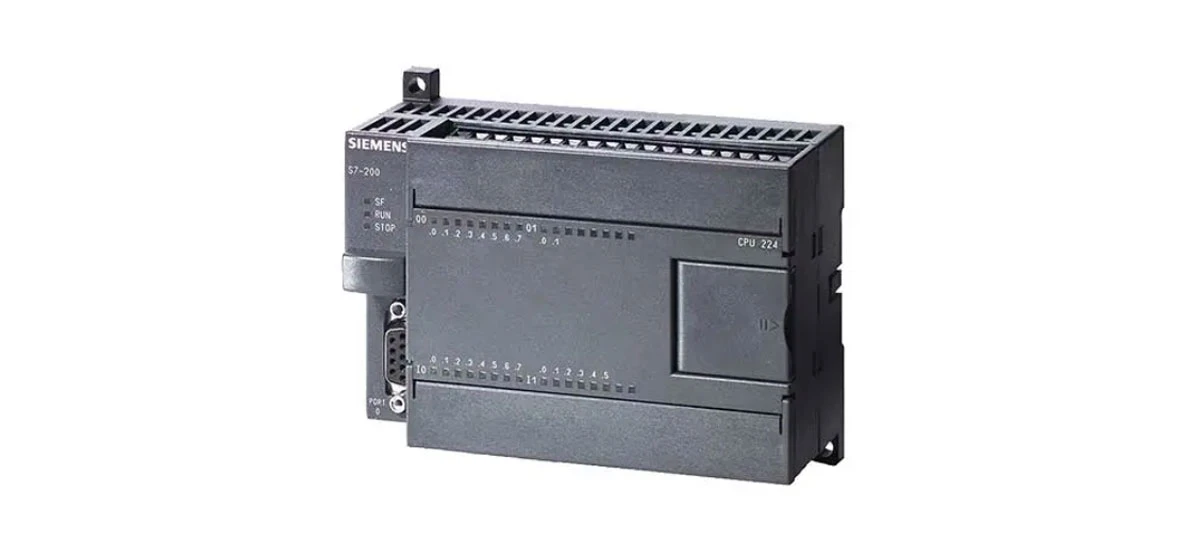
The Siemens S7-200 is a widely used programmable logic controller (PLC) in small to medium-sized industrial automation systems. One of its key strengths lies in supporting multiple communication protocols, which enables seamless connectivity with other devices, sensors, and control systems. This article dives deep into the four most important Siemens S7-200 communication protocols-PPI, MPI, Profibus, and Ethernet-providing step-by-step setup guides, practical use cases, and essential tips to help you optimize your automation network. Whether you're a student learning industrial control or a technician configuring a real-world system, understanding these protocols is crucial for getting the most out of your Siemens S7-200 PLC.
What Are Siemens S7-200 Communication Protocols?
Communication protocols act as "languages" that allow the Siemens S7-200 PLC to exchange data with other devices. Each protocol has unique features, advantages, and ideal applications, depending on factors like network size, data transfer speed, and device compatibility. The Siemens S7-200 supports four core protocols: PPI (Point-to-Point Interface), MPI (Multi-Point Interface), Profibus, and Ethernet. These protocols ensure the Siemens S7-200 can integrate into different industrial environments, from simple standalone systems to complex, interconnected networks. Choosing the right protocol for your project starts with understanding their key differences and use cases.
Siemens S7-200 PPI Protocol: Setup and Applications
What Is PPI Protocol for Siemens S7-200?
PPI is the default communication protocol for the Siemens S7-200 PLC. It is a simple, cost-effective point-to-point or multi-point protocol designed for small-scale applications. PPI works over RS-485 physical layer and is primarily used for programming the Siemens S7-200, transferring data between a single PLC and a PC, or connecting a few S7-200 PLCs in a small network. The protocol supports baud rates from 9.6 kbps to 187.5 kbps, which is sufficient for most basic automation tasks. One of the biggest advantages of PPI is its plug-and-play functionality-no complex configuration is needed for basic use.
How to Configure PPI Protocol on Siemens S7-200 (Step-by-Step)
Hardware Preparation: Connect the Siemens S7-200 PLC to your PC using a compatible RS-485 to USB cable (e.g., Siemens PC/PPI cable). Ensure the cable is properly plugged into the PLC's RS-485 port (labeled "Port 0" or "Port 1") and your PC's USB port.
Software Setup: Install Siemens Step 7 Micro/WIN software (the programming software for S7-200). Open the software and create a new project or open an existing one.
Communication Settings: Go to the "Set PG/PC Interface" option in Step 7 Micro/WIN. Select the PC/PPI cable as the interface type and choose the correct COM port (check Device Manager on your PC to find the COM port).
Baud Rate Configuration: Match the baud rate between the PC and the Siemens S7-200. The default baud rate for PPI is 9600 bps, but you can adjust it to 19200 bps or 187500 bps for faster data transfer.
Establish Connection: Click "Communicate" > "Whole Network" to search for the Siemens S7-200 PLC. Once detected, you can upload/download programs or exchange data between the PC and the PLC.
Ideal Use Cases for Siemens S7-200 PPI Protocol
PPI is perfect for small automation systems where you need simple communication. Common applications include programming the Siemens S7-200 PLC on-site, connecting a single PLC to a human-machine interface (HMI) for basic monitoring, or linking 2-3 S7-200 PLCs in a small production line. It's also a great choice for educational settings, as it's easy to learn and requires minimal hardware.
Siemens S7-200 MPI Protocol: Communication with Siemens Devices
What Is MPI Protocol for Siemens S7-200?
MPI is a multi-point communication protocol developed by Siemens for connecting PLCs, HMIs, and other Siemens automation devices. Unlike PPI, MPI supports more nodes (up to 32 devices) and is ideal for small to medium-sized networks where multiple Siemens devices need to communicate. The Siemens S7-200 uses MPI over RS-485, and it's compatible with other Siemens PLCs like S7-300/S7-400 and HMIs like TP/OP panels. MPI supports baud rates up to 187.5 kbps and uses a master-slave communication model, where one device (e.g., an HMI) acts as the master and others (e.g., S7-200 PLCs) act as slaves.
S7-200 MPI Communication with Other Siemens PLCs (Setup Guide)
Hardware Requirements: Use an MPI cable (e.g., Siemens MPI cable) or an RS-485 cable with MPI terminators. Connect all Siemens devices (S7-200 PLCs, S7-300 PLC, HMI) in a daisy-chain configuration. Ensure each device has a unique MPI address (set via DIP switches on the PLC or HMI).
Software Configuration: Open Step 7 Micro/WIN for the Siemens S7-200. Go to "Communication" > "Set PG/PC Interface" and select "MPI" as the interface type. Configure the MPI address for the PC (default is 0) and the baud rate (match with all devices in the network).
Network Configuration: Use the "NetPro" tool in Step 7 (for S7-300/S7-400) or Step 7 Micro/WIN to define the network structure. Assign unique MPI addresses to each Siemens S7-200 PLC (range: 1-31) to avoid conflicts.
Test Communication: Use the "Ping" function in Step 7 Micro/WIN to verify connectivity between the Siemens S7-200 and other devices. You can also transfer test data (e.g., read/write holding registers) to ensure smooth communication.
Key Tips for Siemens S7-200 MPI Protocol
- Always use a terminator resistor (120 ohms) at both ends of the MPI network to reduce signal interference.
- Keep the total cable length under 50 meters for baud rates above 19200 bps to maintain signal quality.
- Avoid assigning duplicate MPI addresses-this is the most common cause of communication failures.
Siemens S7-200 Profibus Protocol: Industrial Network Integration
An Introduction to Profibus for Siemens S7-200
Profibus (Process Field Bus) is a widely used industrial communication protocol for large-scale automation systems. The Siemens S7-200 supports Profibus DP (Decentralized Peripherals), which is designed for connecting PLCs to remote I/O modules, drives, and other field devices. To use Profibus with the Siemens S7-200, you need an optional Profibus DP master/slave module (e.g., EM227 Profibus DP module). Profibus DP supports high data transfer rates (up to 12 Mbps) and can connect up to 127 devices, making it ideal for complex industrial networks.
Profibus DP Setup Guide for Siemens S7-200
Install the Profibus Module: Attach the EM227 Profibus DP module to the Siemens S7-200 PLC. Ensure the module is firmly connected to the PLC's expansion slot and powered on.
Wiring the Profibus Network: Use a Profibus cable (shielded twisted pair) to connect the Siemens S7-200's EM227 module to other Profibus devices (e.g., remote I/O modules, drives). Install terminator resistors at both ends of the network.
Configure the Profibus Module: Open Step 7 Micro/WIN and install the GSD (General Station Description) file for the EM227 module. Go to "Tools" > "Profibus Configuration" to set the Profibus address (1-126) and baud rate (match with other network devices).
Define Data Exchange: Use Step 7 Micro/WIN to map the Profibus DP data (input/output bytes) to the Siemens S7-200's memory areas (e.g., I registers for inputs, Q registers for outputs). This allows the PLC to read data from remote devices and send control commands.
Test the Network: Use a Profibus diagnostic tool (e.g., Siemens Simatic Net) to check for communication errors. Verify that data is being transferred correctly between the Siemens S7-200 and other Profibus devices.
Advantages of Using Profibus with Siemens S7-200
Profibus DP offers faster data transfer than PPI or MPI, making it suitable for time-critical applications like assembly lines or process control. It also supports long cable lengths (up to 1000 meters at 9.6 kbps) and can connect a large number of devices, making it ideal for large factories. Additionally, Profibus is an open standard, so it works with devices from different manufacturers, not just Siemens.
Siemens S7-200 Ethernet Setup: High-Speed Network Connectivity
Why Choose Ethernet for Siemens S7-200?
Ethernet is the most popular communication protocol for modern industrial automation, offering high data transfer speeds (up to 1 Gbps), long-distance connectivity, and easy integration with IT networks. The Siemens S7-200 can be equipped with an Ethernet module (e.g., CP243-1 Ethernet communication processor) to enable Ethernet communication. With Ethernet, the Siemens S7-200 can connect to PCs, HMIs, other PLCs, and cloud-based monitoring systems, making it perfect for remote control, data logging, and Industry 4.0 applications.
Step-by-Step Siemens S7-200 Ethernet Connection Setup
Hardware Installation: Install the CP243-1 Ethernet module into the Siemens S7-200's expansion slot. Connect the module to a network switch or router using a standard Ethernet cable (CAT5e or higher).
IP Address Configuration: Assign a static IP address to the CP243-1 module. This can be done via Step 7 Micro/WIN: Go to "Tools" > "Ethernet Configuration" and enter the IP address (e.g., 192.168.0.10), subnet mask (e.g., 255.255.255.0), and gateway (if needed). Ensure the IP address is unique in your network.
Software Setup for Communication: In Step 7 Micro/WIN, go to "Set PG/PC Interface" and select "TCP/IP" as the interface type. Enter the Siemens S7-200's IP address to establish a connection.
Data Exchange Configuration: Use Step 7 Micro/WIN to define the data to be exchanged over Ethernet. You can use protocols like TCP/IP, UDP, or Siemens S7 protocol for data transfer. For example, you can set up the Siemens S7-200 to send production data to a PC for logging or receive control commands from an HMI.
Siemens S7-200 Ethernet Connection Troubleshooting: If communication fails, check the following:
- Ensure the Ethernet cable is properly connected and not damaged.
- Verify that the IP address of the CP243-1 module is correct and not conflicting with other devices.
- Check the network switch/router for power and connectivity issues.
- Use the "Ping" command on your PC to test the connection to the Siemens S7-200's IP address.
Practical Applications of Siemens S7-200 Ethernet Communication
Ethernet enables the Siemens S7-200 to be part of a larger industrial network. Common applications include remote monitoring of production processes (e.g., checking temperature or pressure from a central office), remote programming and troubleshooting of the PLC, and integration with MES (Manufacturing Execution Systems) for data analysis. It also supports Industry 4.0 initiatives, such as connecting the Siemens S7-200 to cloud platforms like Siemens MindSphere for predictive maintenance and process optimization.
S7-200 Communication Protocols Comparison: Which One to Choose?
Choosing the right communication protocol for your Siemens S7-200 depends on your project's requirements. Here's a quick comparison to help you decide:
- PPI: Best for small, simple systems (1-3 devices) where cost and ease of use are priorities. Ideal for programming and basic data transfer.
- MPI: Suitable for small to medium networks with multiple Siemens devices (up to 32 nodes). Great for connecting S7-200 to S7-300/S7-400 PLCs or Siemens HMIs.
- Profibus: Perfect for large-scale industrial networks with high data transfer needs and multiple devices (up to 127 nodes). Ideal for time-critical applications and integration with remote I/O.
- Ethernet: The best choice for high-speed, long-distance communication and integration with IT networks. Ideal for remote control, data logging, and Industry 4.0 applications.
By understanding the strengths of each protocol, you can design a communication network that meets your system's performance, scalability, and cost requirements.
Conclusion
The Siemens S7-200's support for PPI, MPI, Profibus, and Ethernet protocols makes it a versatile choice for industrial automation. Each protocol serves a unique purpose, from simple programming (PPI) to large-scale network integration (Profibus, Ethernet). By following the setup guides and tips in this article, you can configure a reliable communication network that connects your Siemens S7-200 to other devices, optimizes your automation processes, and supports future scalability. Whether you're working on a small project or a complex industrial system, the Siemens S7-200's communication protocols provide the flexibility and performance you need to succeed.


