

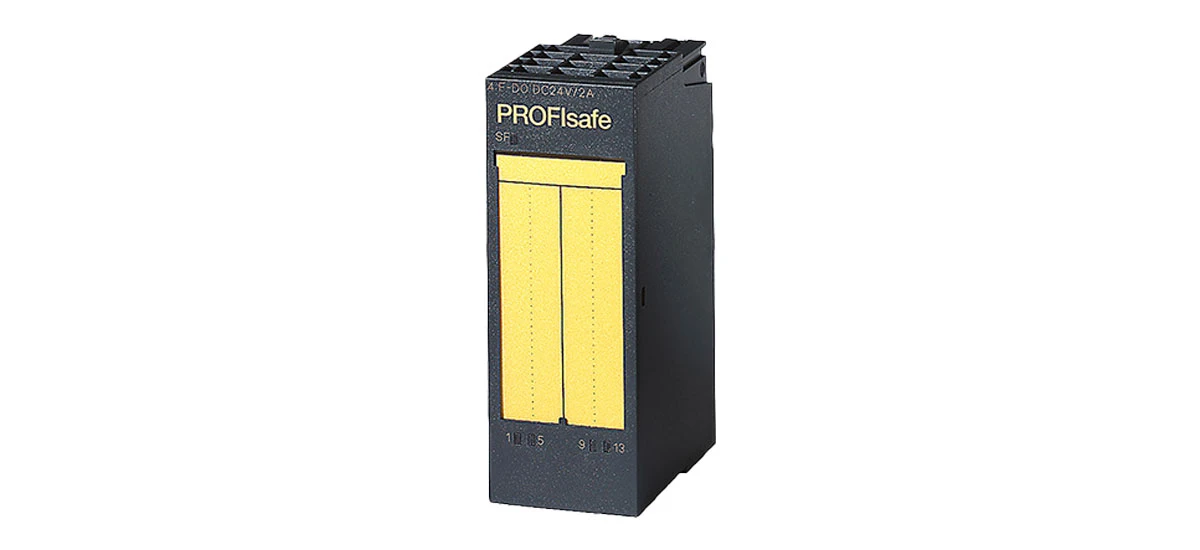
In today's industrial world, machines and systems need to communicate smoothly to work well. One key part of this communication is Siemens SIMATIC DP Electronic Modules. These modules help connect different devices in factories, like motors, sensors, and controllers, using a standard called PROFIBUS DP. Whether you're new to industrial automation or looking to learn more, this guide will break down everything you need to know about Siemens SIMATIC DP Electronic Modules.
What Are Siemens SIMATIC DP Electronic Modules?
First, let's answer the basics: What exactly are Siemens SIMATIC DP Electronic Modules? Simply put, they are small, powerful devices made by Siemens to help industrial systems "talk" to each other. The "DP" stands for "Decentralized Peripherals," which means these modules can be placed close to machines (instead of a central room) to make communication faster and more reliable.
Siemens SIMATIC DP Electronic Modules work with SIMATIC controllers (like the S7 series), which are the "brains" of many factory systems. For example, if a sensor detects a problem with a conveyor belt, the Siemens SIMATIC DP Electronic Module sends that information to the controller quickly. The controller then tells the belt to stop or adjust-keeping the factory running safely.
These modules are used in many industries, from car manufacturing to food processing. Their main job is to make sure data moves smoothly between devices, so factories can operate efficiently.
Key Features of Siemens SIMATIC DP Electronic Modules
Siemens SIMATIC DP Electronic Modules have features that make them popular for industrial use. Let's look at the most important ones:
1. High Reliability
Factories run 24/7, so equipment needs to be tough. Siemens SIMATIC DP Electronic Modules are built to handle harsh conditions-like dust, vibration, and extreme temperatures (from -25°C to 60°C). Siemens tests these modules for up to 10,000 hours of continuous use without failure, which means they rarely break down. This reliability saves factories time and money on unexpected repairs, especially for critical lines like car assembly.
2. Easy Compatibility
Siemens SIMATIC DP Electronic Modules work with many other Siemens products, like SIMATIC S7 controllers and PROFIBUS DP cables. They also work with some non-Siemens devices that use the PROFIBUS DP standard. Even older Siemens PROFIBUS DP devices (made in the 2000s) can connect to new SIMATIC DP modules without adapters-no need to replace working equipment just to upgrade.
3. Fast Communication
Speed matters in factories. Siemens SIMATIC DP Electronic Modules can send data at speeds up to 12 Mbps (megabits per second). This speed is enough to send 100 sensor readings to the controller in just one second-critical for fast-moving lines like beverage bottling, where delays could mean spilled products. Unlike slower modules, they don't cause lags that slow down production.
4. Simple Setup
You don't need to be an expert to set up Siemens SIMATIC DP Electronic Modules. They come with clear, picture-based instructions, and Siemens offers STEP 7 software to help configure them. The STEP 7 software has a "Wizard" mode that walks you through setup with step-by-step images-no coding or advanced tech skills needed. Most people can get a module working in 30 minutes or less.
How to Install Siemens SIMATIC DP Electronic Modules
Installing Siemens SIMATIC DP Electronic Modules is straightforward if you follow these steps. Before you start, gather your tools: a screwdriver (Phillips or flathead, depending on the module), PROFIBUS DP cable (shielded for less interference), the module, and a small crimp tool (optional but helpful).
Step 1: Choose the Right Location
Place the Siemens SIMATIC DP Electronic Module close to the device it will connect to (like a sensor or motor). Avoid areas near large motors (they cause electrical interference) or water pipes (to prevent leaks from damaging the module). Also, leave a little space around the module for airflow-this prevents overheating.
Step 2: Mount the Module
Most Siemens SIMATIC DP Electronic Modules mount on a DIN rail (a metal strip common in factories). DIN rails are usually 35mm wide-most SIMATIC DP modules fit this standard, so you won't need a special rail. Slide the module onto the rail from the top until it clicks into place. Use a screwdriver to tighten the small screw on the bottom of the module-this keeps it secure, even if the factory has strong vibrations.
Step 3: Connect the Cables
First, connect the power cable to the module (check the manual for voltage-usually 24V DC; never use higher voltage, as it will damage the module). Then, connect the PROFIBUS DP cable: the module has two ports (labeled "PROFIBUS DP IN" and "OUT") to daisy-chain multiple modules. Use a crimp tool to attach wire ends to the terminal blocks-this ensures a tight connection that won't come loose over time. Finally, connect the module to your device (like a sensor) using the front terminal blocks.
Step 4: Test the Connection
Turn on the power and open Siemens STEP 7 software on your computer (connect the computer to the controller with a USB cable). The software will scan for devices-if the connection works, it will show a "Device Found" message and a green checkmark. If not, STEP 7 will list possible issues (like "Wrong Module Address" or "Loose Cable") to help you fix it. Test the module by sending a small command (e.g., "Turn on Sensor Light") to make sure data flows both ways.
Maintenance Tips for Siemens SIMATIC DP Electronic Modules
To keep your Siemens SIMATIC DP Electronic Modules working well for years, follow these simple maintenance tips:
1. Clean the Module Regularly
Dust can build up on the module and block vents, causing overheating. Every 3 months, turn off the power and wipe the module with a dry, soft cloth. Use a soft-bristle brush (like an old toothbrush) to gently remove dust from the small vents-don't use compressed air, as it can push dust into the module's internal parts and cause damage.
2. Check Cables Monthly
Loose or damaged cables are the top cause of communication problems. Once a month, check all cables connected to the Siemens SIMATIC DP Electronic Module. Tighten any loose terminal screws (use a screwdriver set to the right size-too much force will strip the screws). Look for signs of wear, like cracked insulation on the power cable or bent pins on the PROFIBUS connector-these small issues can lead to big downtime later.
3. Update Software
Siemens sometimes releases updates for the software used with SIMATIC DP modules (like STEP 7). These updates fix bugs (e.g., "Address Conflict Errors") and add new features (e.g., "Remote Monitoring"). Download updates from Siemens' official "Support Portal" (free to register) and save a backup of your old settings before updating-just in case the new update causes issues. Most updates take 10-15 minutes to install.
4. Monitor Temperature
Siemens SIMATIC DP Electronic Modules work best at temperatures between -25°C and 60°C. If your factory gets hotter (like near a steel furnace) or colder (like a cold-storage warehouse), install a simple temperature sensor (costing around $20) near the module. Set an alert (using a basic controller) if the temperature goes above 55°C or below -20°C-this lets you act before overheating or freezing damages the module.
Troubleshooting Common Issues with Siemens SIMATIC DP Electronic Modules
Even with good maintenance, you might run into small problems with Siemens SIMATIC DP Electronic Modules. Here's how to fix the most common ones quickly:
Issue 1: Module Doesn't Turn On
If the module's power light is off, first check the power cable-make sure it's plugged in tightly at both the module and the power supply. Use a multimeter to test the power supply (it should show 24V DC). If the supply is working but the module still won't turn on, check the small fuse inside the module (most have a fuse labeled "F1" on the side). A blown fuse can be replaced with a standard 500mA slow-blow fuse-this is a cheap fix (fuses cost less than $1).
Issue 2: No Communication with Controller
If the STEP 7 software shows a "red light" or "Device Not Found" message, first check the PROFIBUS DP cable-make sure it's connected to both the module's "IN" port and the controller. If the cable is fine, check the module's address (set with small DIP switches on the front). Each switch represents a number (1, 2, 4, 8, etc.)-add the numbers of the switches that are "on" to get the address. For example, switches 1 and 2 on = address 3. Make sure this address matches the one you set in STEP 7-wrong addresses are a common mistake.
Issue 3: Module Overheats
If the module feels hot (over 60°C) or the power light flashes red, first clean the vents (as in the maintenance tips). If that doesn't help, check if the module is too close to other hot devices (like a motor driver). If it is, move it 5-10cm away for better airflow. For very hot areas (like near ovens), install a small USB fan (powered by the factory's 24V supply) pointed at the module-it can lower the temperature by 10-15°C and costs less than $10.
Siemens SIMATIC DP Electronic Modules vs. Other DP Modules
You might wonder: Why choose Siemens SIMATIC DP Electronic Modules over other DP modules (like those from Allen-Bradley or Phoenix Contact)? Here are the key differences that matter for factories:
1. Better Compatibility with Siemens Systems
If you already use Siemens controllers (like S7-1200 or S7-1500), Siemens SIMATIC DP Electronic Modules will work seamlessly with them. For example, the module will automatically share data like "module status" (e.g., "Power On," "Sensor Connected") with the controller-no extra programming needed. Other brands often require you to manually code this data share, which takes time and can lead to errors (like missing status updates). Even older Siemens PROFIBUS DP devices (from the 2000s) can connect to new SIMATIC DP modules-other brands may not work with old Siemens gear without expensive adapters.
2. More Durable Design
Siemens SIMATIC DP Electronic Modules are built to last longer in tough factory conditions. They have an IP20 protection rating, meaning they're protected from solid objects larger than 12mm (like screws) and accidental finger touches. Many other DP modules only have an IP10 rating-they're not protected from fingers or small objects, which increases the risk of damage. Siemens also tests their modules for vibration resistance (up to 5g, which is like the vibration of a heavy-duty drill)-other brands often only handle 2-3g, so they break more easily in busy factories.
3. Stronger Support
Siemens has a global support network that's hard to beat. If you have a problem with your Siemens SIMATIC DP Electronic Module, you can call 24/7 support in 45 languages-even on weekends or holidays. Their website has free "Troubleshooting Videos" that show you step-by-step how to fix issues (like "Replacing a Fuse" or "Setting the Address"). They also offer free online courses (via Siemens Learning Center) to teach you how to use the modules. Other brands often only offer support during business hours (9am-5pm) and charge for training courses-this can slow down fixes when your factory is running 24/7.
Why Choose Siemens SIMATIC DP Electronic Modules for Industrial Automation
Industrial automation is all about making factories faster, safer, and more efficient-and Siemens SIMATIC DP Electronic Modules help with all three. Here's why they're a top choice for industrial automation:
Faster Data Transfer: As mentioned earlier, these modules send data up to 12 Mbps. This speed is enough to send 100 sensor readings to the controller in just one second-critical for fast-moving lines like beverage bottling, where delays could mean spilled products.
Easy to Scale: If you add more machines to your factory, you can simply add more Siemens SIMATIC DP Electronic Modules. They daisy-chain together, so you don't need to run new cables from the controller-saving time and money on expansion.
Cost-Effective: While Siemens SIMATIC DP Electronic Modules aren't the cheapest option (they cost \(50-\)200 more than basic DP modules), their durability and low maintenance costs save money in the long run. Most last 10+ years without major issues-basic modules often need replacement after 3-5 years.
Trusted Brand: Siemens has been making industrial equipment for over 170 years. When you buy Siemens SIMATIC DP Electronic Modules, you're getting a product that's been tested and trusted by factories around the world-from Toyota car plants to Nestlé food factories.
Final Thoughts on Siemens SIMATIC DP Electronic Modules
Siemens SIMATIC DP Electronic Modules are a key part of modern industrial automation. They help machines communicate quickly, work reliably in tough conditions, and are easy to install and maintain. Whether you're setting up a new factory system (like a robotic assembly line) or upgrading an old one (to reduce downtime), these modules are a smart choice.
Remember: To get the most out of your Siemens SIMATIC DP Electronic Modules, follow the installation steps (especially choosing the right location), do regular maintenance (like cleaning vents), and troubleshoot issues early (using STEP 7's error messages). And if you need help, Siemens' 24/7 support team is always there to assist-no matter where your factory is.
If you're ready to start using Siemens SIMATIC DP Electronic Modules, check Siemens' website for product specs (they list which modules work with different controllers) or contact a local Siemens distributor. They can help you pick the right module for your needs-whether it's a small module for 4 sensors or a larger one for 16 motors.


