


Hey there! I'm a supplier of Mitsubishi PLCs, and today I'm gonna share with you how to implement safety interlock functions in a Mitsubishi PLC. Safety interlocks are super important in industrial automation. They help prevent dangerous situations by making sure that certain conditions are met before a machine or process can operate.
Understanding Safety Interlocks
First off, let's talk about what safety interlocks are. Simply put, they're like the guards of your industrial system. They stop things from going haywire by making sure that operations only happen when it's safe. For example, in a manufacturing line, you don't want a robot arm to start moving while a worker is still in the work area. A safety interlock can prevent that by checking if the area is clear before allowing the arm to move.
Mitsubishi PLCs: A Great Choice
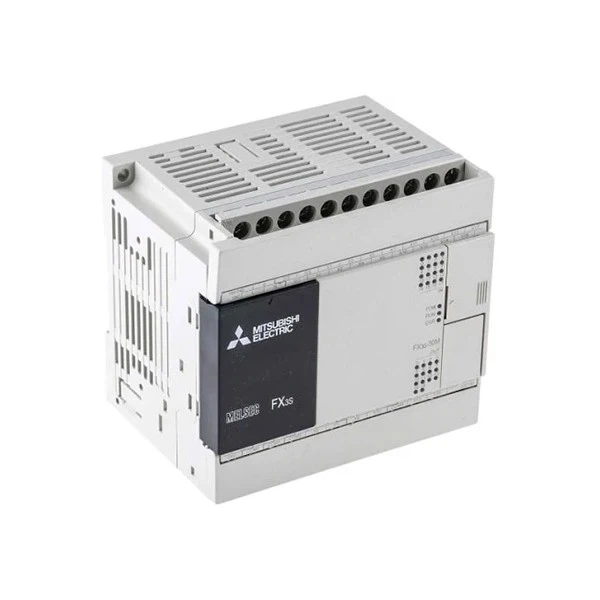
Mitsubishi PLCs are well - known in the industry for their reliability and flexibility. Whether you're working with a small - scale project or a large industrial setup, there's a Mitsubishi PLC that can fit your needs. For instance, the Fx2n 80mr Ds is a popular choice for medium - sized applications. It has enough input and output points to handle various sensors and actuators, which are crucial for implementing safety interlocks. And the Mitsubishi FX3S 30MR ES is great for smaller projects where space and cost are considerations.
Steps to Implement Safety Interlocks
Step 1: Identify Safety Requirements
The first thing you need to do is figure out what safety requirements your system has. This involves looking at the entire process and identifying potential hazards. For example, if you're dealing with a conveyor belt system, you need to consider things like pinch points, the risk of objects falling off the belt, and the possibility of someone getting caught in the moving parts. Once you've identified these hazards, you can determine what conditions need to be met to ensure safety.
Step 2: Select Sensors
Sensors are the eyes and ears of your safety interlock system. They detect the conditions that you identified in the previous step. There are many types of sensors you can use, such as proximity sensors, limit switches, and light curtains. Proximity sensors can detect the presence of an object or a person in a certain area. Limit switches can be used to detect the position of moving parts. And light curtains create a protective barrier. If the light beam is broken, it indicates that something has entered the protected area. For example, in a robotic work cell, you can use light curtains to prevent the robot from operating when a person enters the cell.
Step 3: Connect Sensors to the PLC
Once you've selected the sensors, you need to connect them to the Mitsubishi PLC. The PLC has input terminals where you can connect the sensors. Make sure to follow the wiring diagram provided in the PLC's manual. Each sensor should be connected to the appropriate input point on the PLC. For example, if you're using a proximity sensor, you'll connect its output to an input point on the PLC. The PLC will then read the signal from the sensor and use it in the safety interlock logic.
Step 4: Write the Safety Interlock Logic
This is where the magic happens. You need to write the logic in the PLC programming software. Most Mitsubishi PLCs use ladder logic programming, which is easy to understand and work with. The logic should be designed to check the signals from the sensors and make decisions based on those signals. For example, if a light curtain is broken, the logic should immediately stop the operation of the machine. You can use basic ladder logic elements like contacts and coils. Contacts represent the input signals from the sensors, and coils represent the output signals that control the actuators.

Here's a simple example of ladder logic for a safety interlock:
- Assume we have a proximity sensor connected to input X0 and a motor control output Y0.
- We want the motor to run only when the proximity sensor doesn't detect an object (i.e., the input X0 is OFF).
- In ladder logic, we'll place a normally - open contact for X0 in series with a coil for Y0. When X0 is OFF, the circuit is complete, and Y0 is energized, which means the motor runs. If X0 is ON (an object is detected), the circuit is broken, and Y0 is de - energized, stopping the motor.
Step 5: Test the System
After writing the logic, you need to test the system to make sure it works as expected. Start by simulating different scenarios. For example, you can manually trigger the sensors to see if the PLC responds correctly. Check if the machine stops when it's supposed to and starts when the conditions are safe. Make any necessary adjustments to the logic if the system doesn't work as expected.
Additional Considerations
Redundancy
In some critical applications, it's a good idea to have redundant safety interlocks. This means having multiple sensors and multiple logic paths to ensure that the safety function works even if one component fails. For example, you can use two light curtains in parallel. If one light curtain fails, the other one can still detect an intrusion and stop the machine.
Maintenance
Regular maintenance is essential for the proper functioning of the safety interlock system. Check the sensors for damage, clean the light curtains, and make sure the wiring is secure. Also, test the system periodically to ensure that the safety interlocks are still working correctly.
Using Mitsubishi's Specialized Products
Mitsubishi also offers some specialized products that can make implementing safety interlocks easier. For example, the HG - KN43J - S100 Mitsubishi is a servo motor with built - in safety features. These features can be integrated with the PLC's safety interlock logic to provide an extra layer of protection.
Conclusion
Implementing safety interlocks in a Mitsubishi PLC is a process that requires careful planning and attention to detail. By following the steps I've outlined above, you can create a reliable and effective safety interlock system. Remember, safety is not something to be taken lightly in industrial automation.
If you're interested in purchasing Mitsubishi PLCs or need more information on implementing safety interlocks, feel free to reach out for a procurement discussion. I'm here to help you find the best solutions for your industrial automation needs.
References
- Mitsubishi Electric Corporation. (20XX). Mitsubishi PLC User Manuals.
- Industrial Automation Handbook. (20XX). Various publishers.


