

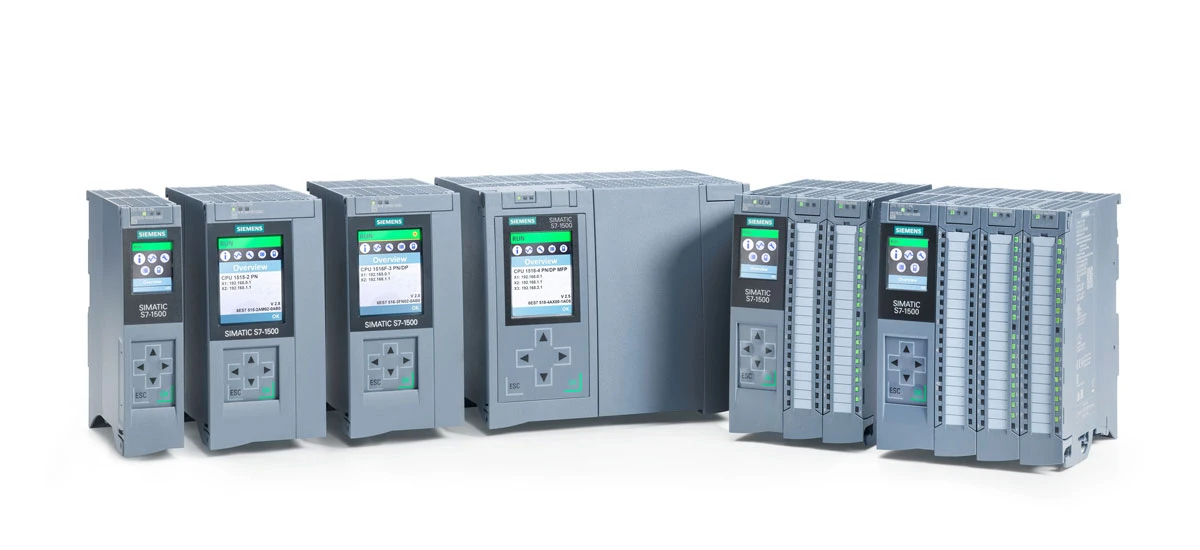
In the mold making industry, precision and efficiency are the keys to success. Siemens PLC (Programmable Logic Controller) is a core tool that controls every part of the mold production process, from injection molding cycles to temperature adjustment. However, many technicians, even those with experience, make mistakes when programming Siemens PLC systems. These mistakes can cause production delays, bad products, higher maintenance costs, and even damage to equipment. To help you avoid these problems, we have collected the 10 most common Siemens PLC programming mistakes in mold making and explained how to fix them clearly. Whether you are new to Siemens PLC programming or an experienced worker, this guide will help you improve programming accuracy and keep mold production smooth with Siemens PLC.
Why Siemens PLC Programming Accuracy Matters in Mold Making
Mold making is a very precise field. Even a small mistake can ruin a whole batch of products. Siemens PLC systems are designed to control mold machines reliably and precisely, such as injection molding machines, blow molding machines, and compression molding machines. A well-written Siemens PLC program ensures steady mold cycles, accurate temperature control, and safe operation. On the other hand, poor Siemens PLC programming can lead to frequent machine stops, inconsistent product quality, and unnecessary wear on molds and equipment. For mold manufacturers, spending time avoiding Siemens PLC programming mistakes means saving money and improving competitiveness. That's why understanding and fixing these common errors in Siemens PLC programming in mold making is so important for any factory that uses Siemens PLC technology.
10 Common Siemens PLC Programming Mistakes in Mold Making (and Their Fixes)
Mistake 1: Ignoring Input/Output (I/O) Signal Verification for Mold Sensors
One of the most common mistakes in Siemens PLC programming for mold making is not checking the I/O signals from mold sensors. Mold machines depend on sensors to detect the mold's position, the presence of raw materials, and when each production step is done. If the Siemens PLC program does not check these signals, it may misread the sensor data. This can cause wrong mold movements, like closing the mold too early or too late. This mistake directly affects the stability of production, so Siemens PLC programming in mold making must pay strict attention to signal verification.
Why it happens: Technicians often hurry to finish programming and skip the signal verification step. They assume the sensors are working well. They also often forget to consider signal interference in the mold production environment, which can distort sensor readings-a common oversight in Siemens PLC programming for mold making.
How to fix it: Always add signal verification logic to your Siemens PLC program. Use Siemens PLC's built-in functions to check the stability of sensor signals (for example, using a delay timer to filter out noise). Before full production starts, test each sensor's signal in the actual mold production environment. For instance, you can program the Siemens PLC to wait for 2-3 continuous valid signals from the mold position sensor before moving to the next step. This simple fix can prevent most I/O-related errors in mold making and follow Siemens PLC mold making programming best practices.
Mistake 2: Overlooking Mold Temperature Control Logic Errors
Temperature control is critical in mold making-even a 1°C difference can affect the final product's quality. A common Siemens PLC programming mistake is creating flawed temperature control logic, such as using wrong PID (Proportional-Integral-Derivative) parameters or not setting temperature limits for different mold zones. Proper temperature control is a key part of Siemens PLC programming in mold making because it directly impacts product quality.
Why it happens: Many technicians use the same generic PID parameters for all mold types. They don't realize that different molds (like plastic injection molds vs. metal stamping molds) need different temperature control settings. They also often forget to program safety interlocks that stop the mold machine if the temperature goes beyond the safe range-another gap in Siemens PLC programming for mold making.
How to fix it: Adjust the PID parameters in your Siemens PLC program to match the specific mold and material. Use Siemens PLC's temperature control function blocks to make programming easier. Besides, add interlock logic that shuts down the mold machine if the temperature is higher or lower than the preset limits. Calibrate the temperature sensors regularly to ensure accurate readings, which helps your Siemens PLC program maintain stable temperature control. This method follows Siemens PLC mold making programming best practices and helps avoid common Siemens PLC issues in injection mold programming.
Mistake 3: Using Unoptimized Ladder Logic for Mold Cycle Sequences
Ladder Logic (LL) is the most common programming language for Siemens PLC in mold making. However, many technicians write unoptimized ladder logic for mold cycle sequences. For example, they use too many unnecessary contacts or coils, or arrange the logic in a messy way. This can slow down the Siemens PLC's scan time, leading to delayed mold movements and lower production efficiency. Optimizing ladder logic is a vital part of effective Siemens PLC programming in mold making.
Why it happens: Beginners often copy and paste ladder logic from other programs without changing it for the specific mold cycle. Experienced technicians may rush to meet deadlines and ignore optimizing the logic-a common mistake in Siemens PLC programming for mold making.
How to fix it: Optimize your ladder logic by removing redundant contacts and coils. Arrange the logic in a logical order that follows the mold cycle sequence (such as mold opening → raw material injection → mold closing → cooling → product ejection). Use Siemens PLC's function blocks (FC) and function calls to reuse code for repeated steps in the mold cycle. For example, if multiple mold cycles need a cooling step, create a single cooling function block and use it whenever needed. This not only reduces the scan time but also makes the program easier to maintain. Remember, optimized ladder logic is key to maximizing the performance of your Siemens PLC in mold making and aligns with Siemens PLC programming tips for mold manufacturers.
Mistake 4: Neglecting Emergency Stop (E-Stop) Circuit Programming
Safety is the top priority in mold making, and the emergency stop (E-Stop) function is a critical safety feature. A dangerous Siemens PLC programming mistake is not programming the E-Stop circuit properly. For example, not making sure all mold movements stop immediately when the E-Stop button is pressed, or failing to reset the E-Stop correctly. Safety-focused programming is a must in Siemens PLC programming in mold making.
Why it happens: Some technicians think the E-Stop is only a hardware feature and forget to add corresponding logic in the Siemens PLC program. Others may program the E-Stop to only stop part of the mold machine, leaving other components running-a risky oversight in Siemens PLC programming for mold making.
How to fix it: Design the E-Stop logic as a top-priority circuit in your Siemens PLC program. Use Siemens PLC's safety relays and safety function blocks to ensure that pressing the E-Stop button cuts off power to all mold machine components (like hydraulic pumps, motors, heaters) immediately. Program a manual reset function that requires the technician to check the mold machine and clear any faults before restarting. Additionally, test the E-Stop function thoroughly before each production run to make sure it works as intended. This mistake is easy to avoid and can prevent serious accidents in the mold production facility, which is one of the key Siemens PLC programming tips for mold manufacturers.
Mistake 5: Failing to Implement Data Logging for Mold Performance
Data logging is essential for monitoring mold performance, finding trends, and solving problems. However, many Siemens PLC programs for mold making do not include data logging functions. This makes it hard to track key metrics such as mold cycle time, temperature changes, and error rates. Adding data logging is a valuable practice in Siemens PLC programming in mold making.
Why it happens: Technicians may not realize the value of data logging or think it's too complex to add to the Siemens PLC program. They may also focus more on basic control functions than data collection-a missed opportunity in Siemens PLC programming for mold making.
How to fix it: Use Siemens PLC's data logging function blocks to record key mold production metrics. Store the data in the Siemens PLC's internal memory or an external HMI (Human-Machine Interface) system. Set clear data logging intervals (for example, every 10 seconds or after each mold cycle) and include relevant parameters such as temperature, pressure, cycle time, and error codes. This data will help you find potential issues early, such as a slow increase in cycle time due to a faulty sensor. For mold manufacturers, data logging with Siemens PLC is a powerful tool for continuous improvement and quality control, and it helps in avoiding Siemens PLC mistakes in mold production.
Mistake 6: Overcomplicating the Program with Unnecessary Instructions
Another common mistake is making the Siemens PLC program too complicated with unnecessary instructions. This includes adding unused variables, redundant logic, or complex mathematical calculations that are not needed for the mold making process. Overcomplicated programs are harder to debug, maintain, and modify-a major issue in Siemens PLC programming in mold making.
Why it happens: Some technicians try to make the program "versatile" by adding features that may be useful in other applications, without considering the specific needs of the mold making process. Others may start programming without a clear plan, leading to disorganized and overly complex code-a common pitfall in Siemens PLC programming for mold making.
How to fix it: Before programming, create a detailed plan of the mold making process and identify the exact functions the Siemens PLC needs to perform. Remove any variables, logic, or instructions that are not directly related to these functions. Use simple and straightforward instructions whenever possible-avoid complex mathematical operations unless they are essential for temperature control or pressure regulation. For example, if the mold only needs basic on/off control for a heater, there's no need to add a complex PID algorithm. A simple and clean Siemens PLC program is easier to manage and less likely to have errors, which is a key aspect of Siemens PLC mold making programming best practices.
Mistake 7: Ignoring Compatibility Between Siemens PLC Hardware and Mold Software
Mold making facilities often use different types of Siemens PLC hardware (such as S7-1200, S7-1500) and software (such as TIA Portal). A common mistake is ignoring the compatibility between hardware and software, which leads to program errors or failure to download the program to the PLC. Checking compatibility is a basic step in Siemens PLC programming in mold making.
Why it happens: Technicians may use an outdated version of TIA Portal to program a new Siemens S7-1500 PLC, or select hardware modules that are not compatible with the software. They may also forget to update the PLC firmware, which can cause compatibility issues-a frequent error in Siemens PLC programming for mold making.
How to fix it: Always check the compatibility between Siemens PLC hardware and software before starting programming. Use the latest version of TIA Portal that supports your PLC model. Update the PLC firmware to the latest version using Siemens' official tools. Before downloading the program, run a compatibility check in TIA Portal to find any issues. If you're using third-party software or hardware with your Siemens PLC, make sure they are certified to work with the specific PLC model. Ignoring compatibility can waste time and frustrate technicians, so this step is crucial for successful Siemens PLC programming in mold making and helps solve common Siemens PLC issues in injection mold programming.
Mistake 8: Not Adding Comments and Documentation to Siemens PLC Programs
Many technicians skip adding comments and documentation when writing Siemens PLC programs for mold making. This makes it hard for other technicians (or even the same technician later) to understand the program's logic. It leads to difficulties in debugging, modifying, or maintaining the program. Clear documentation is an often-overlooked part of effective Siemens PLC programming in mold making.
Why it happens: Technicians may think comments take too much time or assume they will remember the program's logic later. In fast-paced production environments, documentation is often not a priority-a mistake that reduces long-term efficiency in Siemens PLC programming in mold making.
How to fix it: Add clear, short comments to every section of your Siemens PLC program. Explain the purpose of each logic block, such as "Mold closing interlock with position sensor verification" or "Temperature control for zone 2 of plastic injection mold." Create a separate documentation file that includes an overview of the program, a list of variables, and notes on key functions. This practice makes the program easier to understand and maintain, which is one of the important Siemens PLC programming tips for mold manufacturers. When working in a team, consistent commenting ensures everyone can work together effectively on the Siemens PLC program.
Mistake 9: Neglecting Program Backup and Recovery Procedures
Failing to set up proper backup and recovery procedures for Siemens PLC programs is a common mistake in mold making. If the PLC program is lost due to hardware failure, accidental deletion, or firmware issues, production can stop completely. Backup protocols are a critical part of Siemens PLC programming in mold making.
Why it happens: Technicians may forget to back up the program after programming or updating it. They may also store backups in only one place, which is at risk of being lost or damaged. Many assume the program will stay safe in the PLC's memory, ignoring the possibility of unexpected problems-a risky oversight in Siemens PLC programming for mold making.
How to fix it: Establish a regular backup schedule for your Siemens PLC program. After every programming session or program update, back up the program to multiple places, such as a secure server, an external hard drive, and a cloud storage service. Test the backup files regularly to make sure they can be successfully restored to the PLC. Include backup and recovery steps in your facility's standard operating procedures (SOPs) for Siemens PLC programming in mold making. This simple step can save hours of downtime and avoid the need to rewrite the entire program, helping in avoiding Siemens PLC mistakes in mold production.
Mistake 10: Failing to Test the Program Under Realistic Mold Production Conditions
Many technicians only test Siemens PLC programs in a simulated environment, not under the actual conditions of the mold production floor. This can lead to unexpected errors when the program is used in full production. Simulated conditions do not always reflect real-world factors like machine vibration, signal interference, or changes in material properties. Realistic testing is essential for reliable Siemens PLC programming in mold making.
Why it happens: Simulated testing is faster and easier than testing on the actual production line. Technicians may also worry that testing on the production machine will disrupt the production schedule. Some may overtrust the simulation results and think they are enough to ensure the program works well-a common mistake in Siemens PLC programming for mold making.
How to fix it: Test the Siemens PLC program under real production conditions before full deployment. Arrange a test period when the production line is not busy. Run the program with actual raw materials, set the machine to normal production speed, and monitor all functions closely. Check for issues like signal delays, incorrect mold movements, or temperature fluctuations. Involve on-site operators in the testing process-they know the machine's normal operation best and can spot unusual behaviors. Fix any problems found during the test and retest until the program runs smoothly. This step ensures that the Siemens PLC program can handle real-world conditions and reduces the risk of production disruptions, following Siemens PLC mold making programming best practices.
Conclusion: Improve Your Siemens PLC Programming for Better Mold Making
Siemens PLC programming in mold making requires attention to detail, adherence to best practices, and careful testing. The 10 common mistakes discussed above can be avoided with proper planning, thorough verification, and realistic testing. By following the fixes we've outlined, you can improve the accuracy and reliability of your Siemens PLC programs, reduce production downtime, and enhance product quality. Remember to use the Siemens PLC programming tips for mold manufacturers, implement data logging, and keep your programs simple and well-documented. With these efforts, you can make the most of your Siemens PLC system and gain a competitive edge in the mold making industry. Whether you're a beginner or an experienced technician, focusing on avoiding these mistakes will help you achieve better results in Siemens PLC programming in mold making.


