

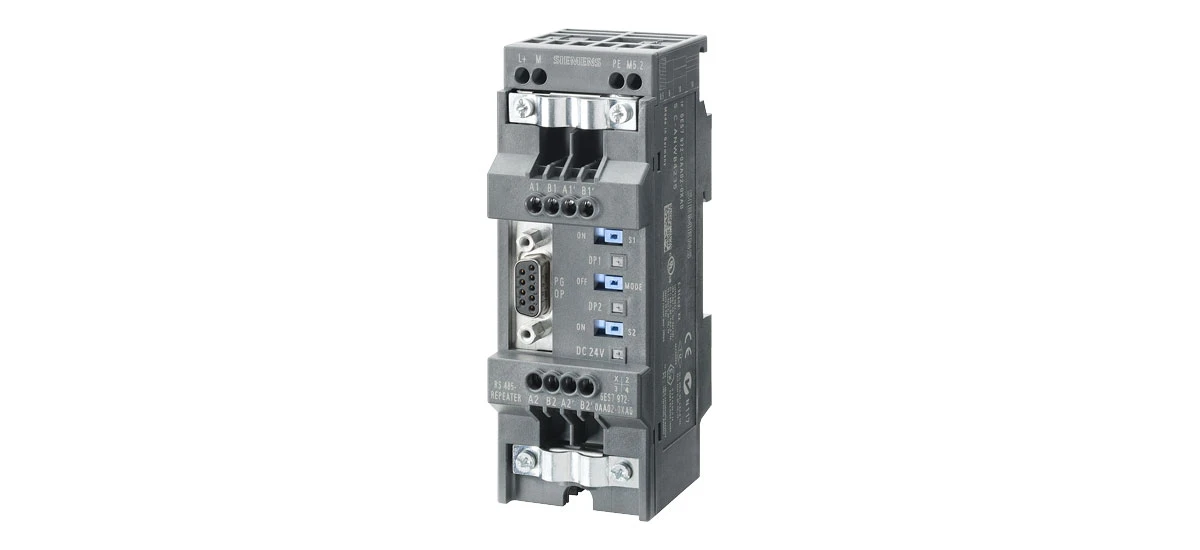
If you work with industrial automation or Siemens S7-300 PLC systems, you've likely heard of the Siemens 6ES7972-0AA02-0XA0. This small but powerful connector plays a critical role in MPI (Multi-Point Interface) and Profibus communication, linking S7-300 controllers to other devices in a network. In this guide, we'll cover everything you need to know about the Siemens 6ES7972-0AA02-0XA0-from its key features and how to use it to troubleshooting tips and compatibility details. Whether you're a student learning industrial tech or a technician maintaining equipment, this article breaks down complex info into easy-to-understand terms.
What Is the Siemens 6ES7972-0AA02-0XA0?
The Siemens 6ES7972-0AA02-0XA0 is a dedicated MPI/Profibus connector designed specifically for Siemens S7-300 programmable logic controllers (PLCs). It acts as a physical interface between the S7-300 CPU and other devices in a Profibus or MPI network, such as HMIs (Human-Machine Interfaces), sensors, actuators, or other PLCs. Unlike generic connectors, the Siemens 6ES7972-0AA02-0XA0 is built to meet Siemens' strict industrial standards, ensuring reliable communication in harsh factory environments.
One of the main jobs of the Siemens 6ES7972-0AA02-0XA0 is to handle data transfer between connected devices. MPI networks are often used for small-scale communication (up to 32 devices) with moderate speed, while Profibus networks support larger setups (up to 127 devices) and faster data rates-both rely on the Siemens 6ES7972-0AA02-0XA0 to maintain stable connections. This connector is also known for its easy installation, making it a top choice for both new setups and upgrades to existing S7-300 systems.
Key Features of the Siemens 6ES7972-0AA02-0XA0
To understand why the Siemens 6ES7972-0AA02-0XA0 is so widely used, let's look at its core features. These design elements make it reliable, versatile, and suitable for industrial use:
Durable Industrial Design
The Siemens 6ES7972-0AA02-0XA0 is built to withstand tough factory conditions. It has a robust plastic housing that resists dust, vibration, and temperature changes (operating range: 0°C to 60°C). The screw terminals are corrosion-resistant, ensuring secure wire connections that don't loosen over time. This durability means the Siemens 6ES7972-0AA02-0XA0 can last for years in high-demand environments, reducing replacement costs.
Built-In Terminal Resistor
A critical feature of the Siemens 6ES7972-0AA02-0XA0 is its integrated terminal resistor (120 ohms). In Profibus/MPI networks, terminal resistors are needed at the two ends of the bus to prevent signal reflection, which can cause communication errors. With the Siemens 6ES7972-0AA02-0XA0, you don't need to buy a separate resistor-just flip a switch on the connector to activate it. This saves time during setup and ensures proper network performance.
Flexible Communication Speeds
The Siemens 6ES7972-0AA02-0XA0 supports a range of communication speeds to fit different network needs. For MPI networks, it works with speeds from 19.2 kbps to 12 Mbps, while Profibus networks can use speeds up to 12 Mbps. This flexibility means the Siemens 6ES7972-0AA02-0XA0 can adapt to small, slow networks (like a single HMI connected to a PLC) or larger, faster systems (like multiple sensors and actuators in a production line).
Easy Wiring and Installation
The Siemens 6ES7972-0AA02-0XA0 has clear labeling for wires (A, B, and shield), making wiring simple even for beginners. The compact size (45mm x 24mm x 12mm) fits in tight spaces inside control cabinets. It also snaps easily onto DIN rails, a standard mounting system in industrial settings. Whether you're installing the Siemens 6ES7972-0AA02-0XA0 for the first time or replacing an old connector, the process takes just a few minutes.
How to Use the Siemens 6ES7972-0AA02-0XA0 with S7-300
Using the Siemens 6ES7972-0AA02-0XA0 is straightforward, but following the right steps ensures smooth communication. Below is a step-by-step guide for setting it up with a Siemens S7-300 PLC:
Step 1: Gather Tools and Materials
Before you start, you'll need: the Siemens 6ES7972-0AA02-0XA0, Profibus/MPI cable (twisted pair with shield), wire strippers, a screwdriver, and your S7-300 PLC (e.g., CPU 312C, 313C, or 315-2DP). Make sure the cable is compatible with Profibus/MPI-twisted pair reduces interference, and the shield protects against electrical noise.
Step 2: Wire the Connector
- Strip 5-7mm of insulation from the ends of the Profibus cable's A (positive) and B (negative) wires, plus the shield.
- Open the Siemens 6ES7972-0AA02-0XA0's terminal covers using a screwdriver.
- Connect the A wire to the terminal labeled "A" (usually red or marked with a "+"), the B wire to "B" (usually blue or marked with a "-"), and the shield to the ground terminal (marked with a ground symbol).
- Tighten the screws to secure the wires-don't overtighten, as this can damage the terminals.
Step 3: Activate the Terminal Resistor
If the Siemens 6ES7972-0AA02-0XA0 is at either end of the Profibus/MPI bus, flip the switch on the connector to "ON" to activate the terminal resistor. If it's in the middle of the bus, leave the switch "OFF" (no resistor needed for middle devices). This step is crucial-forgetting it can cause signal issues.
Step 4: Connect to the S7-300 PLC
The Siemens 6ES7972-0AA02-0XA0 plugs directly into the MPI/Profibus port on the S7-300 CPU. Align the connector's pins with the port and push firmly until it clicks into place. Ensure the connector is fully seated to avoid loose connections.
Step 5: Test the Connection
Turn on the S7-300 PLC and the connected devices (e.g., HMI, sensor). Use Siemens software like STEP 7 to check communication: go to the "Online & Diagnostics" menu and verify that the PLC detects the Siemens 6ES7972-0AA02-0XA0 and other network devices. If there's no communication, double-check the wiring and terminal resistor switch.
Siemens 6ES7972-0AA02-0XA0 Wiring Guide
Proper wiring is key to the Siemens 6ES7972-0AA02-0XA0's performance. Here's a detailed breakdown of the wiring process, including common mistakes to avoid:
Wiring Pinout for Siemens 6ES7972-0AA02-0XA0
The Siemens 6ES7972-0AA02-0XA0 has three main terminals:
- Terminal 1: Profibus A (positive signal)
- Terminal 2: Profibus B (negative signal)
- Terminal 3: Shield (ground)
Always use twisted-pair cable for A and B wires-this minimizes electromagnetic interference (EMI) from nearby motors or power cables. The shield should be connected to ground at both ends of the bus to protect against noise. Never connect the shield to power or leave it ungrounded, as this can cause communication errors.
Common Wiring Mistakes to Avoid
- Swapping A and B wires: This is the most common mistake. If A and B are reversed, the Siemens 6ES7972-0AA02-0XA0 won't communicate with other devices. Double-check the cable colors and terminal labels.
- Not stripping wires properly: Wires that are too short or have too much insulation can cause loose connections or short circuits. Strip exactly 5-7mm of insulation.
- Overlooking the shield: The shield is critical for reducing interference. Make sure it's connected to the ground terminal on the Siemens 6ES7972-0AA02-0XA0 and the other end of the bus.
- Using non-Profibus cable: Regular copper wire doesn't have the same noise resistance as Profibus cable. Always use cable rated for Profibus/MPI (e.g., Siemens Profibus FC Standard Cable).
Troubleshooting Common Issues with Siemens 6ES7972-0AA02-0XA0
Even with proper setup, you might encounter issues with the Siemens 6ES7972-0AA02-0XA0. Below are the most common problems and how to fix them:
Problem 1: No Communication Between Devices
Possible Causes: Swapped A/B wires, terminal resistor not activated, loose connections, or wrong communication speed.
Fix: Check the wiring (ensure A and B are correct), verify the terminal resistor switch is "ON" for end devices, tighten all screws, and confirm the network speed matches in STEP 7 (e.g., 1.5 Mbps for MPI).
Problem 2: Intermittent Signal or Data Loss
Possible Causes: Electromagnetic interference, damaged cable, or overloaded network.
Fix: Move the Profibus cable away from power cables/motors, replace damaged cable, or reduce the number of devices on the network (MPI supports up to 32 devices, Profibus up to 127).
Problem 3: Siemens 6ES7972-0AA02-0XA0 Gets Hot
Possible Causes: Short circuit in wiring or faulty connector.
Fix: Turn off power, check for crossed wires (A touching B or ground), and replace the Siemens 6ES7972-0AA02-0XA0 if it's still hot after fixing the wiring.
Problem 4: PLC Doesn't Detect the Connector
Possible Causes: Connector not fully plugged into the PLC port, damaged pins on the connector, or faulty PLC port.
Fix: Unplug and reinsert the Siemens 6ES7972-0AA02-0XA0 firmly, inspect the pins for bent/damaged parts, and test the PLC port with another compatible connector.
Siemens 6ES7972-0AA02-0XA0 Compatibility
The Siemens 6ES7972-0AA02-0XA0 is designed to work seamlessly with Siemens S7-300 PLCs, but it also supports other Profibus/MPI devices. Here's a breakdown of its compatibility:
Compatible S7-300 PLC Models
The Siemens 6ES7972-0AA02-0XA0 works with all S7-300 CPU models that have an MPI/Profibus port, including:
- CPU 312C
- CPU 313C
- CPU 314C-2 DP
- CPU 315-2 DP
- CPU 317-2 DP
- CPU 319-3 PN/DP
It also works with S7-300 expansion modules that add MPI/Profibus functionality.
Other Compatible Devices
Beyond S7-300 PLCs, the Siemens 6ES7972-0AA02-0XA0 can connect to:
- Siemens HMI panels (e.g., TP177B, MP277)
- Profibus sensors and actuators (e.g., from Pepperl+Fuchs, Sick)
- Other Siemens PLCs (e.g., S7-400, S7-1200 with Profibus module)
- Industrial PCs (IPCs) with Profibus/MPI cards
Always check the device's manual to confirm Profibus/MPI compatibility before connecting.
Siemens 6ES7972-0AA02-0XA0 Technical Specs
Understanding the technical details of the Siemens 6ES7972-0AA02-0XA0 helps you choose the right connector for your network. Here are the key specs (based on Siemens official documentation):
|
Specification |
Details |
|
Model Number |
Siemens 6ES7972-0AA02-0XA0 |
|
Communication Protocols |
MPI, Profibus DP |
|
Communication Speed |
MPI: 19.2 kbps – 12 Mbps; Profibus: 9.6 kbps – 12 Mbps |
|
Terminal Resistor |
Built-in 120 ohms (switchable) |
|
Wiring Type |
Twisted pair with shield |
|
Terminal Type |
Screw terminals (0.5 mm² – 1.5 mm² wire size) |
|
Operating Temperature |
0°C to 60°C |
|
Storage Temperature |
-20°C to 80°C |
|
Humidity |
5% to 95% (non-condensing) |
|
Mounting |
DIN rail (35mm) or direct mounting |
|
Dimensions (W x H x D) |
45mm x 24mm x 12mm |
|
Weight |
Approx. 20g |
Why Choose the Siemens 6ES7972-0AA02-0XA0 for Industrial Networks?
With so many connectors on the market, why should you choose the Siemens 6ES7972-0AA02-0XA0? Here are the top reasons:
Reliability You Can Trust
Siemens is a leader in industrial automation, and the 6ES7972-0AA02-0XA0 lives up to the brand's reputation. It's tested to meet strict industrial standards (e.g., IEC 61158) and is built with high-quality materials. This reliability means fewer downtime incidents and lower maintenance costs.
Easy to Use for Beginners and Experts
Whether you're new to PLCs or an experienced technician, the Siemens 6ES7972-0AA02-0XA0 is easy to install and configure. The clear labeling, built-in resistor, and plug-and-play design save time and reduce errors. Even students learning industrial tech can set it up with minimal guidance.
Versatility for Different Networks
The Siemens 6ES7972-0AA02-0XA0 works with both MPI and Profibus networks, making it a flexible choice for different project sizes. You can use it for small-scale setups (like a single PLC and HMI) or large industrial networks (like a production line with dozens of devices).
Cost-Effective Long-Term Solution
While the Siemens 6ES7972-0AA02-0XA0 might cost more than generic connectors, its durability and performance make it a cost-effective choice. It lasts longer, requires less maintenance, and reduces the risk of communication failures that can lead to expensive downtime.
Final Thoughts on the Siemens 6ES7972-0AA02-0XA0
The Siemens 6ES7972-0AA02-0XA0 is more than just a connector-it's a critical component that ensures reliable communication in S7-300-based industrial networks. Its durable design, built-in terminal resistor, easy installation, and broad compatibility make it a top choice for engineers, technicians, and students alike.
Whether you're setting up a new MPI/Profibus network, troubleshooting an existing one, or learning about industrial automation, understanding the Siemens 6ES7972-0AA02-0XA0 is essential. By following the wiring guide, using the troubleshooting tips, and leveraging its key features, you can ensure your network runs smoothly for years to come.
If you have more questions about the Siemens 6ES7972-0AA02-0XA0-like specific compatibility with your device or advanced setup tips-feel free to leave a comment below!


