

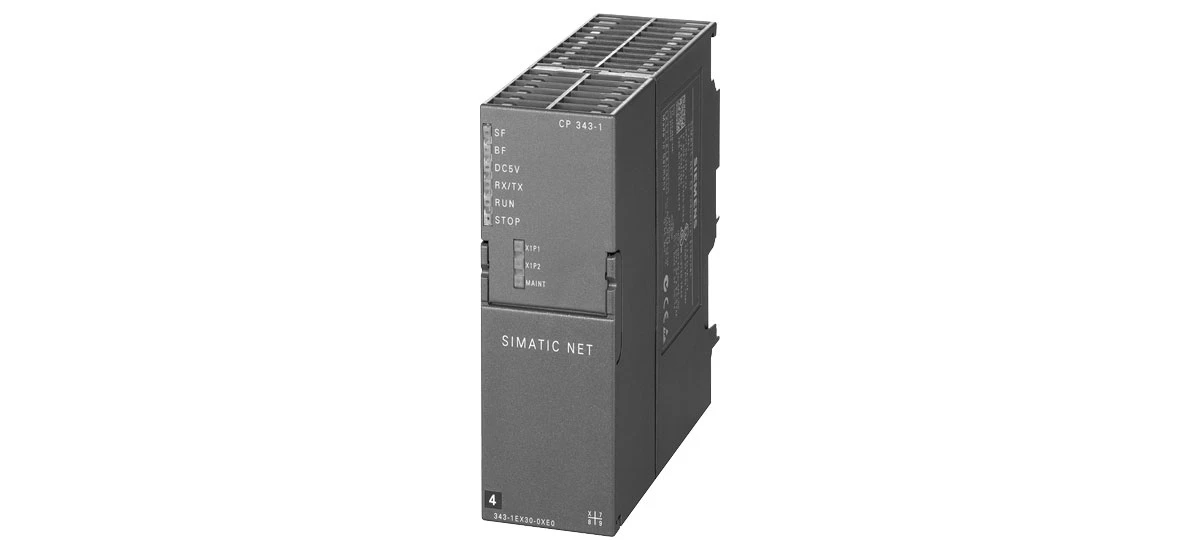
In today's factory settings-whether it's a car assembly line, a food packaging plant, or a electronics manufacturing facility-automation systems rely heavily on stable network connections. Every device, from tiny temperature sensors to large robotic arms, needs to send and receive data quickly to keep production on track. A managed industrial Ethernet switch acts as the "brain" of this network, linking devices like sensors, PLCs (Programmable Logic Controllers), and machines into a unified system. Choosing the right one-such as the Siemens 6GK7343-1EX30-0XE0-can mean the difference between smooth, non-stop production and costly downtime. But with so many switches on the market, how do you make the best choice for your unique needs? This blog will guide you through key steps, use real-world examples, and explain why the Siemens 6GK7343-1EX30-0XE0 is a top pick for many automation projects.
Start by Understanding Your Automation System's Needs
Before picking a managed industrial Ethernet switch for your automation system, you must first map out exactly what your system requires. This step ensures the switch doesn't just "work"-it works perfectly for your project, avoiding wasted money on unneeded features or frustration from missing ones.
Figure Out Bandwidth Requirements
Different devices in your automation system need different amounts of network speed, also called "bandwidth." Think of bandwidth like a highway: narrow highways (low bandwidth) slow down traffic (data), while wide highways (high bandwidth) let traffic move fast. For example, simple sensors that send a small data packet every few seconds (like a sensor checking if a box is on a conveyor belt) only need a small amount of bandwidth. But devices that send large, constant streams of data-such as high-definition cameras monitoring product quality or robotic arms sharing real-time movement instructions-need much more. The Siemens 6GK7343-1EX30-0XE0 supports Gigabit Ethernet ports (1,000 Mbps), which is like a 10-lane highway for data. This speed is more than enough for most industrial devices, even if you have multiple high-bandwidth tools running at the same time. This makes it a versatile choice for a managed industrial Ethernet switch for your automation system, whether you're running a small packaging line or a medium-sized electronics workshop.
Count the Number of Connected Devices
Next, ask: How many devices do you need to plug into the switch? A small automation project-like a single production line for making plastic cups-might have 10-20 devices: 5 sensors, 2 PLCs, 1 HMI (Human-Machine Interface) screen, 3 conveyor belt controllers, and a quality-check camera. A large factory with multiple lines could have 50 or more devices. The Siemens 6GK7343-1EX30-0XE0 comes with 8 Ethernet ports, which is ideal for small to medium projects. Each port can connect to one device, and the ports are clearly labeled so you can easily track which port links to which tool (e.g., "Port 1: Conveyor Belt 1 Sensor"). If your project grows later-say, you add a second plastic cup line-you can easily expand your network by daisy-chaining additional Siemens switches to the 6GK7343-1EX30-0XE0.
Check if the Switch Fits Industrial Environments
Industrial sites are very different from offices. Offices are cool, clean, and quiet-but factories are hot, dusty, and full of vibrations from machines. A regular office switch (the kind you might use at home or in a desk job) will break quickly in a factory: dust will clog its parts, heat will melt its circuits, and vibrations will shake its internal components loose. A good managed industrial Ethernet switch for your automation system must be built to handle these harsh conditions.
Temperature Resistance
Factories can have extreme temperature swings. Near metal-melting furnaces, the air might reach 55°C (131°F), while outdoor storage areas or unheated warehouses in winter could drop to -5°C (23°F). If a switch can't handle these temps, it will shut down-stopping your entire automation system. The Siemens 6GK7343-1EX30-0XE0 works reliably in temperatures from -10°C to 60°C (-14°F to 140°F). That's a wider range than most industrial switches on the market. For example, in a bakery where ovens raise the room temp to 45°C, or a cold-storage facility for frozen meats where temps stay at -8°C, this switch will keep working without glitches. This wide temperature range ensures your automation system stays online year-round, no matter the season or factory conditions.
Shock and Vibration Protection
Machines in factories create constant vibrations-conveyor belts hum, robotic arms move back and forth, and forklifts drive over concrete floors. Accidental shocks are also common: a worker might bump the switch with a toolbox, or a pallet of materials might knock into it. Fragile office switches can't handle this, but the Siemens 6GK7343-1EX30-0XE0 is built tough. It has a thick, rugged metal case (not cheap plastic like office switches) that absorbs shocks and blocks vibrations. It also meets strict industrial standards: IEC 60068-2-27 for shock resistance (it can handle a 50g impact for 11 milliseconds-like being dropped from a small table) and IEC 60068-2-6 for vibration resistance (it works through vibrations from 5 to 500 Hz, which covers most factory machines). This durability means you don't have to worry about the switch breaking from daily factory activity-even in busy, high-movement areas.
Prioritize Reliability and Redundancy
In automation systems, downtime is expensive. A 5-minute network outage in a car factory could cost $10,000 in lost production; a 30-minute outage in a beverage bottling plant could waste 1,000+ bottles. That's why reliability is non-negotiable for a managed industrial Ethernet switch for your automation system. A key part of reliability is "redundancy"-backup features that keep the network running even if one part fails.
Look for Redundancy Features
Redundancy is like having a backup tire for your car: if the main tire pops, you use the backup to keep driving. For switches, redundancy means having a backup path for data. The Siemens 6GK7343-1EX30-0XE0 supports MRP (Media Redundancy Protocol), a special feature that creates a "loop" of data paths. If one path breaks-say, a network cable gets cut by a forklift or a port stops working-MRP automatically switches to the backup path in less than a second. You won't even notice the switch happened. Let's use a real example: in a snack-packing line, the main cable connects the switch to a sensor that checks if bags are sealed properly. If that cable gets damaged, MRP sends the sensor's data through the backup cable immediately. The packing line keeps running, and you don't have to stop production to fix the cable (you can fix it during a scheduled break). This redundancy saves you time, money, and stress.
Error Detection and Recovery
Even small errors-like a loose cable or a faulty sensor-can turn into big outages if they're not fixed quickly. A good switch should spot these errors early and let you know about them. The Siemens 6GK7343-1EX30-0XE0 has built-in error-detection tools that monitor the network 24/7. If it finds a problem-such as a cable that's not fully plugged in or a sensor that's sending corrupted data-it sends an alert right away. You can get alerts via email, or they can pop up on your factory's central control screen (the HMI). For example, if a port on the switch stops working, the HMI will show a message like "Port 4: No Connection-Check Cable." This lets you fix the issue before it causes an outage.
Ensure Compatibility with Existing Systems
You don't want to buy a new switch only to find it doesn't work with the devices you already have. Your managed industrial Ethernet switch for your automation system must "speak the same language" as your PLCs, HMIs, and sensors. This means supporting the right "protocols" (special communication rules) and working with devices from different brands.
Support for Industrial Protocols
Think of protocols as languages: if your switch speaks only English, it can't talk to a sensor that speaks only Spanish. Industrial devices use specific protocols to communicate, and the most common ones are PROFINET, Modbus TCP, and Ethernet/IP. The Siemens 6GK7343-1EX30-0XE0 supports PROFINET-the most widely used protocol in European and North American factories. PROFINET is fast and reliable, making it perfect for devices that need real-time data, like robotic arms or assembly line controllers. For example, if you have a Siemens S7-1200 PLC (a common industrial controller), the 6GK7343-1EX30-0XE0 will connect to it instantly via PROFINET. The switch also supports Modbus TCP, which is used by many older devices (like Schneider or Allen-Bradley PLCs). This dual-protocol support means you don't have to replace your old devices to use the switch-saving you money.
Easy Integration with Other Brands
Most factories don't use devices from just one brand. You might have a Siemens PLC, an Allen-Bradley HMI, and an Omron sensor-all working together. A good switch should connect all these brands without trouble. The Siemens 6GK7343-1EX30-0XE0 has an open design, which means it follows universal industrial standards. It can connect to non-Siemens devices just as easily as Siemens ones. For example, if you have an Allen-Bradley HMI that shows production rates, you can plug it into the 6GK7343-1EX30-0XE0 and it will start sharing data with your Siemens PLC right away. You don't need special software or adapters-just a standard Ethernet cable. This cross-brand compatibility makes the switch flexible for any factory setup.
Choose a Switch That's Easy to Manage and Maintain
You don't need to be a network expert to run a factory. A good managed industrial Ethernet switch for your automation system should be easy to set up, monitor, and fix-even if your team's expertise is in machines, not IT.
User-Friendly Management Tools
The Siemens 6GK7343-1EX30-0XE0 uses a web-based interface-meaning you can manage it using any computer, tablet, or even a smartphone (as long as you're on the factory network). You don't need to install special software-just open a web browser, type in the switch's IP address, and you'll see a simple dashboard. The dashboard has clear menus with pictures: "Port Settings," "Network Status," "Alerts," and "Firmware Updates." For example, if you want to rename a port to "Pallet Sensor 2" (instead of "Port 7"), you just click on the port, type the new name, and save. If you want to check if all devices are connected, the dashboard shows green dots for working devices and red dots for offline ones. Even if your team has never managed a switch before, they'll learn how to use this interface in 15-20 minutes. This simplicity saves time and reduces frustration.
Simple Maintenance Tips
Maintaining the Siemens 6GK7343-1EX30-0XE0 is easy-you don't need fancy tools or frequent service calls. Here are a few practical tips (Siemens 6GK7343-1EX30-0XE0 maintenance tips):
- Keep the switch clean: Dust can build up on the case and block vents (which keep the switch cool). Wipe the case with a dry, soft cloth once a month-avoid water or cleaning sprays, which can damage the metal.
- Check cables regularly: Every week, take 5 minutes to make sure all Ethernet cables are tightly plugged into the ports. Loose cables are one of the most common causes of network issues. Also, look for frayed or bent cables-replace them right away (store spare cables near the switch for quick swaps).
- Update firmware: Firmware is the switch's "operating system," and Siemens releases free updates a few times a year to fix small bugs or add new features. Updating is easy: go to the Siemens website, download the latest firmware, and upload it to the switch via the web interface. Do this once a year (during a scheduled shutdown) to keep the switch running smoothly.
- Check LED lights: The switch has small LED lights next to each port-green means the port is working, red means there's an error. Glance at these lights daily; if you see a red light, you can fix the issue before it becomes a problem.
These simple steps will keep the switch running well for 5-7 years-longer than most industrial switches on the market.
Why the Siemens 6GK7343-1EX30-0XE0 Is a Great Choice for Your Automation System
After looking at all the key factors-needs matching, environmental fit, reliability, compatibility, and ease of use-the Siemens 6GK7343-1EX30-0XE0 stands out as a top managed industrial Ethernet switch for your automation system. Here's a closer look at why it's trusted by factory owners and technicians worldwide:
- Fits small to medium projects: With 8 Gigabit ports, it handles 10-20 devices easily, and you can expand it as your factory grows.
- Tough enough for factories: Its metal case, wide temperature range, and shock/vibration resistance mean it survives even the harshest industrial conditions.
- No more downtime: MRP redundancy and error alerts keep your system running, even if cables break or ports fail.
- Works with your existing tools: It supports PROFINET and Modbus TCP, so it connects to Siemens and non-Siemens devices without hassle.
- Easy for anyone to use: The web-based interface and simple maintenance mean your team doesn't need IT skills to manage it.
Installing the Siemens 6GK7343-1EX30-0XE0 is also simple. It comes with a DIN rail mounting kit (DIN rails are the metal strips in factories where devices like PLCs are attached), so you can mount it next to your other equipment in 5 minutes. Siemens also provides a step-by-step guide with pictures-you just plug in the power cable, connect your devices with Ethernet cables, and set up the web interface. Even new technicians can have the switch up and running in less than an hour.
Final Thoughts
Choosing the right managed industrial Ethernet switch for your automation system doesn't have to be overwhelming. By following these steps-understanding your system's needs, checking for industrial durability, prioritizing reliability, ensuring compatibility, and picking an easy-to-manage switch-you'll make a choice that saves you time, money, and stress. The Siemens 6GK7343-1EX30-0XE0 checks all these boxes: it's reliable, flexible, tough, and user-friendly. Whether you're running a small production line for toys or a medium factory making auto parts, this switch will keep your automation system running smoothly day after day. And as your factory grows, it will grow with you-no need to buy a new switch every time you add a device or a production line. For anyone looking for a switch they can trust, the Siemens 6GK7343-1EX30-0XE0 is a smart investment.


