

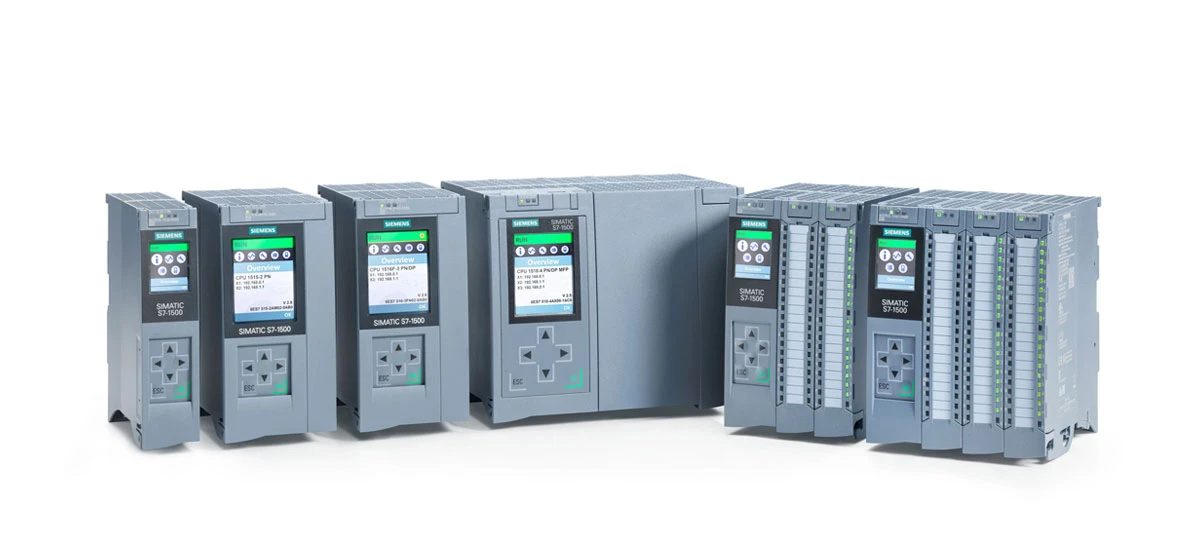
In today's fast-paced industrial world, automation has become the backbone of efficient and reliable operations. From small workshops to global manufacturing plants, businesses rely on programmable logic controllers (PLCs) to streamline processes, reduce human error, and boost productivity. Among the many PLC options available, the Siemens S7-1500 PLC stands out as a game-changer-designed to meet the evolving needs of modern automation. Whether you're new to PLCs and want to learn how to use Siemens S7-1500 PLC for industrial automation, or an experienced technician looking to deepen your knowledge of its advanced features, this guide covers everything. We'll break down what the Siemens S7-1500 PLC is, why it's trusted by industries worldwide, how to program and configure it, and real-world ways it transforms operations. By the end, you'll have a clear understanding of why the Siemens S7-1500 PLC is the top choice for businesses aiming to stay competitive in automation.
Introduction to Siemens S7-1500 PLC
What Is Siemens S7-1500 PLC?
The Siemens S7-1500 PLC is a advanced programmable logic controller designed for industrial automation. Developed by Siemens, a leader in technology solutions, this PLC helps businesses control machines, production lines, and complex processes with precision. Unlike older models, the Siemens S7-1500 PLC combines power, flexibility, and ease of use, making it a top choice for small factories and large industrial facilities alike. Whether you're automating a packaging line or managing a smart factory, the Siemens S7-1500 PLC delivers reliable performance.
Why Choose Siemens S7-1500 PLC for Industrial Automation?
Choosing the right PLC is critical for smooth operations, and the Siemens S7-1500 PLC stands out for several reasons. First, it offers faster processing speeds than many competitors, so it can handle multiple tasks at once without delays. Second, the Siemens S7-1500 PLC works with a wide range of devices and software, making it easy to integrate into existing systems. Third, it includes built-in safety features to protect workers and equipment. For businesses looking to improve efficiency and reduce downtime, the Siemens S7-1500 PLC is a smart investment.
Core Features of Siemens S7-1500 PLC
Powerful Processing Capabilities
At the heart of the Siemens S7-1500 PLC is a high-performance processor. Models like the CPU 1511C-1 PN can execute complex programs in milliseconds, ensuring quick responses to sensor inputs. This power makes the Siemens S7-1500 PLC ideal for applications that require real-time control, such as robotics or assembly lines. Even when handling large amounts of data, the Siemens S7-1500 PLC maintains stability, reducing the risk of system crashes.
Flexible Communication Options
The Siemens S7-1500 PLC supports multiple communication protocols, including Profinet, Modbus, and Ethernet/IP. This flexibility means it can connect to sensors, motors, HMIs (human-machine interfaces), and other PLCs seamlessly. For example, with Profinet, the Siemens S7-1500 PLC can exchange data with devices in real time, making it perfect for synchronized production processes. Whether you need to link local equipment or connect to a cloud-based system, the Siemens S7-1500 PLC has the communication tools to get the job done.
Enhanced Safety Functions
Safety is a top priority in industrial settings, and the Siemens S7-1500 PLC includes advanced safety features. It supports Safety Integrated technology, which allows you to program safety functions directly into the PLC without extra hardware. Features like emergency stop control, safety interlocks, and safe speed monitoring help prevent accidents. The Siemens S7-1500 PLC also meets global safety standards, giving businesses peace of mind that their operations are compliant and protected.
Scalability for Different Applications
One of the best things about the Siemens S7-1500 PLC is its scalability. You can start with a basic CPU and add modules as your needs grow-such as digital input/output modules, analog modules, or communication modules. This means small businesses can use the Siemens S7-1500 PLC for simple tasks and expand it later for more complex operations. Whether you need to control a single machine or an entire factory, the Siemens S7-1500 PLC can adapt to your changing requirements.
Siemens S7-1500 PLC Programming Basics
TIA Portal: The Integrated Programming Environment
To program the Siemens S7-1500 PLC, you'll use Siemens' TIA (Totally Integrated Automation) Portal software. TIA Portal is user-friendly, even for beginners, and combines programming, configuration, and diagnostics in one tool. With its drag-and-drop interface, you can quickly create programs without writing complex code from scratch. The software also includes pre-built function blocks for common tasks, saving you time. For anyone learning Siemens S7-1500 PLC programming basics, TIA Portal is the perfect starting point.
Step-by-Step Programming Process
Programming the Siemens S7-1500 PLC in TIA Portal follows a simple workflow. First, create a new project and select the correct CPU model. Next, configure the hardware-adding modules and setting up communication links. Then, write your program using a programming language like Ladder Logic or Function Block Diagram. After writing the code, test it with TIA Portal's simulation tool to catch errors. Finally, download the program to the Siemens S7-1500 PLC and monitor its performance. This step-by-step process makes programming accessible to both new and experienced users.
Common Programming Languages for Siemens S7-1500 PLC
The Siemens S7-1500 PLC supports several standard programming languages, so you can choose the one that best fits your needs. Ladder Logic is the most popular-it uses graphical symbols that look like electrical circuits, making it easy for electricians to learn. Function Block Diagram (FBD) is great for complex logic, as it uses blocks to represent functions. Structured Text (ST) is similar to programming languages like C++ and is ideal for advanced users. No matter which language you choose, the Siemens S7-1500 PLC handles it efficiently.
How to Configure Siemens S7-1500 PLC
Hardware Configuration Steps
Configuring the Siemens S7-1500 PLC's hardware is straightforward with TIA Portal. Start by connecting the CPU to your computer via Ethernet or a USB cable. Open TIA Portal and create a new hardware configuration. Select the CPU model (e.g., CPU 1516F-3 PN/DP) and add any necessary modules, such as digital I/O or analog modules. Assign addresses to each module so the PLC can communicate with them. Finally, save the configuration and download it to the Siemens S7-1500 PLC. Always double-check connections to ensure the hardware works as expected.
Software Setup and Configuration
After setting up the hardware, you'll need to configure the software settings for the Siemens S7-1500 PLC. In TIA Portal, set the IP address of the PLC to match your network. Configure communication protocols-for example, enable Profinet if you're connecting to other Profinet devices. You can also set up data logging to track process values or alarms. The software allows you to customize settings based on your application, so the Siemens S7-1500 PLC works exactly how you need it to.
Connecting Siemens S7-1500 PLC to Other Devices
The Siemens S7-1500 PLC can connect to a variety of devices, including HMIs, sensors, motors, and other PLCs. To connect an HMI, use Ethernet or Profinet to establish a communication link. For sensors, wire digital or analog sensors to the PLC's input modules. If you're connecting to another Siemens PLC, use S7 communication for fast data exchange. The key is to ensure all devices use compatible protocols and have matching settings (like IP addresses). With the right setup, the Siemens S7-1500 PLC acts as the central hub of your automation system.
Siemens S7-1500 PLC vs S7-1200: Key Differences
Performance Comparison
When choosing between the Siemens S7-1500 PLC and S7-1200, performance is a key factor. The Siemens S7-1500 PLC has a more powerful processor, making it faster at executing programs and handling large data sets. It also supports more I/O points-up to 65,536 digital inputs/outputs-compared to the S7-1200's 8,192. For applications that require high speed or large-scale control, the Siemens S7-1500 PLC is the better choice. The S7-1200 is great for small projects, but the Siemens S7-1500 PLC excels in complex industrial environments.
Application Scope Differences
The Siemens S7-1500 PLC and S7-1200 are designed for different applications. The S7-1200 is ideal for small machines, such as standalone pumps or small conveyors. The Siemens S7-1500 PLC, on the other hand, is built for large-scale automation-think entire production lines, smart factories, or process control systems. It can handle multiple tasks simultaneously, making it suitable for industries like automotive manufacturing, energy, and pharmaceuticals. If your project is large or growing, the Siemens S7-1500 PLC offers the scalability you need.
Cost and Scalability Contrast
Cost is another consideration. The S7-1200 is more affordable for small businesses or simple projects. However, the Siemens S7-1500 PLC provides better value for large-scale applications, thanks to its scalability and advanced features. You can start with a basic Siemens S7-1500 PLC and add modules as your business grows, avoiding the need to replace the entire system. Over time, this scalability saves money and reduces downtime. For businesses planning long-term growth, the Siemens S7-1500 PLC is a cost-effective investment.
Siemens S7-1500 PLC Troubleshooting Tips
Common Issues and Their Solutions
Even with its reliability, the Siemens S7-1500 PLC may encounter issues. One common problem is communication errors-if the PLC can't connect to devices, check the Ethernet cable and IP address settings. Another issue is program errors, which can cause the PLC to stop working. Use TIA Portal's diagnostic tools to find and fix code mistakes. If the PLC isn't responding, try resetting it or checking the power supply. Most problems with the Siemens S7-1500 PLC are easy to resolve with basic troubleshooting steps.
Diagnostic Tools for Siemens S7-1500 PLC
TIA Portal includes powerful diagnostic tools to help you troubleshoot the Siemens S7-1500 PLC. The online diagnostics feature shows real-time data about the PLC's status, including error codes and module information. You can also use the trace function to record process values and identify issues with timing or logic. For hardware problems, the PLC's LED indicators provide quick feedback-red lights indicate errors, while green lights show normal operation. These tools make it easy to diagnose and fix issues with the Siemens S7-1500 PLC.
Preventive Maintenance for Longevity
To keep your Siemens S7-1500 PLC running smoothly, regular maintenance is key. Clean the PLC and its modules regularly to remove dust and debris. Check wiring connections to ensure they're tight and secure. Update the PLC's firmware and TIA Portal software to get the latest features and bug fixes. Back up your programs regularly to avoid data loss. By following these preventive maintenance steps, you can extend the life of your Siemens S7-1500 PLC and reduce the risk of unexpected downtime.
Real-World Applications of Siemens S7-1500 PLC
Siemens S7-1500 PLC in Manufacturing
The Siemens S7-1500 PLC is widely used in manufacturing, from automotive plants to food processing facilities. In car factories, it controls assembly lines, robots, and quality control systems. For example, it can synchronize robot movements to weld car bodies with precision. In food processing, the Siemens S7-1500 PLC regulates temperature, pressure, and packaging speeds, ensuring consistent product quality. Its ability to handle complex tasks makes it an essential tool for modern manufacturing.
Use in Energy Management Systems
Energy management is another key application for the Siemens S7-1500 PLC. It can monitor and control energy usage in buildings, factories, and power plants. For example, in a solar power plant, the Siemens S7-1500 PLC adjusts the position of solar panels to maximize energy production. In factories, it optimizes the use of motors and pumps to reduce energy waste. By integrating with energy management software, the Siemens S7-1500 PLC helps businesses save money and reduce their environmental impact.
Automation in Transportation with Siemens S7-1500 PLC
The Siemens S7-1500 PLC is also used in transportation systems, such as railways and airports. In railways, it controls train signaling and braking systems, ensuring safe and efficient travel. At airports, it manages baggage handling systems, directing luggage to the correct gates. Its reliability and real-time control make it ideal for transportation applications where safety and efficiency are critical. The Siemens S7-1500 PLC's ability to work in harsh environments (like extreme temperatures) also makes it suitable for outdoor transportation systems.
Conclusion: Is Siemens S7-1500 PLC Right for You?
The Siemens S7-1500 PLC is a versatile, powerful, and reliable solution for industrial automation. Whether you're running a small factory or a large-scale operation, it offers the performance, flexibility, and safety features you need. Its scalability means it can grow with your business, and its user-friendly software makes programming and configuration easy. If you need a PLC that can handle complex tasks, integrate with multiple devices, and deliver consistent results, the Siemens S7-1500 PLC is the ideal choice. From programming basics to advanced troubleshooting, this guide has covered everything you need to get started with the Siemens S7-1500 PLC-and unlock its full potential for your business.


