

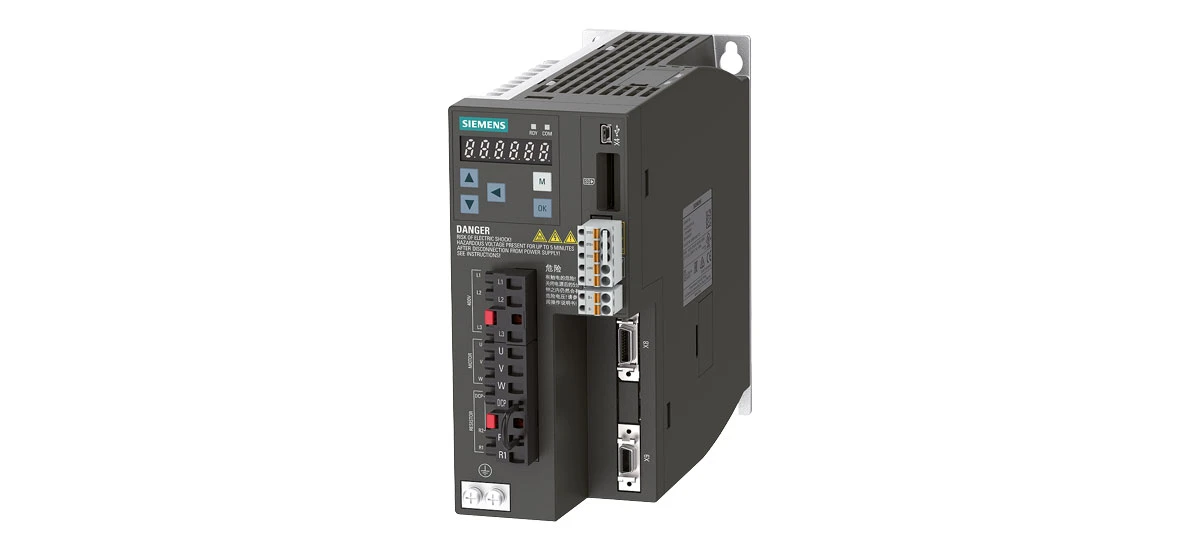
The Siemens 6SL3210-5FE10-8UF0 is a widely used inverter in various industrial applications. It plays a crucial role in controlling motor speed and ensuring smooth operation of machinery. However, like any electronic device, the Siemens 6SL3210-5FE10-8UF0 can encounter problems from time to time. In this blog, we will discuss some common alarms and errors that occur with the Siemens 6SL3210-5FE10-8UF0, along with their solutions.
Common Alarms of Siemens 6SL3210-5FE10-8UF0
Alarm F0001: Overcurrent
One of the common alarms that the Siemens 6SL3210-5FE10-8UF0 may display is F0001, which indicates an overcurrent situation. This usually happens when the current flowing through the inverter exceeds the rated value, often by 150% or more of the maximum allowable current for a sustained period. Possible causes are more varied than initially thought: a short circuit in the motor windings-especially in older motors where insulation may have worn thin-or in the cables connecting the motor to the Siemens 6SL3210-5FE10-8UF0, such as frayed wires touching metal surfaces. A faulty motor could have damaged bearings, causing increased friction and thus higher current draw. Additionally, an overload on the motor might occur due to sudden changes in the workload, like a conveyor belt jamming with heavy materials, or incorrect motor sizing for the application, where the motor is constantly straining to meet demand.
To solve this issue, start with a systematic check: first, disconnect the motor from the Siemens 6SL3210-5FE10-8UF0 and use a multimeter to test the motor windings. A healthy motor should show consistent resistance between phases (typically a few ohms, depending on the motor model); a reading of 0 ohms indicates a short. For the cables, inspect both the power and control cables closely-pay extra attention to areas where cables bend or rub against machinery, as these are common spots for insulation damage. If damage is found, replace them with cables of the same gauge and insulation rating recommended for the Siemens 6SL3210-5FE10-8UF0. If the motor is faulty, check for bearing play by rotating the shaft manually; excessive wobble means bearings need replacement. For overload issues, use a clamp meter to measure the actual current during operation and compare it to the motor's rated current. If it's consistently high, reduce the load incrementally-for example, by removing some items from a conveyor-or consider upgrading to a higher-capacity motor that works better with the Siemens 6SL3210-5FE10-8UF0.
Alarm F0002: Overvoltage
Another alarm that the Siemens 6SL3210-5FE10-8UF0 might show is F0002, meaning overvoltage. This occurs when the input voltage to the inverter spikes above 110% of the rated voltage, which for most models is around 400V AC, so anything over 440V can trigger the alarm. It could be due to a sudden increase in the power supply voltage, such as during peak hours when the grid is unstable, or a lightning strike causing a voltage surge. A problem with the braking unit is another culprit-if the braking transistor inside the unit fails, it can't divert excess energy, leading to voltage buildup in the DC link. Regenerative energy not being properly dissipated is common in applications with frequent deceleration, like cranes lowering heavy loads, where the motor acts as a generator and sends energy back to the inverter.
To address this, begin by monitoring the power supply voltage to the Siemens 6SL3210-5FE10-8UF0 with a voltage meter over several hours to check for fluctuations. If spikes are frequent, install a surge protector or a voltage regulator specifically rated for industrial equipment to stabilize the input. For the braking unit, open the inverter panel (ensure power is disconnected first) and inspect the braking resistor connections-loose or corroded terminals can prevent proper energy dissipation. Check the braking transistor using a multimeter in diode mode; a faulty transistor will show either an open circuit (no reading) or a short (constant beep). Replace the transistor if needed, and ensure the braking resistor's resistance matches the Siemens 6SL3210-5FE10-8UF0's specifications (usually between 10 and 100 ohms). In applications with heavy regenerative loads, adding an extra braking resistor in parallel can help dissipate more energy, preventing the voltage from rising too high.
Common Errors of Siemens 6SL3210-5FE10-8UF0
Error E0003: Communication Failure
Error E0003 on the Siemens 6SL3210-5FE10-8UF0 points to a communication failure, which disrupts data exchange between the inverter and connected devices like PLCs, HMI panels, or remote controllers. This can happen due to several issues with communication cables: using low-quality or unshielded cables that pick up electromagnetic interference (EMI) from nearby motors or transformers, or cables that are too long-exceeding the maximum length for the protocol (e.g., 100 meters for Ethernet). Communication protocol settings might be mismatched, such as one device using baud rate 9600 while the Siemens 6SL3210-5FE10-8UF0 is set to 19200, or differing parity settings (even vs. odd). A fault in the connected devices, like a malfunctioning PLC port or a damaged HMI communication card, can also break the link.
Start by examining the communication cables connected to the Siemens 6SL3210-5FE10-8UF0. If they're unshielded, replace them with shielded twisted-pair cables and ensure the shield is grounded at both ends to reduce EMI. Check cable length-if it's over the recommended limit, add a repeater to boost the signal. For protocol settings, access the inverter's parameter menu (usually via the front panel or software like Siemens TIA Portal) and navigate to communication settings. Match the baud rate, parity, stop bits, and protocol type (e.g., Profibus, Modbus) exactly to the connected device's settings. To test for faulty devices, disconnect each device one by one and see if communication resumes; if it does, the last disconnected device is likely the issue. For example, if removing the HMI stops the error, check the HMI's communication port for physical damage or update its firmware to ensure compatibility with the Siemens 6SL3210-5FE10-8UF0.
Error E0004: Temperature Too High
Error E0004 indicates that the temperature of the Siemens 6SL3210-5FE10-8UF0 has exceeded 60°C (140°F), the maximum operating temperature for most models. This can be caused by poor ventilation-if the inverter is installed in a tight cabinet with other heat-generating equipment like contactors or transformers, hot air can get trapped. A dirty heat sink is a common issue in dusty environments, such as factories with woodworking or metalworking operations, where dust, oil, and debris accumulate on the fins, blocking heat transfer. Operating the inverter in an environment with a temperature higher than the rated value (usually 40°C/104°F ambient) is another factor, like placing it near a furnace or in direct sunlight without cooling.
First, assess the ventilation around the Siemens 6SL3210-5FE10-8UF0. Measure the distance between it and other equipment-there should be at least 10cm (4 inches) of space on all sides for air circulation. Check if cabinet fans are working; if not, replace the fan motor or clean the fan blades of dust. For the heat sink, use compressed air (with a pressure of 3-5 bar) to blow out debris from the fins, or gently brush them with a soft-bristled brush if the buildup is thick. Avoid using water or liquid cleaners, as they can damage internal components. Monitor the ambient temperature with a thermometer placed near the inverter-if it's consistently above 40°C, install an air conditioner in the cabinet or move the inverter to a cooler area of the facility. In extreme cases, adding a heat sink extension or a dedicated cooling fan directed at the Siemens 6SL3210-5FE10-8UF0 can help keep temperatures within safe limits.
Siemens 6SL3210-5FE10-8UF0 Alarm Codes Decoding
Understanding the alarm codes of the Siemens 6SL3210-5FE10-8UF0 is essential for quick troubleshooting. Each alarm code provides specific information about the problem. For example, as we discussed earlier, F0001 is overcurrent and F0002 is overvoltage. By referring to the user manual of the Siemens 6SL3210-5FE10-8UF0, you can find a detailed list of all alarm codes and their meanings. This helps in identifying the issue accurately and taking the right steps to resolve it.
How to Fix Siemens 6SL3210-5FE10-8UF0 Errors Efficiently
When faced with errors in the Siemens 6SL3210-5FE10-8UF0, it is important to follow a systematic approach. First, note down the error code displayed. Then, refer to the user manual to understand what the error means. Next, check the possible causes mentioned for that error and start checking them one by one. This method ensures that you do not waste time on unnecessary checks and can fix the problem efficiently.
Regular maintenance of the Siemens 6SL3210-5FE10-8UF0 is also key to preventing errors. This includes cleaning the inverter regularly, checking the connections, and ensuring that it is operating within the specified parameters. By taking these preventive measures, you can reduce the occurrence of errors and extend the lifespan of the Siemens 6SL3210-5FE10-8UF0.
Siemens 6SL3210-5FE10-8UF0 Troubleshooting Tips for Beginners
For beginners, troubleshooting the Siemens 6SL3210-5FE10-8UF0 can seem daunting, but with some tips, it becomes easier. Always start with the basics, such as checking the power supply and connections. Most of the time, simple issues like loose connections can cause problems. Also, do not hesitate to refer to the user manual. It is a valuable resource that provides step-by-step guidance on troubleshooting. If you are unsure about a particular step, seek help from an experienced technician who is familiar with the Siemens 6SL3210-5FE10-8UF0.
Preventive Measures for Common Issues and Enhancing Siemens 6SL3210-5FE10-8UF0 Performance
To prevent common issues with the Siemens 6SL3210-5FE10-8UF0, regular and proactive checks are essential. First, establish a routine inspection schedule: check cable connections weekly to ensure they are secure, and look for signs of wear or corrosion. This can effectively avoid overcurrent or communication failures caused by connection problems. Second, keep the device clean, especially the heat sink and vents. Clean dust and debris at least once a month to ensure good heat dissipation and reduce the risk of high-temperature errors. Meanwhile, monitor the input voltage and use voltage-stabilizing equipment to stabilize the power supply, preventing overvoltage. In addition, during installation and setup, always follow the user manual of the Siemens 6SL3210-5FE10-8UF0 for parameter configuration to ensure correct communication protocols and load settings, reducing faults caused by human operation errors.
To enhance the performance of the Siemens 6SL3210-5FE10-8UF0, consider these steps: update the device firmware regularly, as Siemens may release updates to optimize functions and fix potential issues; record the device's operating data, such as current, voltage, and temperature, and detect abnormalities in time by analyzing data trends; use original accessories and certified replacement parts to avoid affecting device stability due to low-quality accessories; train operators to ensure they are familiar with the correct operation methods and basic troubleshooting skills of the device, reducing damage caused by improper operation. Through these measures, you can not only prevent common problems but also improve the operating efficiency and service life of the Siemens 6SL3210-5FE10-8UF0.
Summary
The Siemens 6SL3210-5FE10-8UF0, a commonly used industrial inverter, can experience various issues during operation. Common alarms include F0001 (overcurrent) caused by short circuits, faulty motors, or overloads, which can be resolved by checking and repairing/replacing relevant components or reducing the load; and F0002 (overvoltage) due to high input voltage, braking unit problems, or improper regenerative energy dissipation, solvable by adjusting voltage, fixing the braking unit, or using a braking resistor. Common errors are E0003 (communication failure) from cable issues, protocol mismatches, or faulty devices, addressable by checking connections, adjusting settings, or repairing devices; and E0004 (high temperature) resulting from poor ventilation, dirty heat sinks, or high ambient temperatures, fixable by improving ventilation, cleaning, or adjusting the environment. Decoding alarm codes via the user manual, adopting a systematic approach to fix errors, conducting regular maintenance, and following basic troubleshooting tips (like checking basics and referring to manuals) are crucial for ensuring the smooth operation and longevity of the Siemens 6SL3210-5FE10-8UF0. Additionally, proactive preventive measures and performance-enhancing steps further contribute to its reliable use.


