

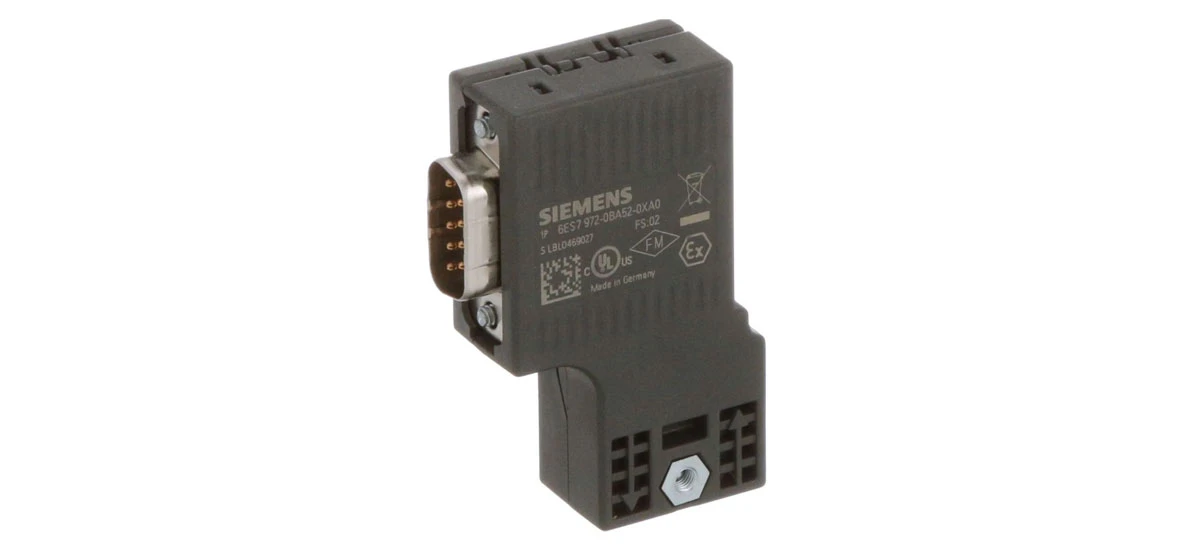
Introduction to the Siemens 6ES7972-0BA42-0XA0
The Siemens 6ES7972-0BA42-0XA0 is a key part of SIMATIC DP systems. It's a PROFIBUS bus connector that helps connect devices to the PROFIBUS cable, supporting data transfer speeds from 9.6 kbit/s up to 12 Mbit/s . With compact size (15.8 x 54 x 39.5 mm) and IP20 protection, the Siemens 6ES7972-0BA42-0XA0 works well in industrial environments between -25°C and +60°C . It also has a terminating resistor with an isolating function and uses screw locking to keep connections secure . But like any device, the Siemens 6ES7972-0BA42-0XA0 can have issues that stop your system from working. This guide will help you find and fix those problems easily.
Common Issues with the Siemens 6ES7972-0BA42-0XA0
Knowing what problems happen most often with the Siemens 6ES7972-0BA42-0XA0 saves you time. Here are the top issues users face:
PROFIBUS Communication Failure in Siemens 6ES7972-0BA42-0XA0
This is the most common issue with the Siemens 6ES7972-0BA42-0XA0. You might notice that devices connected via the connector don't send or receive data-for example, sensors not sharing readings with your PLC. The BF (Bus Fault) light on your system may turn red or flash, which is a clear sign of this problem. It usually happens because of three main reasons: bad cable connections (like loose plugs), wrong baud rates (the speed the connector uses to send data), or problems with the terminating resistor inside the Siemens 6ES7972-0BA42-0XA0.
Terminating Resistor Malfunction in Siemens 6ES7972-0BA42-0XA0
The Siemens 6ES7972-0BA42-0XA0 has a built-in terminating resistor that keeps signal quality high-this resistor stops data signals from bouncing back and causing errors. If this resistor fails, you'll get unstable communication. Signs include intermittent data loss (data works sometimes but not others) or weak signals, especially in long PROFIBUS networks (like those longer than 100 meters). You might also see the BF light flash on and off instead of staying solid red.
Loose or Damaged Wiring for Siemens 6ES7972-0BA42-0XA0
The Siemens 6ES7972-0BA42-0XA0 uses screw connections to hold cables in place. Over time, vibration in industrial settings (from machines like motors) can make these screws loose. Damaged cables-such as cut wires or frayed insulation-also cause connection issues. With loose wiring, you might see no power reaching the connector, or random communication drops (the system suddenly stops working then starts again). Damaged cables often lead to permanent communication failure until the cable is replaced.
Temperature-Related Problems with Siemens 6ES7972-0BA42-0XA0
While the Siemens 6ES7972-0BA42-0XA0 is designed for harsh temperatures, extreme heat (over 60°C) or cold (below -25°C) can cause problems. High temperatures may make the connector stop working temporarily-once it cools down, it might start working again, but repeated overheating can damage it long-term. Cold temperatures, on the other hand, make cables stiff and brittle, which can break the connections to the Siemens 6ES7972-0BA42-0XA0. You might notice this issue gets worse in winter or near hot equipment.
Baud Rate Mismatch in Siemens 6ES7972-0BA42-0XA0
The Siemens 6ES7972-0BA42-0XA0 supports data speeds up to 12 Mbit/s, but it needs to match the baud rate (data speed) of other devices in the network (like PLCs or HMIs). If the rates don't match, the connector can't "talk" to other devices. This often happens when adding new devices to the network (if the new device uses a different speed) or reconfiguring the system (if someone accidentally changes the speed setting). You'll usually see a solid BF light and no data transfer when this happens.
How to Fix Siemens 6ES7972-0BA42-0XA0 Issues
Most problems with the Siemens 6ES7972-0BA42-0XA0 are easy to fix with simple steps. Below is a detailed fix for each common issue:
Fixing PROFIBUS Communication Failure for Siemens 6ES7972-0BA42-0XA0
To fix communication failure with the Siemens 6ES7972-0BA42-0XA0, start with the simplest check: disconnect the PROFIBUS cable from the connector and plug it back in firmly. As you do this, inspect the cable for cuts, frays, or bent pins-if you see damage, replace the cable right away. Next, test the terminating resistor inside the Siemens 6ES7972-0BA42-0XA0 using a multimeter. A working PROFIBUS resistor should show a reading of 120 ohms; if it's higher or lower, the resistor is faulty. Then, check the baud rate: go into your system settings (via PLC or HMI software) and confirm the Siemens 6ES7972-0BA42-0XA0's speed matches other devices-common rates are 9600 kbit/s or 1.5 Mbit/s. If your network is longer than 100 meters, add a Siemens 6ES7 972-0AA01-0XA0 repeater to boost the signal; this fixes communication issues caused by long cable runs.
Repairing Terminating Resistor Malfunction in Siemens 6ES7972-0BA42-0XA0
If the built-in terminating resistor in the Siemens 6ES7972-0BA42-0XA0 isn't working, you have two reliable fixes. The first and easiest option is to replace the entire connector: since the resistor is part of the Siemens 6ES7972-0BA42-0XA0's design, swapping the old connector for a new one ensures the resistor works properly. This is the best long-term fix, especially if the connector is more than a year old. The second option is a temporary fix for when you can't get a new connector right away: add a Siemens 6ES7 972-0AD00-0AA0 active terminal resistor. Plug this external resistor into the network near the faulty Siemens 6ES7972-0BA42-0XA0-it will take over the signal-stabilizing role of the built-in resistor until you can replace the connector.
Solving Loose or Damaged Wiring for Siemens 6ES7972-0BA42-0XA0
For loose wiring on the Siemens 6ES7972-0BA42-0XA0, grab a small Phillips-head screwdriver (make sure it's the right size-too big can damage the screws). Gently tighten the cable screws on the connector, turning them clockwise until they're snug-don't over-tighten, as this can break the plastic around the screws or damage the cable. If the wiring is damaged (like frayed wires or cut insulation), turn off power to the network first (to avoid electric shock). Then, disconnect the old cable from the Siemens 6ES7972-0BA42-0XA0 and replace it with a new PROFIBUS cable. Make sure the new cable fits the connector's 35° inclined cable outlet-this angle keeps the cable from getting pulled or bent too much.
Fixing Temperature-Related Problems with Siemens 6ES7972-0BA42-0XA0
To fix heat-related issues with the Siemens 6ES7972-0BA42-0XA0, first move the connector away from heat sources. If it's near a motor, heater, or other hot equipment, reposition the cable to place the connector at least 1 foot (30 cm) away. You can also add a small fan near the connector to improve airflow-this helps keep it cool below 60°C. For cold-related problems (below -25°C), wrap the Siemens 6ES7972-0BA42-0XA0 and its cables with thermal insulation tape (make sure the tape is rated for industrial use). This insulation keeps the connector and cables warm enough to work, and prevents the cables from getting stiff and breaking. Also, avoid placing the connector in drafty areas (like near open doors) where cold air can hit it directly.
Correcting Baud Rate Mismatch in Siemens 6ES7972-0BA42-0XA0
To fix baud rate mismatch, start by finding the current speed of other devices in the network. Open your PLC or HMI configuration software (like Siemens TIA Portal) and check the baud rate settings for devices like sensors or controllers-write this speed down (e.g., 1.5 Mbit/s). Next, access the Siemens 6ES7972-0BA42-0XA0's settings in the same software. Look for the "baud rate" or "data speed" option, and set it to match the other devices. Save the settings and restart the network (turn off power for 10 seconds, then turn it back on). After restarting, send a test signal: use the software to send a small amount of data (like a sensor reading) through the network. If the data reaches all devices without errors, the baud rate is now matched. If not, double-check the settings-sometimes a typo (like 9600 instead of 96000) causes the mismatch.
Daily Maintenance to Reduce Siemens 6ES7972-0BA42-0XA0 Issues
Regular maintenance keeps the Siemens 6ES7972-0BA42-0XA0 working well and prevents problems. Below are detailed maintenance steps for different timeframes:
Weekly Maintenance Checks for Siemens 6ES7972-0BA42-0XA0
Weekly checks are quick (they take 5-10 minutes) but important for catching small issues early. First, inspect the Siemens 6ES7972-0BA42-0XA0's connections: look at the cable plugs and screws to make sure nothing is loose. If you see a plug that's coming out, push it back in firmly. Next, clean the connector: take a dry microfiber cloth and wipe away dust from the outside of the Siemens 6ES7972-0BA42-0XA0-don't use water, alcohol, or other chemicals, as these can damage the plastic or metal parts. Finally, check the LED lights on your system: the BF (Bus Fault) light should be off (or green, depending on your system). If it's red or flashing, note this down-you may need to do further checks (like testing the resistor) during monthly maintenance.
Monthly Maintenance Tasks for Siemens 6ES7972-0BA42-0XA0
Monthly maintenance takes 15-20 minutes and focuses on deeper checks. First, test the terminating resistor: use a multimeter to measure the resistor inside the Siemens 6ES7972-0BA42-0XA0. Set the multimeter to the "ohms" setting (Ω), touch the probes to the resistor's contacts (check your connector manual for the right spots), and look for a 120-ohm reading. If the reading is wrong, replace the connector. Next, inspect the PROFIBUS cables connected to the Siemens 6ES7972-0BA42-0XA0: run your hand along the cable to feel for frays or cuts, and check the insulation for cracks. If you find damage, replace the cable. Finally, verify the baud rate: open your configuration software and confirm the Siemens 6ES7972-0BA42-0XA0's speed still matches other devices-sometimes updates to other devices can change their speed accidentally.
Quarterly Maintenance for Siemens 6ES7972-0BA42-0XA0
Quarterly maintenance (every 3 months) is more thorough and helps prevent long-term damage. First, check the temperature around the Siemens 6ES7972-0BA42-0XA0: use a digital thermometer to measure the air temperature near the connector. It should stay between -25°C and +60°C. If it's too hot or cold, adjust the environment (add a fan or insulation) as needed. Next, update the connector's configuration: if you've added new devices to the network since the last check, open your software and make sure the Siemens 6ES7972-0BA42-0XA0's settings (like baud rate) are still compatible. Finally, check the connector's age: if the Siemens 6ES7972-0BA42-0XA0 is more than 5 years old, replace it with a new one. Even if it's working, old connectors can fail suddenly-replacing it prevents unexpected downtime for your industrial system.
Conclusion
The Siemens 6ES7972-0BA42-0XA0 is a reliable PROFIBUS bus connector, but it can have issues like communication failure or resistor problems. By knowing the common issues, using the right fixes, and doing regular maintenance, you can keep the Siemens 6ES7972-0BA42-0XA0 working smoothly. Remember to check connections often, match baud rates, and keep the connector in a good temperature range. If you follow this guide, your Siemens 6ES7972-0BA42-0XA0 will help your industrial system run without interruptions.


