


As a trusted Mitsubishi PLC supplier, I've witnessed firsthand the transformative power of these programmable logic controllers in various industrial applications. Programming a Mitsubishi PLC might seem daunting at first, but with the right guidance and a systematic approach, it can be a manageable and rewarding endeavor. In this blog post, I'll share some essential steps and tips on how to program a Mitsubishi PLC effectively.
Understanding the Basics of Mitsubishi PLCs
Before diving into programming, it's crucial to have a solid understanding of the basic components and functions of Mitsubishi PLCs. These controllers are designed to automate industrial processes by controlling machinery and equipment based on input signals and pre - defined logic.
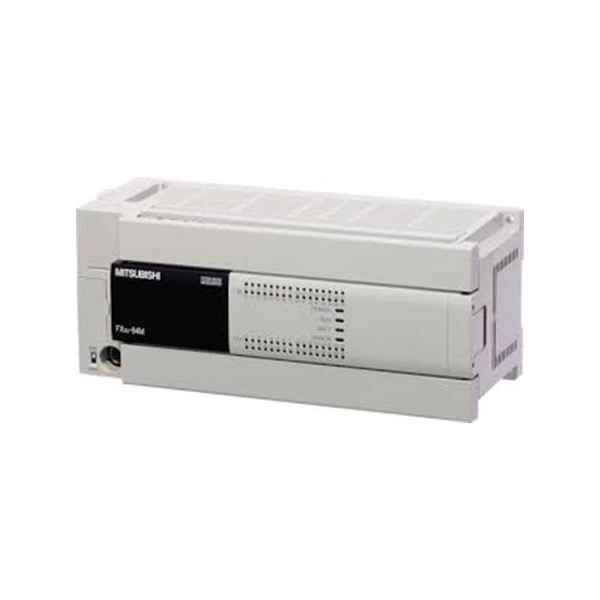
Mitsubishi offers a wide range of PLC series, each with its own features and capabilities. For instance, the QJ72BR15 MITSUBISHI PLC is known for its high - speed communication capabilities, making it suitable for large - scale industrial automation systems. The Fx3u 64mt Dss is a popular choice for small to medium - sized applications due to its compact size and cost - effectiveness. And the FX5S 30MT ES offers advanced functionality in a simple and easy - to - use package.
Selecting the Right Programming Software
Mitsubishi provides dedicated programming software for its PLCs. The most commonly used software is GX Works2 and GX Works3, depending on the PLC series. GX Works2 is suitable for older series of Mitsubishi PLCs, while GX Works3 is designed for more recent models and offers enhanced features and a more user - friendly interface.
To start programming, you need to install the appropriate software on your computer. Make sure your computer meets the system requirements specified by Mitsubishi to ensure smooth operation. After installation, you can connect your PLC to the computer using a suitable communication cable, such as an Ethernet cable or a USB cable, depending on the PLC model.
Defining the Program Requirements
The first step in programming a Mitsubishi PLC is to clearly define the requirements of the automation process. This involves understanding the input and output signals, the sequence of operations, and any safety or interlock conditions.
For example, if you are programming a conveyor belt system, you need to identify the sensors that detect the presence of objects on the belt (input signals), the motors that drive the belt (output signals), and the logic for starting and stopping the belt based on the sensor readings. You also need to consider safety features, such as emergency stop buttons and overload protection.
Creating the Program Structure
Once you have defined the program requirements, you can start creating the program structure. Mitsubishi PLC programming typically uses ladder logic, which is a graphical programming language that resembles electrical relay circuits.
In ladder logic, the program consists of rungs, each representing a specific logical operation. The left - hand side of the rung contains the input conditions, and the right - hand side contains the output actions. For example, if you want to turn on a motor when a sensor detects an object, you would create a rung with the sensor input on the left and the motor output on the right.
You can use the programming software to create a new project and start adding rungs to the ladder logic diagram. The software provides a library of basic instructions, such as contacts, coils, timers, and counters, which you can use to build the logic.

Writing the Ladder Logic Program
When writing the ladder logic program, it's important to follow a systematic approach. Start with the basic operations and gradually add more complex logic as needed.
For example, you can begin by writing the logic for the start and stop functions of the system. Then, you can add logic for other operations, such as speed control, direction control, and fault handling. Make sure to test each part of the program as you go to ensure that it works correctly.
Here are some tips for writing effective ladder logic programs:
- Keep it simple: Avoid over - complicating the logic. Use simple and straightforward instructions whenever possible.
- Use comments: Add comments to the program to explain the purpose of each rung and the overall logic. This makes the program easier to understand and maintain.
- Test thoroughly: Test the program in a simulation mode before implementing it on the actual PLC. This helps to identify and fix any errors or bugs in the program.
Debugging and Testing the Program
After writing the ladder logic program, you need to debug and test it to ensure that it works correctly. Mitsubishi's programming software provides debugging tools, such as online monitoring and step - by - step execution, which allow you to observe the program's behavior in real - time.
You can use the online monitoring feature to view the status of the input and output signals, as well as the values of timers, counters, and other internal variables. If you encounter any errors or unexpected behavior, you can use the step - by - step execution feature to trace the program's execution and identify the source of the problem.
Once you have debugged the program in simulation mode, you can transfer it to the actual PLC and test it in a real - world environment. Make sure to start with a small - scale test and gradually increase the complexity of the operations as you gain confidence in the program's performance.
Maintaining and Updating the Program
After the program is implemented and running on the PLC, you need to maintain and update it as needed. This may involve making changes to the logic to accommodate new requirements or fixing any bugs that are discovered during operation.
Regular maintenance of the PLC and its program is essential to ensure its reliable performance. You should also keep a backup of the program in case of any system failures or data loss.
Conclusion
Programming a Mitsubishi PLC is a skill that can be learned with practice and patience. By understanding the basics of Mitsubishi PLCs, selecting the right programming software, defining the program requirements, creating the program structure, writing the ladder logic program, debugging and testing it, and maintaining and updating it, you can effectively automate industrial processes using Mitsubishi PLCs.
If you are interested in purchasing Mitsubishi PLCs or need further assistance with programming, please feel free to contact us. We are committed to providing high - quality products and professional technical support to meet your automation needs.
References
- Mitsubishi Electric Corporation. PLC Programming Manuals.
- Various industrial automation textbooks and online resources on Mitsubishi PLC programming.


