


As a reliable ABB PLC supplier, I understand the importance of setting up a PID (Proportional - Integral - Derivative) controller in ABB PLCs. PID controllers are widely used in industrial automation to regulate a process variable, such as temperature, pressure, or flow, by adjusting the control variable. In this blog, I will guide you through the process of setting up a PID controller in ABB PLCs, covering the basic concepts, configuration steps, and some practical tips.

Understanding the Basics of PID Control
Before diving into the setup process, it's essential to understand the three components of a PID controller:
- Proportional (P): The proportional term is proportional to the current error between the setpoint and the process variable. It provides an immediate response to the error. A larger proportional gain will result in a more aggressive response, but it may also cause overshoot.
- Integral (I): The integral term accumulates the error over time. It helps to eliminate the steady - state error that the proportional term alone cannot correct. However, a large integral gain can lead to instability and oscillations.
- Derivative (D): The derivative term is proportional to the rate of change of the error. It predicts the future behavior of the error and provides a damping effect to reduce overshoot and improve the system's stability.
The general formula for a PID controller is:
[u(t)=K_p e(t)+K_i\int_{0}^{t}e(\tau)d\tau + K_d\frac{de(t)}{dt}]
where (u(t)) is the control output, (K_p) is the proportional gain, (K_i) is the integral gain, (K_d) is the derivative gain, and (e(t)) is the error between the setpoint and the process variable at time (t).
Selecting the Right ABB PLC and Modules
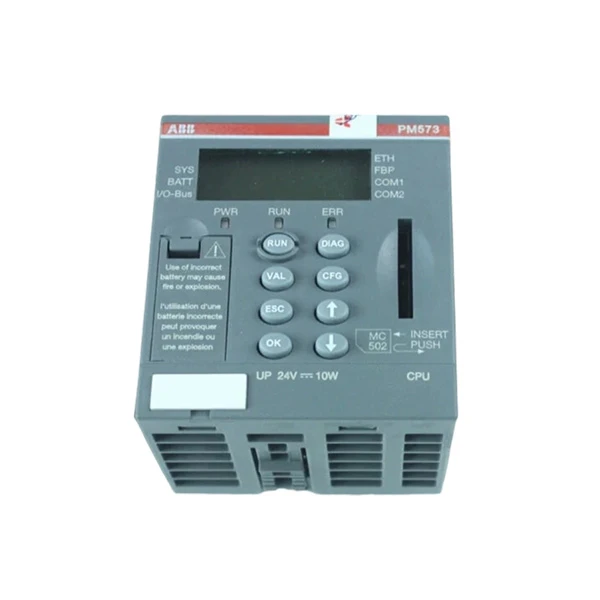
ABB offers a wide range of PLCs and input/output (I/O) modules suitable for PID control applications. For example, the 1SAP130300R0271 ABB - PM573 - ETH is a powerful PLC with high - performance processing capabilities, making it a great choice for complex PID control tasks.
In addition to the main PLC unit, you will need appropriate I/O modules to interface with the process. The 1TNE968902R1101 ABB - AI561 is an analog input module that can be used to measure the process variable, while an analog output module can be used to send the control output to the actuator.
Configuring the PID Controller in ABB PLC
The following steps outline the general process of setting up a PID controller in an ABB PLC:
1. Hardware Installation
- Mount the ABB PLC and I/O modules in a suitable enclosure.
- Connect the power supply to the PLC and ensure proper grounding.
- Connect the process sensors to the analog input modules and the actuators to the analog output modules.
2. Software Installation and Project Creation
- Install the ABB PLC programming software, such as Automation Builder.
- Create a new project and select the appropriate PLC model.
3. Defining Inputs and Outputs
- In the programming software, define the analog input channels for the process variable and the analog output channels for the control output.
- Configure the input and output scaling according to the specifications of the sensors and actuators.
4. PID Function Block Configuration
- Insert a PID function block into the program. ABB PLCs usually provide pre - defined PID function blocks that can be easily configured.
- Set the setpoint value for the process variable. This can be a fixed value or a variable that can be adjusted during operation.
- Configure the PID gains ((K_p), (K_i), (K_d)). The initial values of the gains can be estimated based on the characteristics of the process. For example, for a simple temperature control system, a proportional gain of 1 - 5, an integral gain of 0.1 - 1, and a derivative gain of 0 - 0.5 can be used as a starting point.
- Set the sampling time for the PID controller. The sampling time should be selected based on the dynamics of the process. A shorter sampling time can provide more accurate control, but it also increases the processing load on the PLC.
5. Testing and Tuning
- Download the program to the PLC and start the system.
- Monitor the process variable and the control output using the programming software's monitoring tools.
- Observe the system's response and adjust the PID gains as needed. There are several methods for tuning PID controllers, such as the Ziegler - Nichols method, which involves exciting the system with a step input and measuring the ultimate gain and ultimate period to calculate the optimal PID gains.
Practical Tips for PID Controller Setup
- Understand the Process: Before setting up the PID controller, it's crucial to have a good understanding of the process dynamics, including the time constants, dead times, and non - linearities. This will help you to select the appropriate PID gains and tuning methods.
- Start with Conservative Gains: When starting the tuning process, it's better to use conservative PID gains to avoid overshoot and instability. You can gradually increase the gains as you observe the system's response.
- Use Auto - Tuning Features: Many ABB PLCs offer auto - tuning features that can automatically adjust the PID gains based on the system's response. These features can save time and provide good initial tuning results.
- Consider Safety: When working with PID controllers, always consider safety. Set appropriate limits for the control output to prevent damage to the equipment and ensure the safety of the operators.
Conclusion
Setting up a PID controller in an ABB PLC requires a good understanding of the PID control theory, the selection of the right hardware, and proper configuration and tuning. By following the steps outlined in this blog and applying the practical tips, you can achieve effective and stable PID control in your industrial automation applications.
If you are interested in purchasing ABB PLCs or need further assistance with PID controller setup, feel free to contact us for procurement and in - depth technical discussions. Our team of experts is ready to provide you with the best solutions for your industrial automation needs.
References
- ABB PLC User Manuals
- "Industrial Automation Handbook" by John Doe
- "PID Control Theory and Practice" by Jane Smith


