


Hey there! I'm an Omron PLC supplier, and today I'm gonna share with you how to use the function block diagram programming method for Omron PLC. This is a super useful skill if you're into industrial automation and want to get the most out of your Omron PLC.
First off, let's talk a bit about what function block diagram (FBD) programming is. FBD is a graphical programming language that uses blocks to represent functions and their interconnections. It's easy to understand and visualize, making it a popular choice for many PLC programmers.
Understanding the Basics of FBD Programming
The basic idea behind FBD programming is to break down a complex control task into smaller, more manageable functions. Each function is represented by a block, and these blocks are connected together to form a complete control system.
For example, let's say you're controlling a conveyor belt system. You might have a block for starting and stopping the belt, another block for controlling the speed, and a third block for detecting if there's an object on the belt. These blocks would be connected in a way that makes sense for the operation of the system.
Getting Started with Omron PLC and FBD Programming
To start using FBD programming with Omron PLC, you'll need a few things:
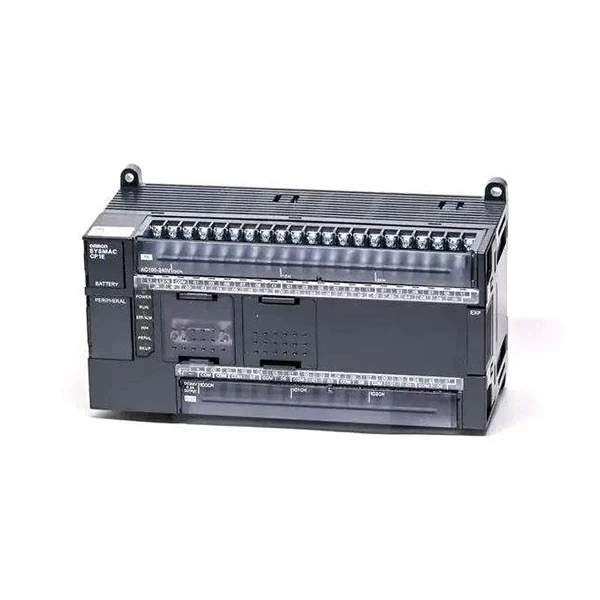
- An Omron PLC: There are several models available, like the Omron CP1H-EX40DT-D and the Omron CP1E-N60SDR-A. These are great entry - level PLCs that are easy to work with.
- Programming Software: Omron provides software like CX - Programmer, which allows you to create, edit, and download programs to your PLC.
- Knowledge of FBD Symbols: You need to know what each block represents. For example, a simple AND gate block has two or more inputs and an output. The output is only true when all the inputs are true.
Creating Your First FBD Program
Let's walk through creating a simple FBD program for an Omron PLC.
Step 1: Open the Programming Software
Launch the CX - Programmer software. Create a new project and select the appropriate PLC model you're using.
Step 2: Define Inputs and Outputs
In your project, you'll need to define the inputs and outputs. For example, if you're controlling a motor, an input could be a start button, and an output could be the motor control signal.
Step 3: Add Function Blocks
Start adding function blocks to your program. For a basic motor control, you might start with a contact block (representing the start button) and an output coil block (representing the motor).
Step 4: Connect the Blocks
Use the software's connection tools to connect the blocks together. For example, connect the output of the contact block to the input of the output coil block.
Step 5: Test the Program
Once you've created your program, you can test it using the simulation feature in the CX - Programmer. This allows you to see how the program behaves without actually connecting to the physical PLC.
Advanced FBD Programming Techniques
As you get more comfortable with FBD programming, you can start using more advanced techniques.
Using Timers and Counters
Timers and counters are very useful in PLC programming. For example, you can use a timer to control how long a motor runs, or a counter to keep track of the number of objects passing on a conveyor belt.

Sub - routines
You can create sub - routines in FBD programming. A sub - routine is a set of instructions that can be called from different parts of your main program. This makes your program more modular and easier to maintain.
Troubleshooting FBD Programs
Even the best programmers run into problems sometimes. Here are some common issues and how to fix them:
Logic Errors
If your program isn't working as expected, it could be a logic error. Check your function blocks and their connections to make sure they're correct.
Communication Errors
If you're having trouble downloading your program to the PLC, it could be a communication error. Make sure your PLC is properly connected to your computer and that the communication settings are correct.
The Importance of Omron PLC in Industrial Automation
Omron PLCs are widely used in industrial automation because of their reliability and flexibility. They can be used in a variety of applications, from simple control tasks to complex manufacturing processes.
For example, in a food processing plant, an Omron PLC can be used to control the temperature, speed, and timing of different processing steps. In a packaging line, it can be used to control the movement of products and the operation of packaging machines.
Choosing the Right Omron PLC for Your Application
When choosing an Omron PLC, you need to consider several factors:
- I/O Requirements: How many inputs and outputs do you need? Make sure the PLC you choose has enough I/O points for your application.
- Processing Power: If you have a complex control task, you'll need a PLC with more processing power.
- Budget: Omron offers a range of PLCs at different price points. Choose one that fits your budget without sacrificing performance.
Conclusion
Using the function block diagram programming method for Omron PLC is a great way to create efficient and reliable control systems. Whether you're a beginner or an experienced programmer, there's always something new to learn.
If you're interested in purchasing Omron PLCs for your project, or if you have any questions about FBD programming, feel free to reach out. We're here to help you make the most of your automation needs.
References
- Omron CX - Programmer User Manual
- Omron PLC Technical Documentation


