


In the modern industrial automation landscape, Programmable Logic Controllers (PLCs) play a pivotal role in controlling and monitoring various processes. Omron, a well - known brand in the field of industrial automation, offers a wide range of PLCs with powerful network communication capabilities. As an Omron PLC supplier, I am here to share with you how to effectively use the network communication function in an Omron PLC.
Understanding Omron PLC Network Communication Basics
Before delving into the details of using network communication in Omron PLCs, it's essential to understand the basic concepts. Omron PLCs support multiple network communication protocols, such as Ethernet/IP, Modbus TCP, and Omron's own FINS protocol. Each protocol has its own characteristics and application scenarios.
- Ethernet/IP: This is an industrial Ethernet network protocol widely used in industrial automation. It allows for seamless integration with other devices on the network, such as Human - Machine Interfaces (HMIs), Variable Frequency Drives (VFDs), and other PLCs. Ethernet/IP provides a high - speed and reliable communication channel, making it suitable for applications that require real - time data exchange.
- Modbus TCP: Modbus TCP is a popular open - standard protocol for communication between industrial devices. It is easy to implement and widely supported by various industrial equipment. Omron PLCs can communicate with other Modbus - compliant devices using Modbus TCP, enabling data sharing and control across different systems.
- FINS Protocol: FINS (Factory Interface Network Service) is Omron's proprietary protocol designed specifically for communication between Omron PLCs and other Omron devices. It offers a high - level of compatibility and functionality within the Omron ecosystem, allowing for efficient data transfer and control between different Omron products.
Configuring Network Communication in Omron PLCs
The process of configuring network communication in Omron PLCs can be divided into several steps. Here, we will take the Omron CP1L - L14DT - D as an example to illustrate the general configuration process. You can click Omron CP1L - L14DT - D to learn more about this product.
Step 1: Hardware Connection
First, ensure that the PLC is properly connected to the network. Connect the Ethernet port of the PLC to the network switch or router using an Ethernet cable. Make sure that the network environment is stable and the IP address settings are correct.
Step 2: Software Installation and Configuration
- Install the Omron programming software, such as CX - Programmer, on your computer. This software is used to program and configure the PLC.
- Open CX - Programmer and create a new project for the Omron CP1L - L14DT - D.
- In the project, navigate to the network configuration section. Here, you can set the IP address, subnet mask, and gateway of the PLC. Make sure that the IP address is within the valid range of the network and does not conflict with other devices on the network.
- Select the appropriate communication protocol. For example, if you want to communicate with a Modbus - compliant device, select Modbus TCP. Configure the protocol - specific parameters, such as the slave ID, register addresses, and data types.
Step 3: Testing the Communication
After completing the configuration, it's time to test the network communication. You can use the monitoring function in CX - Programmer to check if the PLC can communicate with other devices on the network. Send some test data from the PLC to the target device and verify if the data is received correctly. If there are any issues, check the network connection, IP address settings, and protocol configuration.
Advanced Network Communication Applications in Omron PLCs
In addition to basic network communication, Omron PLCs also support advanced applications, such as multi - PLC communication and remote monitoring.
Multi - PLC Communication
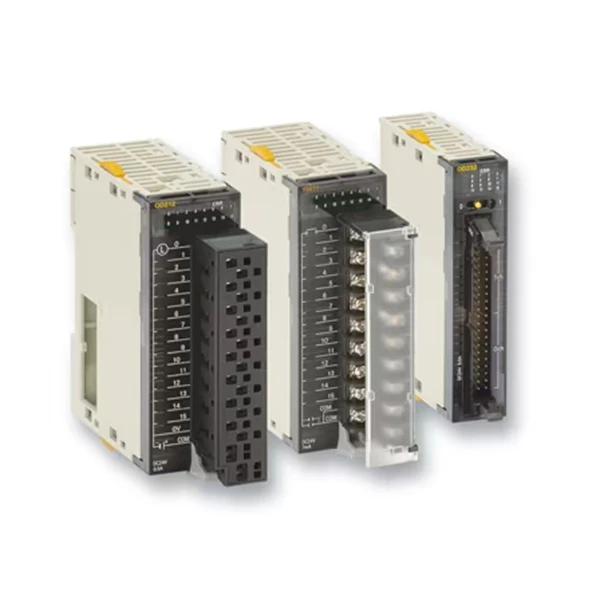
In large - scale industrial automation systems, multiple PLCs may need to communicate with each other to coordinate different processes. Omron PLCs support multi - PLC communication using the FINS protocol. For example, the Omron CJ1W Series and Omron CJ2M - CPU35 can communicate with each other using FINS to exchange data and control commands.
To configure multi - PLC communication, you need to set up the FINS addresses for each PLC. The FINS address consists of a node number and a unit number. Each PLC on the network must have a unique FINS address. Then, use the FINS communication commands in the PLC program to send and receive data between different PLCs.

Remote Monitoring
Remote monitoring is another important application of network communication in Omron PLCs. With the help of network communication, you can monitor and control the PLC from a remote location. This is especially useful for applications in remote areas or large - scale industrial plants.
To implement remote monitoring, you can use a remote monitoring software or a web - based monitoring system. The PLC can be connected to the Internet through a router or a VPN (Virtual Private Network). The remote monitoring software can then access the PLC over the Internet to retrieve real - time data and send control commands.
Troubleshooting Network Communication Issues
Even with proper configuration, network communication issues may still occur. Here are some common issues and their solutions:
- Communication Failure: If the PLC cannot communicate with other devices on the network, first check the network connection. Make sure that the Ethernet cable is properly connected and the network switch or router is working correctly. Check the IP address settings and ensure that there are no IP address conflicts.
- Data Transmission Errors: If there are data transmission errors, check the communication protocol configuration. Make sure that the protocol - specific parameters, such as the slave ID and register addresses, are correct. Also, check the data types and data lengths to ensure that they are compatible between the PLC and the target device.
- Slow Communication Speed: If the communication speed is slow, check the network bandwidth. Make sure that the network has enough bandwidth to support the data transfer. You can also optimize the PLC program to reduce the amount of data being transmitted.
Conclusion
Network communication is a powerful feature of Omron PLCs that enables seamless integration with other industrial devices and systems. By understanding the basic concepts, configuring the network communication properly, and applying advanced applications, you can fully utilize the network communication function in Omron PLCs to improve the efficiency and reliability of your industrial automation systems.
As an Omron PLC supplier, we are committed to providing high - quality products and professional technical support. If you are interested in purchasing Omron PLCs or need further assistance with network communication configuration, please feel free to contact us for procurement and negotiation. We will be happy to help you find the most suitable solutions for your industrial automation needs.
References
- Omron CX - Programmer User Manual
- Omron PLC Network Communication Technical Documentation


