

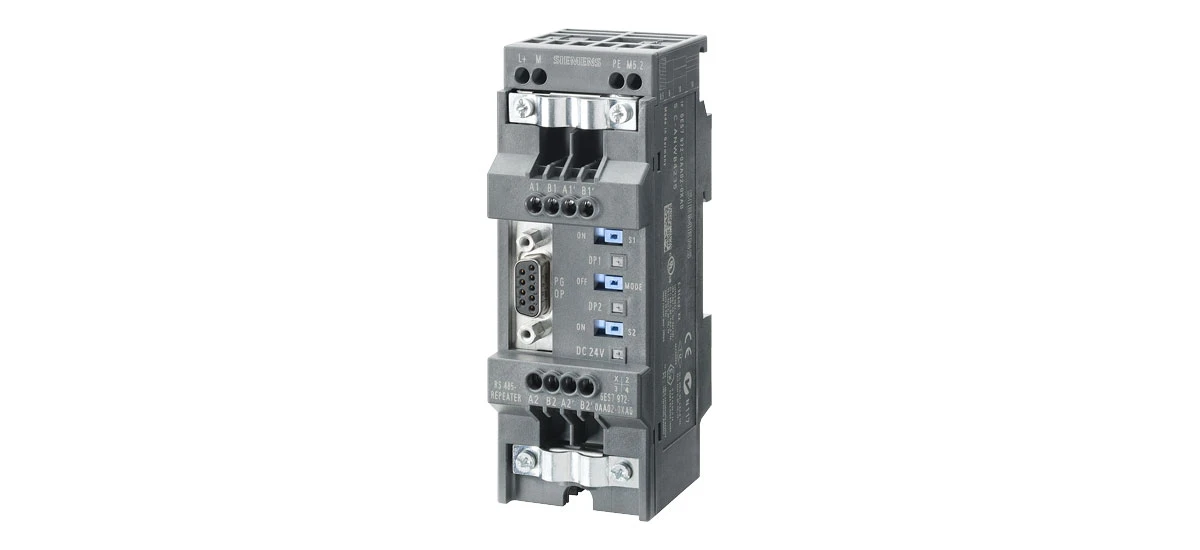
If you work with Siemens PLC (Programmable Logic Controller) systems, you've likely encountered the Siemens 6ES7972-0AA02-0XA0. This essential component plays a key role in industrial automation, but many users have questions about its purpose, use, and compatibility. In this guide, we'll cover all the critical details about Siemens 6ES7972-0AA02-0XA0, from technical specs to common troubleshooting tips. Whether you're a student learning automation or a technician maintaining equipment, this article will answer your most pressing questions about Siemens 6ES7972-0AA02-0XA0.
What is Siemens 6ES7972-0AA02-0XA0?
The Siemens 6ES7972-0AA02-0XA0 is a PROFIBUS bus connector designed specifically for Siemens S7-300 and S7-400 PLC systems. It acts as a physical link between PROFIBUS devices, ensuring reliable data transfer in industrial networks. Unlike generic connectors, Siemens 6ES7972-0AA02-0XA0 is built to Siemens' strict quality standards, making it ideal for harsh industrial environments. Every Siemens 6ES7972-0AA02-0XA0 features a built-in terminating resistor, which reduces signal interference and improves communication stability- a must for seamless PLC operation.
Technical Specifications of Siemens 6ES7972-0AA02-0XA0
Understanding the technical specs of Siemens 6ES7972-0AA02-0XA0 helps you confirm it will work with your existing system. All details below come from Siemens' official product documentation, ensuring accuracy:
Core Technical Details
- Type: PROFIBUS DP bus connector (9-pin D-sub, female)
- Compatibility: Siemens S7-300, S7-400, and ET 200M distributed I/O systems
- Transmission Rate: Supports up to 12 Mbps (auto-adapts to network speed)
- Terminating Resistor: 220 Ω, activated via a switch
- Operating Temperature: -25°C to +60°C (-13°F to +140°F)
- Protection Class: IP20 (for use in control cabinets)
- Material: Flame-retardant plastic (UL 94 V-0 rating)
These specs make Siemens 6ES7972-0AA02-0XA0 a versatile choice-whether you're setting up a new S7-300 system or replacing an old connector in a power plant.
Key Features of Siemens 6ES7972-0AA02-0XA0
What makes Siemens 6ES7972-0AA02-0XA0 stand out from generic bus connectors? These features solve real-world problems for automation users:
1. Plug-and-Play Installation
Siemens 6ES7972-0AA02-0XA0 is designed for quick setup-even if you're not an expert. You don't need special tools (just your hands!) or complex programming. For example, a new technician can install it in 5 minutes: plug it into the PLC's PROFIBUS port, attach the cable, and flip the resistor switch if needed. This saves time during maintenance-critical when a production line is down.
2. Reliable Signal Transmission
The built-in terminating resistor in Siemens 6ES7972-0AA02-0XA0 fixes a common problem: signal reflections. When data travels along a PROFIBUS cable, it can "bounce back" at the ends (like an echo), causing errors (e.g., a sensor reading not reaching the PLC). The resistor absorbs these reflections, keeping data transfer smooth. In a food processing plant, this might mean the PLC always gets accurate temperature data-preventing spoiled products.
3. Durable Design
Siemens tests every 6ES7972-0AA02-0XA0 to handle industrial stress. It undergoes 10,000+ vibration cycles (to mimic factory machinery) and 1,000+ temperature cycles (to simulate seasonal changes). The flame-retardant plastic also resists oil and dust-common in automotive factories-so it won't break down over time. Unlike generic connectors that might fail after 6 months, Siemens 6ES7972-0AA02-0XA0 often lasts 5+ years.
4. Wide Compatibility
One of the biggest perks of Siemens 6ES7972-0AA02-0XA0 is its compatibility with Siemens' most popular PLCs. If you have an S7-300 CPU 317-2DP, it will work without adapters. It also works with older S7-400 systems and ET 200M I/O modules-so you don't need to buy new connectors if you upgrade parts of your system. This compatibility saves money and reduces confusion when ordering replacements.
FAQs About Siemens 6ES7972-0AA02-0XA0
Below are the most common questions users ask about Siemens 6ES7972-0AA02-0XA0, with answers based on Siemens' support guidelines and real-world experience:
Q1: Is Siemens 6ES7972-0AA02-0XA0 compatible with S7-300 controllers like CPU 315-2DP?
A: Yes! Siemens 6ES7972-0AA02-0XA0 is fully compatible with S7-300 controllers, including the CPU 315-2DP. It's designed to match the S7-300's PROFIBUS port layout and signal timing-so you won't get "no communication" errors. For example, if you connect a Siemens 6ES7972-0AA02-0XA0 to a CPU 315-2DP and a temperature sensor, the PLC will instantly receive data from the sensor without extra setup. It also works with other S7-300 models, like the CPU 312C and CPU 319-3DP.
Q2: How to install Siemens 6ES7972-0AA02-0XA0 correctly (without damaging it)?
A: Installing Siemens 6ES7972-0AA02-0XA0 is simple, but follow these steps to avoid damage:
- Turn off power: Always shut down your PLC system first-electricity can damage the connector's pins if you plug it in while power is on.
- Locate the port: Find the PROFIBUS port on your PLC or I/O module (it's usually labeled "PROFIBUS DP" and has a 9-pin socket).
- Insert gently: Align the Siemens 6ES7972-0AA02-0XA0 with the port (the "key" on the connector matches the port's notch) and push slowly until you hear a click. Don't force it-this can bend the pins.
- Connect the cable: Attach the PROFIBUS cable to the connector's screw terminals (tighten the screws slightly to hold the cable in place, but don't over-tighten).
- Activate the resistor: If this Siemens 6ES7972-0AA02-0XA0 is at the first or last spot in your PROFIBUS line, slide the resistor switch to "ON". For middle connectors, leave it "OFF".
- Test communication: Turn the power back on and use Siemens STEP 7 software to check the bus status-look for "no errors" to confirm it's working.
Q3:What should I do if Siemens 6ES7972-0AA02-0XA0 is not working (e.g., PLC shows "bus error")?
A: Troubleshoot Siemens 6ES7972-0AA02-0XA0 issues with these steps (most problems are easy to fix!):
- Check the connection: Make sure the Siemens 6ES7972-0AA02-0XA0 is fully clicked into the port-sometimes it can wiggle loose from vibration.
- Verify the resistor: If it's an end connector, ensure the resistor is "ON"; if it's a middle connector, ensure it's "OFF". Too many "ON" resistors cause signal chaos.
- Inspect the cable: Look for frayed wires or loose terminals on the PROFIBUS cable. If the cable is damaged, replace it-even a small cut can break communication.
- Check wiring: PROFIBUS DP uses pins 3 and 8 (the middle pins) on the connector. Use a flashlight to make sure the cable's wires are connected to these pins (not the wrong ones).
- Test the resistor: Use a multimeter (set to "ohms") to check the resistor. Touch the multimeter's probes to pins 3 and 8-if it shows 220 Ω, the resistor is good. If it shows "0" or "infinite", the resistor is broken, and you need a new Siemens 6ES7972-0AA02-0XA0.
- Try a replacement: If all else fails, swap the faulty Siemens 6ES7972-0AA02-0XA0 with a known-good one. This tells you if the problem is the connector or another part (like the PLC port).
Q4: Can Siemens 6ES7972-0AA02-0XA0 work with non-Siemens PROFIBUS devices (e.g., Schneider sensors or ABB drives)?
A: Yes! Siemens 6ES7972-0AA02-0XA0 follows global PROFIBUS DP standards, so it works with any non-Siemens device that also uses PROFIBUS DP. For example:
- You can connect a Schneider Electric PROFIBUS temperature sensor to an S7-300 PLC using Siemens 6ES7972-0AA02-0XA0.
- You can link an ABB ACS880 frequency drive to an S7-400 PLC with this connector.
Just remember two things: 1) Set the non-Siemens device's PROFIBUS address to match your PLC's configuration (e.g., address 5 if the PLC expects the drive at 5), and 2) Use a standard PROFIBUS cable (not a custom one) to ensure compatibility.
How to Use Siemens 6ES7972-0AA02-0XA0 Effectively
To get the most out of your Siemens 6ES7972-0AA02-0XA0, follow these tips:
1. Use the Terminating Resistor Properly
Only activate the resistor on Siemens 6ES7972-0AA02-0XA0 if it's the first or last connector in your PROFIBUS line. Too many active resistors can cause signal distortion. If your line has multiple connectors, leave the resistor "OFF" for middle devices.
2. Keep Cables Organized
Avoid bending or stretching PROFIBUS cables connected to Siemens 6ES7972-0AA02-0XA0. Secure cables with clips to prevent accidental disconnection or damage, which can disrupt communication.
3. Regularly Inspect the Connector
Check Siemens 6ES7972-0AA02-0XA0 for signs of wear (like loose pins or cracked plastic) during routine maintenance. Replace old or damaged connectors to avoid system issues.
4. Match the Transmission Rate
Siemens 6ES7972-0AA02-0XA0 supports up to 12 Mbps, but your PROFIBUS network's speed is set by the PLC. Ensure the network speed matches your application needs-higher speeds are better for large data transfers, while lower speeds may be more stable for long cable runs.
Why Choose Genuine Siemens 6ES7972-0AA02-0XA0?
Generic or counterfeit bus connectors might cost less, but they're risky-here's why genuine Siemens 6ES7972-0AA02-0XA0 is worth the investment:
- No unexpected downtime: Fakes often have faulty resistors or weak pins. One factory reported a 8-hour shutdown because a fake connector failed-costing $10,000 in lost production. Genuine Siemens 6ES7972-0AA02-0XA0 rarely fails.
- Perfect compatibility: Generic connectors may not match the S7-300/S7-400's signal timing, leading to "random" bus errors that are hard to fix. Siemens 6ES7972-0AA02-0XA0 is designed for these PLCs-no guesswork.
- Safety compliance: Genuine Siemens 6ES7972-0AA02-0XA0 meets global safety standards (like IEC 61131-2), so it won't cause electrical hazards (e.g., short circuits). Fakes often skip safety tests.
- Warranty and support: Siemens offers a 1-year warranty on 6ES7972-0AA02-0XA0. If it breaks (through normal use), Siemens will replace it for free. You also get access to Siemens' technical support-they can help you troubleshoot issues over the phone.
Final Thoughts on Siemens 6ES7972-0AA02-0XA0
Siemens 6ES7972-0AA02-0XA0 is more than just a connector-it's a reliable part of your industrial automation system. Its easy installation, durable design, and wide compatibility make it a top choice for technicians and engineers worldwide. Whether you're setting up a new S7-300 line or replacing an old connector, Siemens 6ES7972-0AA02-0XA0 ensures your PROFIBUS network runs smoothly.
Remember: Always use genuine Siemens 6ES7972-0AA02-0XA0, follow proper installation steps, and inspect it regularly. If you have more questions-like how to use it with a specific PLC model or where to find replacement parts-reach out to an authorized Siemens distributor or visit Siemens' support portal (Siemens Support Center). With Siemens 6ES7972-0AA02-0XA0, you can trust that your automation system will stay connected and efficient for years to come.


