

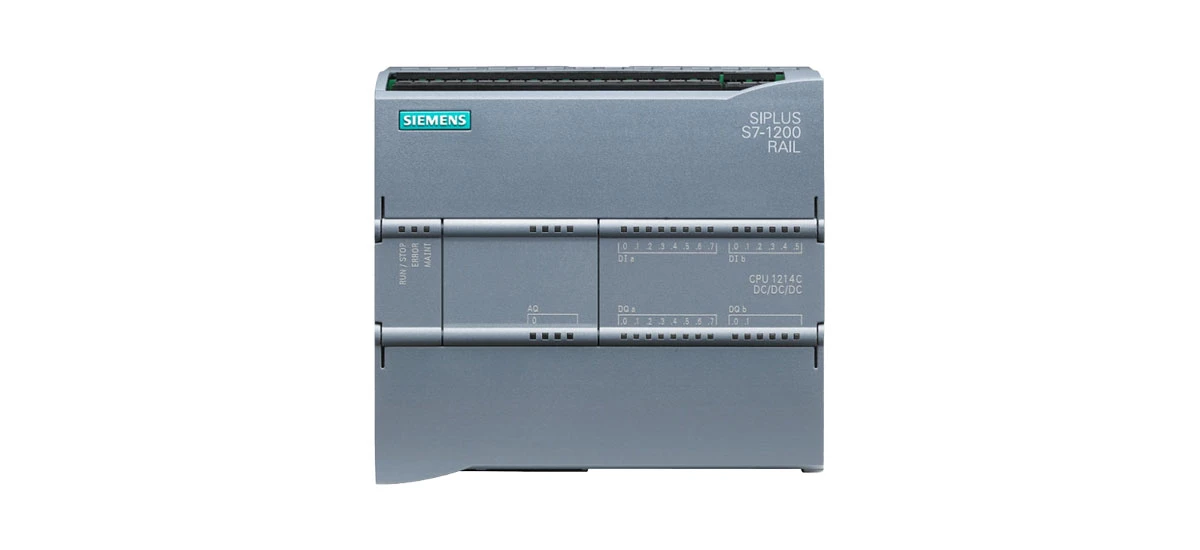
In the world of industrial automation, reliable communication between devices is key to smooth operations. The Siemens S7 1200 is a compact, powerful PLC (Programmable Logic Controller) that has become a favorite among engineers and plant managers for its flexibility and performance. A big part of what makes the Siemens S7 1200 so versatile is its support for three critical communication protocols: Profinet, Modbus TCP, and OPC UA. These protocols let the Siemens S7 1200 connect with sensors, actuators, HMIs (Human-Machine Interfaces), and other industrial equipment seamlessly. In this blog, we'll break down each protocol, explain how it works with the Siemens S7 1200, and help you understand when to use each one. Whether you're setting up a new system or upgrading an existing one, this guide will give you the practical knowledge you need to make the most of your Siemens S7 1200.
An Overview of Siemens S7 1200 and Industrial Communication
The Siemens S7 1200 is designed for small to medium-sized automation projects, but don't let its compact size fool you. It offers advanced features that rival larger PLCs, including strong communication capabilities. In industrial settings, devices like motors, sensors, and control systems need to "talk" to each other to share data and coordinate tasks. Communication protocols are the rules that govern this data exchange, ensuring information is sent quickly, accurately, and reliably. The Siemens S7 1200 supports Profinet, Modbus TCP, and OPC UA natively, meaning you don't need extra hardware to use them-just the right software configuration. This flexibility makes the Siemens S7 1200 ideal for a wide range of applications, from manufacturing lines to water treatment plants. Understanding how each protocol works with the Siemens S7 1200 will help you design more efficient, connected systems.
Siemens S7 1200 Profinet Protocol: Fast, Real-Time Industrial Ethernet
Profinet is a leading industrial Ethernet protocol, and it's one of the most popular choices for users of the Siemens S7 1200. Developed for industrial automation, Profinet is optimized for speed and real-time communication, making it perfect for applications where devices need to respond instantly to changes.
How Profinet Works with Siemens S7 1200
The Siemens S7 1200 acts as either a "controller" (master) or "device" (slave) in a Profinet network. As a controller, the Siemens S7 1200 can manage multiple Profinet devices, such as remote I/O modules, drives, or HMIs. Data is sent in small, frequent packets, allowing for cycle times as fast as 1 millisecond-critical for high-speed processes like assembly lines or robotic arms. The Siemens S7 1200 uses Profinet IO (Input/Output) for real-time data exchange and Profinet CBA (Component-Based Automation) for more complex, cross-device communication. Setting up Siemens S7 1200 Profinet configuration is straightforward with Siemens' TIA Portal software, where you can map devices, assign IP addresses, and configure data exchange parameters.
Key Benefits of Profinet for Siemens S7 1200 Users
One of the biggest advantages of using Profinet with the Siemens S7 1200 is its speed. Real-time communication ensures that the PLC receives data from sensors and sends commands to actuators without delay, reducing downtime and improving productivity. Profinet also supports plug-and-play functionality, so you can add new devices to the network without reconfiguring the entire system-saving time during installation and upgrades. Another benefit is its compatibility with other Siemens products, like S7-1500 PLCs or Simatic HMIs, creating a seamless ecosystem. For users working on large-scale projects, Profinet's ability to handle up to 1000 devices per network makes it a scalable choice that can grow with your needs.
Common Applications of Siemens S7 1200 Profinet Configuration
Siemens S7 1200 Profinet configuration is widely used in industries where speed and precision are essential. In automotive manufacturing, for example, the Siemens S7 1200 uses Profinet to control robotic arms, conveyors, and quality inspection systems, ensuring each step of the assembly process is synchronized. In food and beverage production, Profinet enables the Siemens S7 1200 to monitor temperature, pressure, and flow rates in real time, keeping processes within safety limits. It's also popular in packaging lines, where the PLC coordinates with labelers, fillers, and sealers to maintain consistent output. Any application that requires fast, reliable communication between the Siemens S7 1200 and other industrial devices will benefit from Profinet.
Siemens S7 1200 Modbus TCP Protocol: Simple, Universal Connectivity
Modbus TCP is one of the oldest and most widely used industrial communication protocols-and for good reason. It's simple, open, and compatible with almost every type of industrial equipment. The Siemens S7 1200's support for Modbus TCP makes it easy to connect to legacy devices or equipment from different manufacturers, making it a versatile choice for mixed-system environments.
The Basics of Modbus TCP with Siemens S7 1200
Modbus TCP is a client-server protocol that uses Ethernet to send data between devices. The Siemens S7 1200 can act as either a Modbus TCP client (initiating data requests) or a server (responding to requests from other devices). Data is exchanged using "registers"-standardized memory locations where devices store information like temperature readings, motor speeds, or valve positions. The Siemens S7 1200 Modbus TCP setup is simple: you just need to configure the PLC's IP address, set up client/server parameters in TIA Portal, and map the registers to the data you want to share. Unlike some other protocols, Modbus TCP doesn't require specialized hardware or complex licensing-making it a cost-effective option for small to medium projects.
Why Choose Modbus TCP for Siemens S7 1200?
The biggest advantage of Modbus TCP is its universality. Almost every industrial device-from sensors and meters to VFD and HMIs-supports Modbus TCP. This means you can use the Siemens S7 1200 to connect to equipment from brands like Allen Bradley, Mitsubishi, or Schneider without compatibility issues. Modbus TCP is also easy to troubleshoot: since it's an open protocol, there are plenty of tools and resources available to help you diagnose problems. For users who need to integrate legacy systems with modern automation, Modbus TCP is the perfect bridge. Another benefit is its low overhead-data packets are small, so it uses less network bandwidth, making it ideal for remote monitoring applications where internet connectivity is limited.
Practical Uses of Siemens S7 1200 Modbus TCP Setup
Siemens S7 1200 Modbus TCP setup is commonly used in applications where simplicity and compatibility are top priorities. In building automation, for example, the Siemens S7 1200 uses Modbus TCP to connect to HVAC systems, lighting controls, and security devices, allowing for centralized monitoring and management. In water and wastewater treatment plants, Modbus TCP enables the PLC to communicate with flow meters, level sensors, and pumps, ensuring efficient operation and compliance with environmental regulations. It's also popular in small manufacturing facilities, where budget and ease of use are key-many small businesses rely on Modbus TCP to connect their Siemens S7 1200 to basic industrial equipment without the need for expensive IT support. Whether you're connecting a single sensor or a dozen devices, Modbus TCP makes it easy to get your Siemens S7 1200 up and running.
Siemens S7 1200 OPC UA Protocol: Secure, Interoperable Industrial 4.0 Communication
OPC UA (Open Platform Communications Unified Architecture) is the modern standard for industrial communication, designed to meet the needs of Industry 4.0. Unlike Profinet and Modbus TCP, which focus on real-time or simple data exchange, OPC UA is built for secure, cross-platform communication-making it ideal for smart factories and remote monitoring. The Siemens S7 1200's support for OPC UA lets it connect to cloud platforms, big data analytics tools, and other advanced systems, paving the way for digital transformation.
How OPC UA Enhances Siemens S7 1200 Communication
OPC UA is a platform-independent protocol, meaning it works on Windows, Linux, and even mobile devices. This flexibility allows the Siemens S7 1200 to communicate with a wide range of systems, from local HMIs to cloud-based platforms like Siemens MindSphere. OPC UA uses a structured data model, which makes it easy to share complex information-like production schedules, maintenance records, or quality data-between devices. Security is another key feature: OPC UA supports encryption, authentication, and authorization, ensuring that data sent from the Siemens S7 1200 is protected from cyber threats. Setting up Siemens S7 1200 OPC UA communication involves configuring security settings, defining data nodes, and establishing connections to client applications-all of which can be done in TIA Portal.
Key Advantages of OPC UA for Siemens S7 1200 Users
For users looking to embrace Industry 4.0, OPC UA is a game-changer. It enables the Siemens S7 1200 to integrate with advanced technologies like AI, machine learning, and predictive maintenance tools, helping you optimize your operations and reduce costs. OPC UA's interoperability means you can connect the Siemens S7 1200 to systems from different manufacturers, breaking down "data silos" and creating a unified view of your production process. Security is another major benefit-with cyber threats on the rise, OPC UA's built-in security features give you peace of mind that your industrial data is safe. Additionally, OPC UA is future-proof: it's constantly updated to support new technologies, so your Siemens S7 1200 will remain compatible with upcoming systems for years to come.
Real-World Applications of Siemens S7 1200 OPC UA Communication
Siemens S7 1200 OPC UA communication is used in smart factories around the world, where data-driven decision-making is critical. In discrete manufacturing, for example, the Siemens S7 1200 uses OPC UA to send production data to a cloud platform, where managers can monitor output, track downtime, and identify bottlenecks in real time. In process industries like oil and gas, OPC UA enables the PLC to share safety-critical data with remote monitoring centers, ensuring compliance with regulations and improving response times to emergencies. It's also popular in renewable energy systems, where the Siemens S7 1200 uses OPC UA to connect solar panels, wind turbines, and battery storage systems, optimizing energy production and distribution. Any application that requires secure, cross-platform communication or integration with Industry 4.0 technologies will benefit from OPC UA.
Comparing the Three Communication Protocols for Siemens S7 1200
Choosing the right communication protocol for your Siemens S7 1200 depends on your specific needs. To help you decide, let's compare Profinet, Modbus TCP, and OPC UA across key factors: speed, compatibility, security, and use case.
Speed and Real-Time Performance
Profinet is the fastest of the three protocols, with real-time cycle times as low as 1 ms. This makes it ideal for applications where devices need to respond instantly, like robotic arms or high-speed assembly lines. Modbus TCP is slower, with typical cycle times between 10-100 ms, but it's fast enough for most basic applications like sensor monitoring or simple control tasks. OPC UA is the slowest of the three, with cycle times ranging from 100 ms to several seconds, but it's not designed for real-time control-instead, it's used for exchanging non-time-critical data like production reports or maintenance alerts.
Compatibility and Interoperability
Modbus TCP is the most compatible protocol, supporting almost every type of industrial equipment from any manufacturer. This makes it perfect for mixed-system environments or legacy integrations. Profinet is widely supported by European manufacturers but has less compatibility with equipment from Asia or North America. OPC UA is highly interoperable across platforms (Windows, Linux, cloud) but may require newer equipment that supports the protocol-older devices may need a gateway to connect to the Siemens S7 1200 via OPC UA.
Security Features
OPC UA is the most secure protocol, with built-in encryption, authentication, and authorization. This makes it the best choice for applications where data privacy is critical, like remote monitoring or cloud integration. Profinet has basic security features, but it's not as robust as OPC UA-most users rely on network firewalls to protect Profinet networks. Modbus TCP has no built-in security, which means data is sent in plain text. For Modbus TCP networks, it's important to use secure networks (like VPNs) or add a security layer to protect against cyber threats.
Ideal Use Cases
- Profinet: High-speed automation, real-time control, large-scale Siemens ecosystems (e.g., automotive manufacturing, packaging lines).
- Modbus TCP: Legacy system integration, mixed-manufacturer environments, simple control tasks (e.g., building automation, small factories).
- OPC UA: Industry 4.0 applications, cloud integration, remote monitoring, secure data exchange (e.g., smart factories, renewable energy systems).
Practical Tips for Siemens S7 1200 Protocol Implementation
Implementing communication protocols with the Siemens S7 1200 is straightforward, but following these tips will help you avoid common pitfalls and ensure a smooth setup:
Choose the Right Protocol for Your Needs
Before you start configuring, clearly define your requirements. If you need real-time control, go with Profinet. If you're connecting legacy devices, Modbus TCP is the way to go. For Industry 4.0 or cloud integration, OPC UA is the best choice. Don't try to use a protocol that's not suited for your application-this will lead to performance issues or compatibility problems.
Follow Siemens' Configuration Guidelines
Siemens provides detailed documentation and tutorials for configuring Profinet, Modbus TCP, and OPC UA on the S7 1200. Always refer to the TIA Portal help files, user manuals, or Siemens' technical support website for step-by-step instructions. This will ensure that your configuration is correct and compatible with the latest software updates.
Test the Network Before Full Deployment
Before deploying your system, test the communication between the Siemens S7 1200 and other devices. Use tools like Wireshark to monitor data traffic, check for packet loss, and verify that data is being sent and received correctly. Testing will help you identify and fix issues early, reducing downtime during full deployment.
Secure Your Network
Regardless of which protocol you use, security is important. For OPC UA, enable encryption and authentication. For Profinet and Modbus TCP, use firewalls, VPNs, or network segmentation to protect your network from unauthorized access. Regularly update the firmware on your Siemens S7 1200 and other devices to patch security vulnerabilities.
Use the Right Hardware and Cabling
Industrial communication relies on reliable hardware and cabling. Use high-quality Ethernet cables (Cat 5e or higher) for Profinet and Modbus TCP. For OPC UA cloud connections, ensure you have a stable internet connection with sufficient bandwidth. Invest in industrial-grade switches and routers to avoid network bottlenecks or failures.
Conclusion: Maximizing Siemens S7 1200 Communication Capabilities
The Siemens S7 1200's support for Profinet, Modbus TCP, and OPC UA makes it one of the most versatile PLCs on the market. Whether you're building a high-speed automation system, integrating legacy equipment, or embracing Industry 4.0, the Siemens S7 1200 has the communication capabilities to meet your needs. By understanding how each protocol works, comparing their strengths and weaknesses, and following best practices for implementation, you can create a connected, efficient system that drives productivity and growth.
Profinet offers speed and real-time control for critical applications, Modbus TCP provides simple, universal connectivity for mixed-system environments, and OPC UA enables secure, cross-platform communication for smart factories. No matter which protocol you choose, the Siemens S7 1200's intuitive software and robust hardware make it easy to configure and maintain. As industrial automation continues to evolve, the Siemens S7 1200 will remain a reliable choice for engineers and plant managers looking to build connected, future-proof systems.
If you're new to Siemens S7 1200 communication protocols, start with small projects to gain experience, and don't hesitate to leverage Siemens' technical support or online communities for help. With the right knowledge and tools, you can unlock the full potential of your Siemens S7 1200 and take your industrial automation to the next level.


