

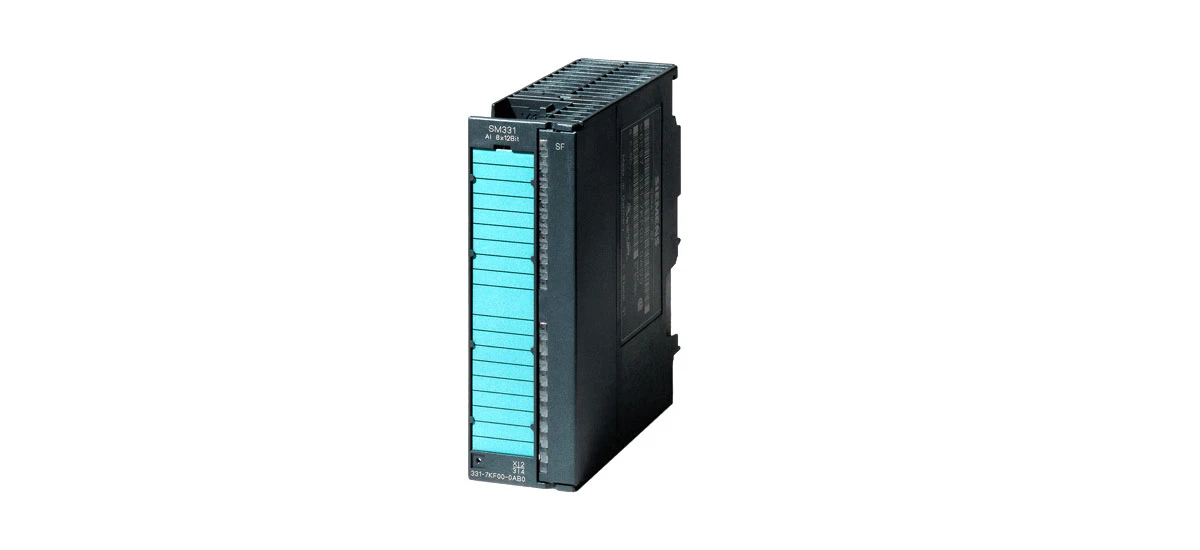
The SIMATIC SM331 is a widely used analog input module in industrial automation systems, playing a crucial role in converting analog signals from sensors and devices into digital data for PLC processing. While reliable, it can face errors that disrupt industrial processes. Whether you're a technician dealing with sudden malfunctions or an engineer aiming to prevent issues, this guide will walk you through common problems, diagnostics, and fixes. Let's equip you with the skills to keep your SIMATIC SM331 running smoothly-let's start troubleshooting!
Common Errors of SIMATIC SM331
Measurement Inaccuracy
One of the most common issues with the SIMATIC SM331 is measurement inaccuracy. This means the module is not providing correct digital values corresponding to the input analog signals, which can lead to incorrect decisions by the PLC. Possible causes include incorrect calibration, loose or corroded connections, a faulty sensor connected to the SIMATIC SM331, or even environmental factors like extreme temperature fluctuations. For example, if a temperature sensor connected to the SIMATIC SM331 is giving wrong readings because its cable has been damaged by moisture, the module will process that incorrect data, leading to measurement errors in the system. Another scenario is when the module's internal components age over time, causing slight shifts in signal conversion, which also results in inaccurate measurements.
Module Not Responding
Another frequent error is when the SIMATIC SM331 module stops responding to the PLC. This can happen due to a variety of reasons, including power supply problems such as voltage drops or surges, a physically damaged module from impact or excessive vibration, or issues with the communication between the module and the PLC. If the power supply to the SIMATIC SM331 is unstable or insufficient-for instance, if the power cable is frayed or the power source is overloaded-the module may fail to operate properly and not respond to commands from the PLC. Additionally, software issues like incorrect module addressing in the PLC program can make the SIMATIC SM331 seem unresponsive, even if it is functioning correctly.
Signal Interference
Signal interference is also a frequent error that affects the SIMATIC SM331. Industrial environments are often filled with electrical noise from machinery, motors, transformers, and other high-power equipment. This noise can interfere with the analog signals entering the SIMATIC SM331, causing distorted readings such as sudden spikes or drops in the measured values. The SIMATIC SM331 is sensitive to such interference, especially if the signal cables are not properly shielded or are run parallel to high-voltage cables. For example, a nearby welding machine can generate strong electromagnetic fields that disrupt the 4-20mA signal from a pressure sensor connected to the SIMATIC SM331.
Channel Failure
Channel failure is another common error in the SIMATIC SM331, where one or more input channels stop functioning while others work normally. This issue often occurs due to internal circuit damage in specific channels, caused by factors like voltage spikes from sensor malfunctions or incorrect wiring. For example, if a technician accidentally connects a 220V AC signal to a 0-10V DC channel of the SIMATIC SM331, it can burn out the channel's components, resulting in permanent failure. Loose or broken wires in the specific channel's terminal can also mimic channel failure, as the signal cannot reach the module. In some cases, software configuration errors-such as assigning the wrong signal type to a channel-can make it appear non-functional even if the hardware is intact.
Diagnostics of SIMATIC SM331 Errors
Using LED Indicators
The SIMATIC SM331 is equipped with LED indicators that act as the first line of defense in diagnosing errors. The "SF" (System Fault) LED lights up when there is a system-level fault, such as a hardware problem with the module or a critical error in its internal circuitry. If the SF LED is flashing, it may indicate a temporary issue, while a steady light usually points to a more serious problem. The "BF" (Bus Fault) LED indicates issues with the communication bus between the SIMATIC SM331 and the PLC, such as a broken bus cable or a mismatch in bus parameters. There is also the "PWR" (Power) LED, which stays on when the module is receiving proper power-if it's off, a power supply issue is likely. By observing these LEDs, technicians can get initial clues about the nature of the error before moving to more complex checks.
Software Diagnostics
PLC programming software, such as STEP 7, provides powerful diagnostic tools specifically designed for the SIMATIC SM331. These tools can display detailed error codes and messages related to the module. For instance, if there is a measurement error, the software may show a specific code like "3000" indicating that the input signal exceeds the module's range, or "3001" meaning a short circuit in the signal line. Technicians can use these error codes, which are listed in the SIMATIC SM331 manual, to narrow down the possible causes. The software also allows users to monitor real-time signal values from the SIMATIC SM331, making it easy to spot abnormal fluctuations that might indicate interference or sensor issues. How to diagnose SIMATIC SM331 faults using software is a key skill for maintaining the module, as it provides precise data to guide troubleshooting.
Checking Connections and Power Supply
Physically inspecting the connections of the SIMATIC SM331 is an important diagnostic step that should never be skipped. Start by turning off the power to the system to ensure safety, then check that all signal wires and power cables are securely connected to the module's terminals-loose screws can cause intermittent connections. Look for signs of corrosion on the terminals, which can occur in humid environments and disrupt signal flow. Next, check the power supply voltage using a multimeter to make sure it meets the requirements of the SIMATIC SM331 (typically 24V DC). A voltage that fluctuates more than ±5% of the rated value can cause the module to behave erratically. It's also a good idea to check the power supply's load-if it's powering too many devices, it may not provide enough current to the SIMATIC SM331.
Solutions to SIMATIC SM331 Errors
Solving Measurement Inaccuracy
If the SIMATIC SM331 has measurement inaccuracy, start by checking the calibration. The module may need to be recalibrated using the appropriate tools and procedures specified in the SIMATIC SM331 manual. This often involves connecting a standard signal generator to the module's input channels and using software like STEP 7 to adjust the module's internal settings until it reads the correct values. If calibration is not the issue, inspect the connections between the sensor and the module-clean corroded terminals with a dry cloth and tighten any loose wires. If the sensor is faulty, replace it with a new one that matches the specifications required by the SIMATIC SM331. In some cases, environmental factors like extreme heat can affect accuracy, so ensuring the module is installed in a temperature-controlled cabinet (within 0-60°C as recommended) can also help. SIMATIC SM331 measurement error solutions often involve these steps, combined with regular maintenance checks.
Fixing Module Not Responding
For a SIMATIC SM331 that is not responding, start by checking the power supply. Use a multimeter to measure the voltage at the module's power terminals-ensure it is within the specified range (usually 20.4-28.8V DC) and that the power cables are not damaged or frayed. If the power supply is okay, check the communication between the module and the PLC. Verify the bus connections-ensure the PROFIBUS or PROFINET cable is properly seated and not broken. In the PLC software, check that the module's address matches the one set in the hardware configuration; an address conflict can make the SIMATIC SM331 unresponsive. If the module is physically damaged (e.g., burnt components or cracked casing), it may need to be replaced. When replacing, make sure to power off the system first and handle the new module with anti-static wristbands to avoid damaging it.
Reducing Signal Interference
To reduce signal interference on the SIMATIC SM331, use shielded cables for the analog signals. The shields should be properly grounded at both ends to create a barrier against electrical noise. Additionally, keep the signal cables at least 30cm away from power cables and sources of electrical noise like motors, inverters, and transformers. Using twisted-pair shielded cables can further reduce interference by canceling out electromagnetic fields. In high-noise environments, installing signal filters on the input lines of the SIMATIC SM331 can help clean up the analog signals. It's also important to ensure that the sensor cables are not too long-excessive cable length can increase the chance of picking up noise, so keep them as short as the installation allows. This helps in ensuring that the SIMATIC SM331 receives clean analog signals for accurate processing.
Resolving Channel Failure
To resolve channel failure in the SIMATIC SM331, first, verify if the issue is hardware or software-related. In the PLC software, check the channel configuration to ensure the correct signal type (e.g., 4-20mA, 0-10V) is selected-reconfigure if necessary. If the configuration is correct, test the problematic channel by connecting a known working sensor or signal generator. If the channel still doesn't respond, inspect the terminal for damage like burnt marks or bent pins; clean or repair minor issues with a soft brush or small tool. For severe damage, such as internal circuit burnout, the module may require repair or replacement. To prevent future channel failures, ensure proper wiring practices (matching signal types to channels) and use surge protectors on sensor lines to shield against voltage spikes.
Conclusion
The SIMATIC SM331 is vital for industrial automation, and mastering its troubleshooting ensures smooth operations. Now that you know the common errors, diagnostics, and solutions, it's time to act. Check your SIMATIC SM331's LEDs, run a quick software diagnostic, or inspect connections today-small steps can prevent big downtime. Share your success stories or challenges with us, and let's keep industrial systems running at their best. Don't let errors slow you down-start troubleshooting your SIMATIC SM331 now!


