


Hey there! As a supplier of Omron PLC modules, I've had my fair share of customers asking about how to boost the processing speed of these nifty devices. So, I thought I'd put together this blog to share some tips and tricks that can help you get the most out of your Omron PLC module.
First off, let's understand what affects the processing speed of an Omron PLC module. There are a few key factors, like the type of CPU, the memory capacity, the programming efficiency, and the communication speed. By focusing on these areas, you can make significant improvements to your PLC's performance.

Upgrade the CPU
The CPU is the brain of the PLC, and upgrading it can have a huge impact on processing speed. Newer Omron PLC models come with more powerful CPUs that can handle complex tasks much faster. For example, if you're using an older model, consider upgrading to a newer one with a higher clock speed and more processing cores. This will allow your PLC to execute instructions more quickly and handle larger amounts of data.
Optimize Memory Usage
Memory plays a crucial role in the performance of your PLC. If your PLC is running out of memory, it can slow down significantly. To optimize memory usage, you can start by deleting any unnecessary programs or data from the PLC's memory. You can also use data compression techniques to reduce the amount of memory required to store data. Additionally, make sure you're using the right type of memory for your application. Some Omron PLC modules support different types of memory, such as RAM and flash memory. Choose the one that best suits your needs.
Improve Programming Efficiency
The way you program your PLC can also affect its processing speed. Here are some tips to improve programming efficiency:
- Use Structured Text: Structured Text is a high-level programming language that allows you to write more efficient and concise code. It's similar to other programming languages like C or Pascal, and it can help you reduce the number of instructions your PLC needs to execute.
- Avoid Unnecessary Loops and Conditional Statements: Loops and conditional statements can slow down your PLC if they're not used properly. Try to keep your code as simple as possible and avoid using nested loops or complex conditional statements.
- Use Function Blocks: Function blocks are pre-written programs that you can use in your PLC code. They can help you save time and reduce the amount of code you need to write. Omron provides a wide range of function blocks that you can use in your applications.
Enhance Communication Speed
Communication speed is another important factor that can affect the processing speed of your PLC. If your PLC is communicating with other devices or systems, make sure the communication speed is optimized. Here are some ways to enhance communication speed:
- Use High-Speed Communication Modules: Omron offers a variety of high-speed communication modules that can significantly improve the communication speed between your PLC and other devices. For example, the NX-CIF105 Omron is a high-speed communication module that supports Ethernet/IP and other industrial protocols.
- Reduce Communication Overhead: Communication overhead refers to the extra data that's sent along with the actual data to ensure reliable communication. To reduce communication overhead, you can use protocols that have a lower overhead or optimize the settings of your communication module.
- Use a Dedicated Network: If possible, use a dedicated network for your PLC communication. This will help you avoid network congestion and ensure that your PLC can communicate with other devices quickly and reliably.
Regular Maintenance and Monitoring
Regular maintenance and monitoring are essential to keep your Omron PLC module running at its best. Here are some things you can do:
- Keep Your PLC Clean: Dust and dirt can accumulate inside your PLC and cause it to overheat or malfunction. Make sure you clean your PLC regularly to prevent this from happening.
- Check for Firmware Updates: Omron regularly releases firmware updates for its PLC modules. These updates can include bug fixes, performance improvements, and new features. Make sure you check for firmware updates regularly and install them as soon as they're available.
- Monitor Performance Metrics: Use monitoring tools to keep track of your PLC's performance metrics, such as CPU usage, memory usage, and communication speed. This will help you identify any issues early on and take corrective action before they become serious problems.
Conclusion
Improving the processing speed of an Omron PLC module requires a combination of hardware upgrades, software optimization, and regular maintenance. By following the tips and tricks outlined in this blog, you can significantly enhance the performance of your PLC and ensure that it can handle your application's requirements.
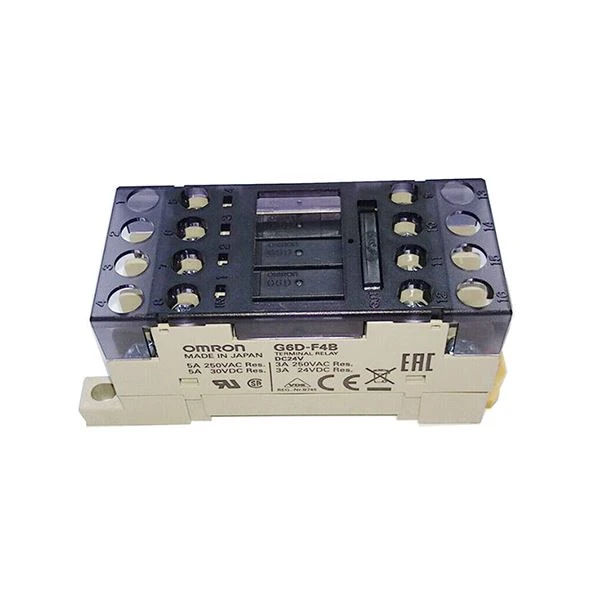
If you're interested in learning more about Omron PLC modules or have any questions about improving their processing speed, feel free to reach out to us. We're here to help you find the right solutions for your needs. Whether you're looking for a specific module like the CJ1W-EIP21 Omron or the Omron G6D-F4B DC24, or you need advice on optimizing your existing PLC system, we've got you covered. Let's start a conversation and see how we can work together to take your automation to the next level.
References
- Omron Corporation. Omron PLC User Manuals.
- Industrial Automation Magazines and Journals.


