


Yo, fellow tech enthusiasts and industry pros! I'm an ABB VFD supplier, and today I'm stoked to share the ins and outs of using the sensorless vector control mode of an ABB VFD. This mode is a game - changer, offering high - performance motor control without the need for external speed sensors. So, let's dive right in!
What is Sensorless Vector Control?
Before we get into how to use it, let's quickly understand what sensorless vector control is. In simple terms, it's a control method that allows the VFD to accurately control the torque and speed of an AC motor without a separate speed sensor. The VFD estimates the motor's speed and position based on the electrical signals it sends to the motor. This is super useful as it cuts down on costs (no need to buy and install a sensor) and simplifies the system design.
Pre - setup Checks
First things first, before you start using the sensorless vector control mode, you've gotta make sure your ABB VFD and the motor are in good shape. Check the VFD for any visible damage, loose connections, or overheating issues. Make sure the motor is properly sized for the VFD. You can refer to the ABB VFD manual for the recommended motor ratings. Also, ensure that the power supply is stable and within the specified voltage and frequency range for the VFD.
Initial Configuration
Once you've done the pre - setup checks, it's time to start configuring the VFD for sensorless vector control.
-
Power on the VFD: Connect the VFD to the power supply and turn it on. Wait for the display to boot up. You'll usually see some startup messages and then the main menu.
-
Select the control mode: Navigate through the VFD's menu to find the control mode settings. Look for an option related to "control mode" or "operation mode". Select the sensorless vector control mode from the available options. This might be labeled as "Sensorless Vector", "SLVC", or something similar.
-
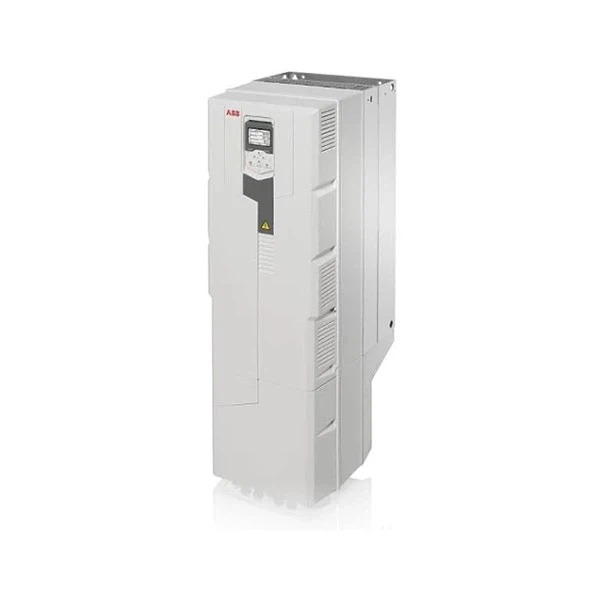
Motor Parameter Setup: This is a crucial step. The VFD needs to know the motor's parameters to accurately estimate its speed and position. You'll need to enter details like the motor's rated power, voltage, current, frequency, and number of poles. You can find these details on the motor's nameplate. For example, if you're using an ABB ACS880 - 01 - 061A - 3 Inverter, make sure to enter the correct motor parameters for the motor it's connected to.
Motor Identification Run
After entering the motor parameters, the VFD needs to perform a motor identification run. This run helps the VFD fine - tune its control algorithms based on the actual characteristics of the motor.
- Initiate the identification run: In the VFD menu, find the option for "motor identification" or "auto - tune". Select it and follow the on - screen instructions. The VFD will usually prompt you to start the motor. Make sure the motor is not mechanically loaded during this run.
- Let the run complete: The VFD will send some test signals to the motor and analyze the responses. This process might take a few minutes. Once it's done, the VFD will store the motor's equivalent circuit parameters and use them for sensorless vector control.
Speed and Torque Control
Now that the VFD is configured and has identified the motor, you can start controlling the motor's speed and torque.
- Speed control: You can set the desired speed of the motor using the VFD's control panel or an external control signal. On the control panel, you can usually use the up and down arrows to adjust the speed. If you're using an external signal, connect a 0 - 10V or 4 - 20mA signal source to the appropriate input terminals on the VFD. The VFD will adjust the output frequency to the motor to achieve the set speed.
- Torque control: Some applications might require precise torque control. To set the torque limit, find the "torque limit" option in the VFD menu. You can set both the maximum and minimum torque limits. The VFD will then try to maintain the motor's torque within these limits while operating in sensorless vector control mode.
Tuning the Control Parameters
To get the best performance out of the sensorless vector control mode, you might need to tune some of the control parameters.
- Acceleration and deceleration times: These parameters determine how quickly the motor speeds up or slows down. If the acceleration time is too short, the motor might draw too much current and trip the VFD. If it's too long, the system response will be slow. You can adjust these times in the VFD menu under "acceleration time" and "deceleration time" settings.
- Stiffness settings: The stiffness settings affect how well the VFD can maintain the set speed or torque under load changes. A higher stiffness setting will make the VFD respond more aggressively to load changes, but it might also cause more instability. You can experiment with different stiffness values to find the optimal setting for your application.
Troubleshooting
Even after a proper setup, you might encounter some issues. Here are some common problems and how to fix them:
- Motor not starting: Check if the motor is mechanically blocked. Also, make sure the control mode is set correctly and the motor parameters are entered accurately. You might need to repeat the motor identification run.
- Speed fluctuations: This could be due to incorrect stiffness settings or a problem with the power supply. Check the power supply for any voltage sags or surges. Try adjusting the stiffness settings in the VFD.
- Overheating: If the VFD or the motor is overheating, check the ventilation. Make sure there is enough airflow around the VFD and the motor. Also, check if the motor is overloaded.
Applications
Sensorless vector control mode in ABB VFDs is used in a wide range of applications. For example, in conveyor systems, it can provide smooth and precise speed control, ensuring that the products are transported at a consistent rate. In pumps and fans, it can adjust the motor speed based on the actual demand, saving energy. And in machine tools, it can offer high - torque control for accurate machining operations. You can use different ABB VFD models like the ABB ACS510 - 01 - 012A - 4 Inverter or the ABB Acs580 - 01 - 169a - 4 90kw Inverter depending on your specific application requirements.
Conclusion
So, there you have it! That's how you use the sensorless vector control mode of an ABB VFD. It might seem a bit complicated at first, but once you get the hang of it, it's a powerful tool for controlling AC motors. Whether you're looking to save costs, simplify your system, or improve performance, sensorless vector control is a great option.
If you're interested in purchasing an ABB VFD or have any questions about the sensorless vector control mode, don't hesitate to reach out. I'm here to help you with all your ABB VFD needs and guide you through the entire process.
References
- ABB VFD User Manuals
- ABB Technical Documentation on Sensorless Vector Control


