


Hey there! As an Omron PLC supplier, I often get asked about how to use the sorting machine control in an Omron PLC. It's a pretty common question, and I'm here to break it down for you in a simple and easy - to - understand way.
First things first, let's talk a bit about Omron PLCs. They're top - notch in the industry. I mean, they've got a solid reputation for reliability and performance. Take the Omron CP1L - L14DT - D for example. This little guy is a workhorse. It's compact, but it packs a punch when it comes to handling various control tasks, including sorting machine control.
Now, let's get into the nitty - gritty of using the sorting machine control in an Omron PLC.
Understanding the Basics of Sorting Machine Control
A sorting machine is all about separating different items based on certain criteria, like size, color, or weight. The PLC is the brain that makes all these sorting operations happen smoothly.
The first step is to understand the input and output requirements of your sorting machine. Inputs could be things like sensors that detect the presence of an item, its size, or its color. Outputs are what the PLC uses to control the actuators of the sorting machine, such as motors that move the items along the conveyor belt or divert them to different chutes.
Configuring the PLC for Sorting Machine Control
When you're setting up your Omron PLC for sorting machine control, you need to do a few key things.
Hardware Setup
First, you've got to connect all the input sensors and output actuators to the right terminals on the PLC. Make sure you follow the wiring diagrams provided in the PLC's manual. It's crucial to get this right, or you'll have all sorts of issues down the line. For power supply, something like the Omron S8VS - 24024 can be a great choice. It provides a stable 24V power supply, which is essential for the proper functioning of the PLC and all its connected devices.
Software Programming
Once the hardware is set up, it's time to program the PLC. Omron offers some really user - friendly programming software. You'll start by creating a program that reads the input signals from the sensors. For example, if you have a size sensor, the PLC will read the signal and determine if the item is within the desired size range.
Based on these input readings, you'll then write code to control the outputs. Let's say an item is detected as being too large. The PLC will send a signal to an actuator, like a pneumatic cylinder, to divert the item to a different chute.
Using Safety Relays
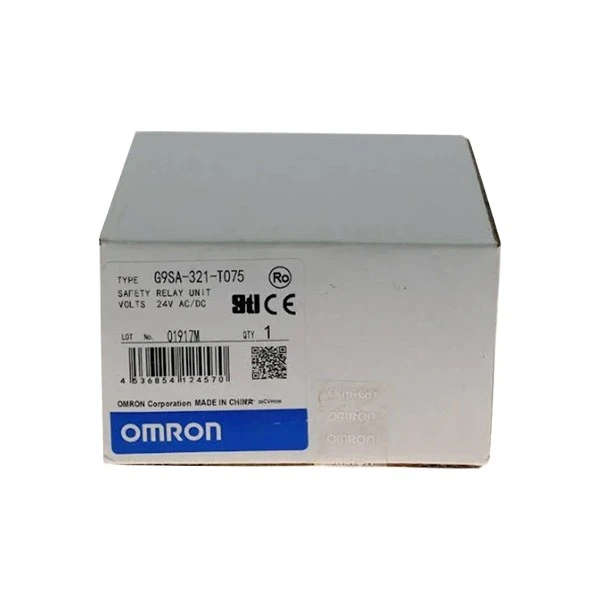
Safety is always a top priority when it comes to industrial machinery. That's where safety relays come in. The Omron G9SA - 321 - T075 AC/DC24 Safety Relay is a great option. It can be used to monitor the safety of the sorting machine. For example, it can detect if there's a jam in the conveyor belt or if an emergency stop button has been pressed. If a safety issue is detected, the safety relay will quickly cut off power to the relevant parts of the machine to prevent any accidents.
Troubleshooting
Even with the best setup, you might run into some problems. Here are some common issues and how to fix them:
Sensor Issues
If a sensor isn't giving accurate readings, it could be due to a loose connection, a dirty sensor, or a faulty sensor. Check the wiring first. If that's okay, clean the sensor according to the manufacturer's instructions. If the problem persists, you might need to replace the sensor.
Actuator Problems
Actuators might not respond as expected. This could be because of a lack of power, a mechanical issue, or a problem with the PLC output. Check the power supply to the actuator and make sure the mechanical parts are working properly. If everything seems okay, review your PLC program to ensure the correct output signals are being sent.
Tips for Optimizing Sorting Machine Control
- Regular Maintenance: Keep your sensors, actuators, and the PLC itself well - maintained. Clean them regularly and check for any signs of wear and tear.
- Update Your Program: As your sorting requirements change, update your PLC program accordingly. This will ensure that your sorting machine always operates at its best.
- Use Data Logging: Omron PLCs have the ability to log data. Use this feature to track the performance of your sorting machine over time. You can analyze the data to identify any trends or areas for improvement.
Conclusion
Using the sorting machine control in an Omron PLC might seem a bit daunting at first, but with the right knowledge and a bit of practice, it's definitely doable. Remember to start with a solid understanding of the basics, configure the hardware and software correctly, and always prioritize safety.
If you're in the market for Omron PLCs or any of the related components like the Omron CP1L - L14DT - D, Omron S8VS - 24024, or Omron G9SA - 321 - T075 AC/DC24 Safety Relay, I'm here to help. Whether you're looking to set up a new sorting machine or upgrade an existing one, feel free to reach out for a chat about your specific needs. We can discuss the best solutions for your project and get you on the right track to efficient sorting machine control.

References
- Omron CP1L - L14DT - D User Manual
- Omron S8VS - 24024 Power Supply Manual
- Omron G9SA - 321 - T075 AC/DC24 Safety Relay Manual


